? Quick Class changer 1.2 using Autohotkey
Game: Trove
Details
This was made by request of @
cryophobe http://www.mpgh.net/forum/showthread.php?t=1010075
Updated and now supports classes you need to scroll down for. Old thread can be found here
http://www.mpgh.net/forum/showthread.php?t=1010287
GUI sample:
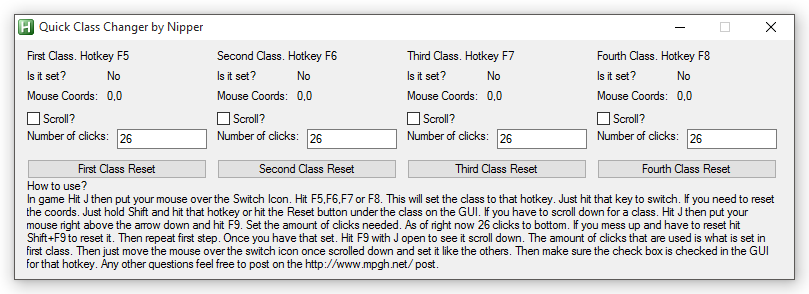
This is a vary basic and simple program. It uses on screen coords that you set. These settings are saved and displayed on the GUI.
Maybe later if we figure out how to packet inject we could do a better job but for now this is what works.
Also if you know what you are doing you can add more hotkeys. I have it setup for 4 . But it can easily add more with a few extra lines.
If you have any questions or comments or ideas to improve please do share.
Please do hit the thank button if you use this. It keeps us coders wanting to code seeing others use our stuff.
And Please do give credit where credit is due if you use my code.
Issues:
Warning: Make sure the characters you switch to are evenly geared hp wise. Other wise you will notice a huge drop in HP. So if you ask "WHERE DID MY HP GO". Well now you know.
How to use.
First open the game and the program.
Next you want to hit J to open the classes.
Then put your mouse over the switch button. Hit F5, F6, F7 or F8. You will see a tooltip saying that the coords are saved. These are wrote to a inifile for later use so you wont have to calibrate with each use as long as the screen never moves.
Once you have the class set to that hot key just hit that hotkey again and it will change to that class.
If you have to scroll down to see the switch button this one takes a little bit more calibrating to get it to work.
First open the switch screen "J" then put your mouse just above the down arrow shown here

. Once you have it there hit F9. This will set it. Now close the screen and open it again and hit F9 it will scroll down to what ever first class is set to. Then just follow the steps up above and set the class. Go to the GUI and hit the check box. Then just hit that hotkey and it should switch. If you need to reset the scroll down settings hit Shift+F9.
If you like to reset the class for that hotkey. You can hold Shift + the hotkey you wish to reset. Or you can also use the button under each class on the GUI it does the same thing for that class.
If for what ever reason you can't seem to get this to work feel free to come on my ts3 server and look for nipper. @
ts3.shackx.net:4455
Autohotkey Source:
Version 1.0
Code:
;Version 1.0
;First Release
#NoEnv ; Recommended for performance and compatibility with future AutoHotkey releases.
; #Warn ; Enable warnings to assist with detecting common errors.
SendMode Input ; Recommended for new scripts due to its superior speed and reliability.
SetWorkingDir %A_ScriptDir% ; Ensures a consistent starting directory.
IfNotExist, %A_ScriptDir%/SpamChat.ini
{
;Default Settings.
IniWrite, No, %A_ScriptDir%/SpamChat.ini, ClassChanger, FirstClassIsSet
IniWrite, 0, %A_ScriptDir%/SpamChat.ini, ClassChanger, FirstClassCoordsX
IniWrite, 0, %A_ScriptDir%/SpamChat.ini, ClassChanger, FirstClassCoordsY
IniWrite, No, %A_ScriptDir%/SpamChat.ini, ClassChanger, SecondClassIsSet
IniWrite, 0, %A_ScriptDir%/SpamChat.ini, ClassChanger, SecondClassCoordsX
IniWrite, 0, %A_ScriptDir%/SpamChat.ini, ClassChanger, SecondClassCoordsY
IniWrite, No, %A_ScriptDir%/SpamChat.ini, ClassChanger, ThirdClassIsSet
IniWrite, 0, %A_ScriptDir%/SpamChat.ini, ClassChanger, ThirdClassCoordsX
IniWrite, 0, %A_ScriptDir%/SpamChat.ini, ClassChanger, ThirdClassCoordsY
IniWrite, No, %A_ScriptDir%/SpamChat.ini, ClassChanger, FourthClassIsSet
IniWrite, 0, %A_ScriptDir%/SpamChat.ini, ClassChanger, FourthClassCoordsX
IniWrite, 0, %A_ScriptDir%/SpamChat.ini, ClassChanger, FourthClassCoordsY
} else {
IniRead, FirstIsSet, %A_ScriptDir%/SpamChat.ini, ClassChanger, FirstClassIsSet
IniRead, FirstXPos, %A_ScriptDir%/SpamChat.ini, ClassChanger, FirstClassCoordsX
IniRead, FirstYPos, %A_ScriptDir%/SpamChat.ini, ClassChanger, FirstClassCoordsY
FirstCoords = %FirstXPos%,%FirstYPos%
IniRead, SecondIsSet, %A_ScriptDir%/SpamChat.ini, ClassChanger, FirstClassIsSet
IniRead, SecondXPos, %A_ScriptDir%/SpamChat.ini, ClassChanger, FirstClassCoordsX
IniRead, SecondYPos, %A_ScriptDir%/SpamChat.ini, ClassChanger, FirstClassCoordsY
SecondCoords = %SecondXPos%,%SecondYPos%
IniRead, ThirdIsSet, %A_ScriptDir%/SpamChat.ini, ClassChanger, FirstClassIsSet
IniRead, ThirdXPos, %A_ScriptDir%/SpamChat.ini, ClassChanger, FirstClassCoordsX
IniRead, ThirdYPos, %A_ScriptDir%/SpamChat.ini, ClassChanger, FirstClassCoordsY
ThirdCoords = %ThirdXPos%,%ThirdYPos%
IniRead, FourthIsSet, %A_ScriptDir%/SpamChat.ini, ClassChanger, FirstClassIsSet
IniRead, FourthXPos, %A_ScriptDir%/SpamChat.ini, ClassChanger, FirstClassCoordsX
IniRead, FourthYPos, %A_ScriptDir%/SpamChat.ini, ClassChanger, FirstClassCoordsY
FourthCoords = %FourthXPos%,%FourthYPos%
}
Gui, Add, Text, x12 y9 w180 h20 , First Class
Gui, Add, Text, x12 y29 w80 h20 , Is it set?
Gui, Add, Text, x92 y29 w100 h20 vFirstSet , %FirstIsSet%
Gui, Add, Text, x12 y49 w80 h20 , Mouse Coords:
Gui, Add, Text, x92 y49 w100 h20 vFirstCoords, %FirstCoords%
Gui, Add, Button, x12 y69 w180 h20 gFirstClassReset, First Class Reset
Gui, Add, Text, x202 y9 w180 h20 , Second Class
Gui, Add, Text, x202 y29 w80 h20 , Is it set?
Gui, Add, Text, x282 y29 w100 h20 vSecondSet, %SecondIsSet%
Gui, Add, Text, x202 y49 w80 h20 , Mouse Coords:
Gui, Add, Text, x282 y49 w100 h20 vSecondCoords, %SecondCoords%
Gui, Add, Button, x202 y69 w180 h20 gSecondClassReset, Second Class Reset
Gui, Add, Text, x392 y9 w180 h20 , Third Class
Gui, Add, Text, x392 y29 w80 h20 , Is it set?
Gui, Add, Text, x472 y29 w100 h20 vThirdSet, %ThirdIsSet%
Gui, Add, Text, x392 y49 w80 h20 , Mouse Coords:
Gui, Add, Text, x472 y49 w100 h20 vThirdCoords, %ThirdCoords%
Gui, Add, Button, x392 y69 w180 h20 gThirdClassReset, Third Class Reset
Gui, Add, Text, x582 y9 w180 h20 , Fourth Class
Gui, Add, Text, x582 y29 w80 h20 , Is it set?
Gui, Add, Text, x662 y29 w100 h20 vFourthSet, %FourthIsSet%
Gui, Add, Text, x582 y49 w80 h20 , Mouse Coords:
Gui, Add, Text, x662 y49 w100 h20 vFourthCoords, %FourthCoords%
Gui, Add, Button, x582 y69 w180 h20 gFourthClassReset, Fourth Class Reset
Gui, Add, Text, x12 y99 w750 h60 , How to use?`nIn game Hit J then put your mouse over the Switch Icon. Hit F4`,F5`,F6 or F8. This will set the class to that hotkey. Just hit that key to switch. If you need to reset the coords. Just hold Shift and hit that hotkey or hit the Reset button under the class on the GUI. Also this will not work for classes that you have to scroll down for. To lazy to program the scroll for the knight sorry. Maybe I will do it later. Any other questions feel free to post on the
http://www.mpgh.net/ post.
Gui, Show, x272 y159 h163 w775, Quick Class Changer by Nipper
Return
;Hotkeys
F5::ClassChange("First")
+F5::
{
FirstClassReset:
ClassReset("First")
Return
}
F6::ClassChange("Second")
+F6::
{
SecondClassReset:
ClassReset("Second")
Return
}
F7::ClassChange("Third")
+F7::
{
ThirdClassReset:
ClassReset("Third")
Return
}
F8::ClassChange("Fourth")
+F8::
{
FourthClassReset:
ClassReset("Fourth")
Return
}
;F9::Reload
ClassChange(ClassNumber) {
;Check if the class is set in the Ini
IniRead, IsClassSet, %A_ScriptDir%/SpamChat.ini, ClassChanger, %ClassNumber%ClassIsSet
If IsClassSet = Yes
{
IniRead, XPos, %A_ScriptDir%/SpamChat.ini, ClassChanger, %ClassNumber%ClassCoordsX
IniRead, YPos, %A_ScriptDir%/SpamChat.ini, ClassChanger, %ClassNumber%ClassCoordsY
ToolTipDisplay("Changing Class")
BlockInput, on
Send j
Sleep 400
MouseClick, Left, %XPos%, %YPos%
BlockInput, off
} else
{
MouseGetPos, XPos, YPos
MouseCoords = %XPos%,%YPos%
IniWrite, Yes, %A_ScriptDir%/SpamChat.ini, ClassChanger, %ClassNumber%ClassIsSet
IniWrite, %XPos%, %A_ScriptDir%/SpamChat.ini, ClassChanger, %ClassNumber%ClassCoordsX
IniWrite, %YPos%, %A_ScriptDir%/SpamChat.ini, ClassChanger, %ClassNumber%ClassCoordsY
GuiControl,, %ClassNumber%Set, Yes
GuiControl,, %ClassNumber%Coords, %MouseCoords%
ToolTipDisplay(ClassNumber . " Class is not set setting now.`nCoords: " . MouseCoords)
}
return
}
ClassReset(ClassNumber) {
;Check if the class is set in the Ini
IniRead, IsClassSet, %A_ScriptDir%/SpamChat.ini, ClassChanger, %ClassNumber%ClassIsSet
If IsClassSet = Yes
{
ToolTipDisplay("Resetting " . ClassNumber . " Class")
ClassCoords = 0,0
IniWrite, No, %A_ScriptDir%/SpamChat.ini, ClassChanger, %ClassNumber%ClassIsSet
IniWrite, 0, %A_ScriptDir%/SpamChat.ini, ClassChanger, %ClassNumber%ClassCoordsX
IniWrite, 0, %A_ScriptDir%/SpamChat.ini, ClassChanger, %ClassNumber%ClassCoordsY
GuiControl,, %ClassNumber%Set, No
MouseCoords = 0,0
GuiControl,, %ClassNumber%Coords, %MouseCoords%
} else
{
ToolTipDisplay("Class was not set nothing to reset.")
}
return
}
ToolTipDisplay(Message) {
ToolTip, %Message%
SetTimer, RemoveToolTip, 5000
return
}
RemoveToolTip:
SetTimer, RemoveToolTip, Off
ToolTip
return
GuiClose:
ExitApp
Version 1.1
Code:
;Version 1.1
;Fixed a typo I left when loading the ini that would only show the first class loaded in the qui across all classes. My bad for me being lazy.
;Version 1.0
;First Release
#NoEnv ; Recommended for performance and compatibility with future AutoHotkey releases.
; #Warn ; Enable warnings to assist with detecting common errors.
SendMode Input ; Recommended for new scripts due to its superior speed and reliability.
SetWorkingDir %A_ScriptDir% ; Ensures a consistent starting directory.
IfNotExist, %A_ScriptDir%/SpamChat.ini
{
;Default Settings.
IniWrite, No, %A_ScriptDir%/SpamChat.ini, ClassChanger, FirstClassIsSet
IniWrite, 0, %A_ScriptDir%/SpamChat.ini, ClassChanger, FirstClassCoordsX
IniWrite, 0, %A_ScriptDir%/SpamChat.ini, ClassChanger, FirstClassCoordsY
IniWrite, No, %A_ScriptDir%/SpamChat.ini, ClassChanger, SecondClassIsSet
IniWrite, 0, %A_ScriptDir%/SpamChat.ini, ClassChanger, SecondClassCoordsX
IniWrite, 0, %A_ScriptDir%/SpamChat.ini, ClassChanger, SecondClassCoordsY
IniWrite, No, %A_ScriptDir%/SpamChat.ini, ClassChanger, ThirdClassIsSet
IniWrite, 0, %A_ScriptDir%/SpamChat.ini, ClassChanger, ThirdClassCoordsX
IniWrite, 0, %A_ScriptDir%/SpamChat.ini, ClassChanger, ThirdClassCoordsY
IniWrite, No, %A_ScriptDir%/SpamChat.ini, ClassChanger, FourthClassIsSet
IniWrite, 0, %A_ScriptDir%/SpamChat.ini, ClassChanger, FourthClassCoordsX
IniWrite, 0, %A_ScriptDir%/SpamChat.ini, ClassChanger, FourthClassCoordsY
} else {
IniRead, FirstIsSet, %A_ScriptDir%/SpamChat.ini, ClassChanger, FirstClassIsSet
IniRead, FirstXPos, %A_ScriptDir%/SpamChat.ini, ClassChanger, FirstClassCoordsX
IniRead, FirstYPos, %A_ScriptDir%/SpamChat.ini, ClassChanger, FirstClassCoordsY
FirstCoords = %FirstXPos%,%FirstYPos%
IniRead, SecondIsSet, %A_ScriptDir%/SpamChat.ini, ClassChanger, SecondClassIsSet
IniRead, SecondXPos, %A_ScriptDir%/SpamChat.ini, ClassChanger, SecondClassCoordsX
IniRead, SecondYPos, %A_ScriptDir%/SpamChat.ini, ClassChanger, SecondClassCoordsY
SecondCoords = %SecondXPos%,%SecondYPos%
IniRead, ThirdIsSet, %A_ScriptDir%/SpamChat.ini, ClassChanger, ThirdClassIsSet
IniRead, ThirdXPos, %A_ScriptDir%/SpamChat.ini, ClassChanger, ThirdClassCoordsX
IniRead, ThirdYPos, %A_ScriptDir%/SpamChat.ini, ClassChanger, ThirdClassCoordsY
ThirdCoords = %ThirdXPos%,%ThirdYPos%
IniRead, FourthIsSet, %A_ScriptDir%/SpamChat.ini, ClassChanger, FourthClassIsSet
IniRead, FourthXPos, %A_ScriptDir%/SpamChat.ini, ClassChanger, FourthClassCoordsX
IniRead, FourthYPos, %A_ScriptDir%/SpamChat.ini, ClassChanger, FourthClassCoordsY
FourthCoords = %FourthXPos%,%FourthYPos%
}
Gui, Add, Text, x12 y9 w180 h20 , First Class
Gui, Add, Text, x12 y29 w80 h20 , Is it set?
Gui, Add, Text, x92 y29 w100 h20 vFirstSet , %FirstIsSet%
Gui, Add, Text, x12 y49 w80 h20 , Mouse Coords:
Gui, Add, Text, x92 y49 w100 h20 vFirstCoords, %FirstCoords%
Gui, Add, Button, x12 y69 w180 h20 gFirstClassReset, First Class Reset
Gui, Add, Text, x202 y9 w180 h20 , Second Class
Gui, Add, Text, x202 y29 w80 h20 , Is it set?
Gui, Add, Text, x282 y29 w100 h20 vSecondSet, %SecondIsSet%
Gui, Add, Text, x202 y49 w80 h20 , Mouse Coords:
Gui, Add, Text, x282 y49 w100 h20 vSecondCoords, %SecondCoords%
Gui, Add, Button, x202 y69 w180 h20 gSecondClassReset, Second Class Reset
Gui, Add, Text, x392 y9 w180 h20 , Third Class
Gui, Add, Text, x392 y29 w80 h20 , Is it set?
Gui, Add, Text, x472 y29 w100 h20 vThirdSet, %ThirdIsSet%
Gui, Add, Text, x392 y49 w80 h20 , Mouse Coords:
Gui, Add, Text, x472 y49 w100 h20 vThirdCoords, %ThirdCoords%
Gui, Add, Button, x392 y69 w180 h20 gThirdClassReset, Third Class Reset
Gui, Add, Text, x582 y9 w180 h20 , Fourth Class
Gui, Add, Text, x582 y29 w80 h20 , Is it set?
Gui, Add, Text, x662 y29 w100 h20 vFourthSet, %FourthIsSet%
Gui, Add, Text, x582 y49 w80 h20 , Mouse Coords:
Gui, Add, Text, x662 y49 w100 h20 vFourthCoords, %FourthCoords%
Gui, Add, Button, x582 y69 w180 h20 gFourthClassReset, Fourth Class Reset
Gui, Add, Text, x12 y99 w750 h60 , How to use?`nIn game Hit J then put your mouse over the Switch Icon. Hit F4`,F5`,F6 or F8. This will set the class to that hotkey. Just hit that key to switch. If you need to reset the coords. Just hold Shift and hit that hotkey or hit the Reset button under the class on the GUI. Also this will not work for classes that you have to scroll down for. To lazy to program the scroll for the knight sorry. Maybe I will do it later. Any other questions feel free to post on the
http://www.mpgh.net/ post.
Gui, Show, x272 y159 h163 w775, Quick Class Changer by Nipper
Return
;Hotkeys
F5::ClassChange("First")
+F5::
{
FirstClassReset:
ClassReset("First")
Return
}
F6::ClassChange("Second")
+F6::
{
SecondClassReset:
ClassReset("Second")
Return
}
F7::ClassChange("Third")
+F7::
{
ThirdClassReset:
ClassReset("Third")
Return
}
F8::ClassChange("Fourth")
+F8::
{
FourthClassReset:
ClassReset("Fourth")
Return
}
;F9::Reload
ClassChange(ClassNumber) {
;Check if the class is set in the Ini
IniRead, IsClassSet, %A_ScriptDir%/SpamChat.ini, ClassChanger, %ClassNumber%ClassIsSet
If IsClassSet = Yes
{
IniRead, XPos, %A_ScriptDir%/SpamChat.ini, ClassChanger, %ClassNumber%ClassCoordsX
IniRead, YPos, %A_ScriptDir%/SpamChat.ini, ClassChanger, %ClassNumber%ClassCoordsY
ToolTipDisplay("Changing Class")
BlockInput, on
Send j
Sleep 400
MouseClick, Left, %XPos%, %YPos%
BlockInput, off
} else
{
MouseGetPos, XPos, YPos
MouseCoords = %XPos%,%YPos%
IniWrite, Yes, %A_ScriptDir%/SpamChat.ini, ClassChanger, %ClassNumber%ClassIsSet
IniWrite, %XPos%, %A_ScriptDir%/SpamChat.ini, ClassChanger, %ClassNumber%ClassCoordsX
IniWrite, %YPos%, %A_ScriptDir%/SpamChat.ini, ClassChanger, %ClassNumber%ClassCoordsY
GuiControl,, %ClassNumber%Set, Yes
GuiControl,, %ClassNumber%Coords, %MouseCoords%
ToolTipDisplay(ClassNumber . " Class is not set setting now.`nCoords: " . MouseCoords)
}
return
}
ClassReset(ClassNumber) {
;Check if the class is set in the Ini
IniRead, IsClassSet, %A_ScriptDir%/SpamChat.ini, ClassChanger, %ClassNumber%ClassIsSet
If IsClassSet = Yes
{
ToolTipDisplay("Resetting " . ClassNumber . " Class")
ClassCoords = 0,0
IniWrite, No, %A_ScriptDir%/SpamChat.ini, ClassChanger, %ClassNumber%ClassIsSet
IniWrite, 0, %A_ScriptDir%/SpamChat.ini, ClassChanger, %ClassNumber%ClassCoordsX
IniWrite, 0, %A_ScriptDir%/SpamChat.ini, ClassChanger, %ClassNumber%ClassCoordsY
GuiControl,, %ClassNumber%Set, No
MouseCoords = 0,0
GuiControl,, %ClassNumber%Coords, %MouseCoords%
} else
{
ToolTipDisplay("Class was not set nothing to reset.")
}
return
}
ToolTipDisplay(Message) {
ToolTip, %Message%
SetTimer, RemoveToolTip, 5000
return
}
RemoveToolTip:
SetTimer, RemoveToolTip, Off
ToolTip
return
GuiClose:
ExitApp
Version 1.2
Code:
/*Version 1.2
Fixed a typeos
Fixed issue where on first load the GUI was all blank.
Added the scroll down option for classes that need to be scrolled down to see the Switch button.
Version 1.1
Fixed a typo I left when loading the ini that would only show the first class loaded in the qui across all classes. My bad for me being lazy.
Version 1.0
First Release
*/
#NoEnv ; Recommended for performance and compatibility with future AutoHotkey releases.
; #Warn ; Enable warnings to assist with detecting common errors.
SendMode Input ; Recommended for new scripts due to its superior speed and reliability.
SetWorkingDir %A_ScriptDir% ; Ensures a consistent starting directory.
Global IniFile := "ClassChanger.ini" ;Save Filename
;SUI Settings
Global GUICaption := "Quick Class Changer by Nipper" ;GUI Window caption. Reason for this so if it changes I wont have to edit each place it is used in control commands.
Global FirstCheckButton := "Button1"
Global SecondCheckButton := "Button3"
Global ThirdCheckButton := "Button5"
Global FourthCheckButton := "Button7"
IfNotExist, %A_ScriptDir%/%IniFile%
{
;Default Settings.
IniWrite, 0, %A_ScriptDir%/%IniFile%, ClassChangerScroll, ScrollCoordsX
IniWrite, 0, %A_ScriptDir%/%IniFile%, ClassChangerScroll, ScrollCoordsY
IniWrite, No, %A_ScriptDir%/%IniFile%, ClassChanger, FirstClassIsSet
IniWrite, 0, %A_ScriptDir%/%IniFile%, ClassChanger, FirstClassCoordsX
IniWrite, 0, %A_ScriptDir%/%IniFile%, ClassChanger, FirstClassCoordsY
IniWrite, 0, %A_ScriptDir%/%IniFile%, ClassChanger, FirstClassScroll
IniWrite, 26, %A_ScriptDir%/%IniFile%, ClassChanger, FirstClassClickNumber
IniWrite, No, %A_ScriptDir%/%IniFile%, ClassChanger, SecondClassIsSet
IniWrite, 0, %A_ScriptDir%/%IniFile%, ClassChanger, SecondClassCoordsX
IniWrite, 0, %A_ScriptDir%/%IniFile%, ClassChanger, SecondClassCoordsY
IniWrite, 0, %A_ScriptDir%/%IniFile%, ClassChanger, SecondClassScroll
IniWrite, 26, %A_ScriptDir%/%IniFile%, ClassChanger, SecondClassClickNumber
IniWrite, No, %A_ScriptDir%/%IniFile%, ClassChanger, ThirdClassIsSet
IniWrite, 0, %A_ScriptDir%/%IniFile%, ClassChanger, ThirdClassCoordsX
IniWrite, 0, %A_ScriptDir%/%IniFile%, ClassChanger, ThirdClassCoordsY
IniWrite, 0, %A_ScriptDir%/%IniFile%, ClassChanger, ThirdClassScroll
IniWrite, 26, %A_ScriptDir%/%IniFile%, ClassChanger, ThirdClassClickNumber
IniWrite, No, %A_ScriptDir%/%IniFile%, ClassChanger, FourthClassIsSet
IniWrite, 0, %A_ScriptDir%/%IniFile%, ClassChanger, FourthClassCoordsX
IniWrite, 0, %A_ScriptDir%/%IniFile%, ClassChanger, FourthClassCoordsY
IniWrite, 0, %A_ScriptDir%/%IniFile%, ClassChanger, FourthClassScroll
IniWrite, 26, %A_ScriptDir%/%IniFile%, ClassChanger, FourthClassClickNumber
}
IniRead, ScrollXPos, %A_ScriptDir%/%IniFile%, ClassChangerScroll, ScrollCoordsX
IniRead, ScrollYPos, %A_ScriptDir%/%IniFile%, ClassChangerScroll, ScrollCoordsY
IniRead, FirstIsSet, %A_ScriptDir%/%IniFile%, ClassChanger, FirstClassIsSet
IniRead, FirstXPos, %A_ScriptDir%/%IniFile%, ClassChanger, FirstClassCoordsX
IniRead, FirstYPos, %A_ScriptDir%/%IniFile%, ClassChanger, FirstClassCoordsY
FirstCoords = %FirstXPos%,%FirstYPos%
IniRead, FirstClassScroll, %A_ScriptDir%/%IniFile%, ClassChanger, FirstClassScroll
IniRead, FirstClickNumber, %A_ScriptDir%/%IniFile%, ClassChanger, FirstClassClickNumber
IniRead, SecondIsSet, %A_ScriptDir%/%IniFile%, ClassChanger, SecondClassIsSet
IniRead, SecondXPos, %A_ScriptDir%/%IniFile%, ClassChanger, SecondClassCoordsX
IniRead, SecondYPos, %A_ScriptDir%/%IniFile%, ClassChanger, SecondClassCoordsY
SecondCoords = %SecondXPos%,%SecondYPos%
IniRead, SecondClassScroll, %A_ScriptDir%/%IniFile%, ClassChanger, SecondClassScroll
IniRead, SecondClickNumber, %A_ScriptDir%/%IniFile%, ClassChanger, SecondClassClickNumber
IniRead, ThirdIsSet, %A_ScriptDir%/%IniFile%, ClassChanger, ThirdClassIsSet
IniRead, ThirdXPos, %A_ScriptDir%/%IniFile%, ClassChanger, ThirdClassCoordsX
IniRead, ThirdYPos, %A_ScriptDir%/%IniFile%, ClassChanger, ThirdClassCoordsY
ThirdCoords = %ThirdXPos%,%ThirdYPos%
IniRead, ThirdClassScroll, %A_ScriptDir%/%IniFile%, ClassChanger, ThirdClassScroll
IniRead, ThirdClickNumber, %A_ScriptDir%/%IniFile%, ClassChanger, ThirdClassClickNumber
IniRead, FourthIsSet, %A_ScriptDir%/%IniFile%, ClassChanger, FourthClassIsSet
IniRead, FourthXPos, %A_ScriptDir%/%IniFile%, ClassChanger, FourthClassCoordsX
IniRead, FourthYPos, %A_ScriptDir%/%IniFile%, ClassChanger, FourthClassCoordsY
FourthCoords = %FourthXPos%,%FourthYPos%
IniRead, FourthClassScroll, %A_ScriptDir%/%IniFile%, ClassChanger, FourthClassScroll
IniRead, FourthClickNumber, %A_ScriptDir%/%IniFile%, ClassChanger, FourthClassClickNumber
Menu, Tray, NoStandard
Menu, Tray, add, Exit, GuiClose ; Creates a new menu item.
Gui, Add, Text, x12 y9 w180 h20 , First Class. Hotkey F5
Gui, Add, Text, x12 y29 w80 h20 , Is it set?
Gui, Add, Text, x92 y29 w100 h20 vFirstSet, %FirstIsSet%
Gui, Add, Text, x12 y49 w80 h20 , Mouse Coords:
Gui, Add, Text, x92 y49 w100 h20 vFirstCoords, %FirstCoords%
Gui, Add, CheckBox, x12 y69 w180 h20 vFirstCheck gFirstScrollCheck, Scroll?
Gui, Add, Text, x12 y89 w90 h20 , Number of clicks:
Gui, Add, Edit, x102 y89 w90 h20 vFirstClicks, %FirstClickNumber%
Gui, Add, Button, x12 y119 w180 h20 gFirstClassReset, First Class Reset
Gui, Add, Text, x202 y9 w180 h20 , Second Class. Hotkey F6
Gui, Add, Text, x202 y29 w80 h20 , Is it set?
Gui, Add, Text, x282 y29 w100 h20 vSecondSet, %SecondIsSet%
Gui, Add, Text, x202 y49 w80 h20 , Mouse Coords:
Gui, Add, Text, x282 y49 w100 h20 vSecondCoords, %SecondCoords%
Gui, Add, CheckBox, x202 y69 w180 h20 vSecondCheck gSecondScrollCheck, Scroll?
Gui, Add, Text, x202 y89 w90 h20 , Number of clicks:
Gui, Add, Edit, x292 y89 w90 h20 vSecondClicks, %SecondClickNumber%
Gui, Add, Button, x202 y119 w180 h20 gSecondClassReset, Second Class Reset
Gui, Add, Text, x392 y9 w180 h20 , Third Class. Hotkey F7
Gui, Add, Text, x392 y29 w80 h20 , Is it set?
Gui, Add, Text, x472 y29 w100 h20 vThirdSet, %ThirdIsSet%
Gui, Add, Text, x392 y49 w80 h20 , Mouse Coords:
Gui, Add, Text, x472 y49 w100 h20 vThirdCoords, %ThirdCoords%
Gui, Add, CheckBox, x392 y69 w180 h20 vThirdCheck gThirdScrollCheck, Scroll?
Gui, Add, Text, x392 y89 w90 h20 , Number of clicks:
Gui, Add, Edit, x482 y89 w90 h20 vThirdClicks, %ThirdClickNumber%
Gui, Add, Button, x392 y119 w180 h20 gThirdClassReset, Third Class Reset
Gui, Add, Text, x582 y9 w180 h20 , Fourth Class. Hotkey F8
Gui, Add, Text, x582 y29 w80 h20 , Is it set?
Gui, Add, Text, x662 y29 w100 h20 vFourthSet, %FourthIsSet%
Gui, Add, Text, x582 y49 w80 h20 , Mouse Coords:
Gui, Add, Text, x662 y49 w100 h20 vFourthCoords, %FourthCoords%
Gui, Add, CheckBox, x582 y69 w180 h20 vFourthCheck gFourthScrollCheck, Scroll?
Gui, Add, Text, x582 y89 w90 h20 , Number of clicks:
Gui, Add, Edit, x672 y89 w90 h20 vFourthClicks, %FourthClickNumber%
Gui, Add, Button, x582 y119 w180 h20 gFourthClassReset, Fourth Class Reset
Gui, Add, Text, x12 y139 w750 h100 , How to use?`nIn game Hit J then put your mouse over the Switch Icon. Hit F5`,F6`,F7 or F8. This will set the class to that hotkey. Just hit that key to switch. If you need to reset the coords. Just hold Shift and hit that hotkey or hit the Reset button under the class on the GUI. If you have to scroll down for a class. Hit J then put your mouse right above the arrow down and hit F9. Set the amount of clicks needed. As of right now 26 clicks to bottom. If you mess up and have to reset hit Shift+F9 to reset it. Then repeat first step. Once you have that set. Hit F9 with J open to see it scroll down. The amount of clicks that are used is what is set in first class. Then just move the mouse over the switch icon once scrolled down and set it like the others. Then make sure the check box is checked in the GUI for that hotkey. Any other questions feel free to post on the
http://www.mpgh.net/ post.
Gui, Show, x348 y205 h239 w779, %GUICaption%
;Checking the check boxes if saved.
if(FirstClassScroll = 1) {
CheckBoxCheck(FirstCheckButton)
}
if(SecondClassScroll = 1) {
CheckBoxCheck(SecondCheckButton)
}
if(ThirdClassScroll = 1) {
CheckBoxCheck(ThirdCheckButton)
}
if(FourthClassScroll = 1) {
CheckBoxCheck(FourthCheckButton)
}
Return
FirstScrollCheck:
Gui, Submit, NoHide
CheckBoxSave(FirstCheck, "First")
Return
SecondScrollCheck:
Gui, Submit, NoHide
CheckBoxSave(SecondCheck, "Second")
Return
ThirdScrollCheck:
Gui, Submit, NoHide
CheckBoxSave(ThirdCheck, "Third")
Return
FourthScrollCheck:
Gui, Submit, NoHide
CheckBoxSave(FourthCheck, "Fourth")
Return
;Hotkeys
F5::ClassChange("First")
+F5::
{
FirstClassReset:
ClassReset("First")
UnCheckBoxCheck(FirstCheckButton)
Return
}
F6::ClassChange("Second")
+F6::
{
SecondClassReset:
ClassReset("Second")
UnCheckBoxCheck(SecondCheckButton)
Return
}
F7::ClassChange("Third")
+F7::
{
ThirdClassReset:
ClassReset("Third")
UnCheckBoxCheck(ThirdCheckButton)
Return
}
F8::ClassChange("Fourth")
+F8::
{
FourthClassReset:
ClassReset("Fourth")
UnCheckBoxCheck(FourthCheckButton)
Return
}
F9::
{
IniRead, ScrollXPos, %A_ScriptDir%/%IniFile%, ClassChangerScroll, ScrollCoordsX
If ScrollXPos = 0
{
MouseGetPos, XPos, YPos
MouseCoords = %XPos%,%YPos%
IniWrite, %XPos%, %A_ScriptDir%/%IniFile%, ClassChangerScroll, ScrollCoordsX
IniWrite, %YPos%, %A_ScriptDir%/%IniFile%, ClassChangerScroll, ScrollCoordsY
ToolTipDisplay("Scroll Down coords set.`nCoords: " . MouseCoords)
} else
{
IniRead, ClickNumber, %A_ScriptDir%/%IniFile%, ClassChanger, FirstClassClickNumber
IniRead, ScrollXPos, %A_ScriptDir%/%IniFile%, ClassChangerScroll, ScrollCoordsX
IniRead, ScrollYPos, %A_ScriptDir%/%IniFile%, ClassChangerScroll, ScrollCoordsY
ToolTipDisplay("This setting has already Clicking at the following " . MouseCoords)
loop %ClickNumber%
{
MouseClick, Left, %ScrollXPos%, %ScrollYPos%
}
}
Return
}
+F9::
{
IniWrite, 0, %A_ScriptDir%/%IniFile%, ClassChangerScroll, ScrollCoordsX
IniWrite, 0, %A_ScriptDir%/%IniFile%, ClassChangerScroll, ScrollCoordsY
ToolTipDisplay("Scroll Down coords reset hit F9 to set them again.")
Return
}
ClassChange(ClassNumber) {
;Check if the class is set in the Ini
IniRead, IsClassSet, %A_ScriptDir%/%IniFile%, ClassChanger, %ClassNumber%ClassIsSet
If IsClassSet = Yes
{
ToolTipDisplay("Changing Class")
BlockInput, on
Send j
Sleep 500
IniRead, ClassScroll, %A_ScriptDir%/%IniFile%, ClassChanger, %ClassNumber%ClassScroll
if ClassScroll = 1
{
IniRead, ClickNumber, %A_ScriptDir%/%IniFile%, ClassChanger, %ClassNumber%ClassClickNumber
IniRead, XPos, %A_ScriptDir%/%IniFile%, ClassChangerScroll, ScrollCoordsX
IniRead, YPos, %A_ScriptDir%/%IniFile%, ClassChangerScroll, ScrollCoordsY
loop %ClickNumber%
{
MouseClick, Left, %XPos%, %YPos%
}
}
IniRead, XPos, %A_ScriptDir%/%IniFile%, ClassChanger, %ClassNumber%ClassCoordsX
IniRead, YPos, %A_ScriptDir%/%IniFile%, ClassChanger, %ClassNumber%ClassCoordsY
sleep 100
MouseClick, Left, %XPos%, %YPos%
BlockInput, off
} else
{
MouseGetPos, XPos, YPos
MouseCoords = %XPos%,%YPos%
IniWrite, Yes, %A_ScriptDir%/%IniFile%, ClassChanger, %ClassNumber%ClassIsSet
IniWrite, %XPos%, %A_ScriptDir%/%IniFile%, ClassChanger, %ClassNumber%ClassCoordsX
IniWrite, %YPos%, %A_ScriptDir%/%IniFile%, ClassChanger, %ClassNumber%ClassCoordsY
GuiControl,, %ClassNumber%Set, Yes
GuiControl,, %ClassNumber%Coords, %MouseCoords%
ToolTipDisplay(ClassNumber . " Class was not set. Setting it now.`nCoords: " . MouseCoords)
}
return
}
ClassReset(ClassNumber) {
;Check if the class is set in the Ini
IniRead, IsClassSet, %A_ScriptDir%/%IniFile%, ClassChanger, %ClassNumber%ClassIsSet
If IsClassSet = Yes
{
ToolTipDisplay("Resetting " . ClassNumber . " Class")
ClassCoords = 0,0
IniWrite, No, %A_ScriptDir%/%IniFile%, ClassChanger, %ClassNumber%ClassIsSet
IniWrite, 0, %A_ScriptDir%/%IniFile%, ClassChanger, %ClassNumber%ClassCoordsX
IniWrite, 0, %A_ScriptDir%/%IniFile%, ClassChanger, %ClassNumber%ClassCoordsY
IniWrite, 0, %A_ScriptDir%/%IniFile%, ClassChanger, %ClassNumber%ClassScroll
GuiControl,, %ClassNumber%Set, No
MouseCoords = 0,0
GuiControl,, %ClassNumber%Coords, %MouseCoords%
} else
{
ToolTipDisplay("Class was not set. So nothing to reset.")
}
return
}
CheckBoxCheck(ButtonNum) {
Control, Check,, %ButtonNum%, %GUICaption%
return
}
UnCheckBoxCheck(ButtonNum) {
Control, UnCheck,, %ButtonNum%, %GUICaption%
return
}
CheckBoxSave(ButtonToCheck, Class) {
if(ButtonToCheck = 1) {
IniWrite, 1, %A_ScriptDir%/%IniFile%, ClassChanger, %Class%ClassScroll
} else {
IniWrite, 0, %A_ScriptDir%/%IniFile%, ClassChanger, %Class%ClassScroll
}
return
}
ToolTipDisplay(Message) {
ToolTip, %Message%
SetTimer, RemoveToolTip, 5000
return
}
RemoveToolTip:
SetTimer, RemoveToolTip, Off
ToolTip
return
GuiClose:
Gui, Submit, nohide
IniWrite, %FirstClicks%, %A_ScriptDir%/%IniFile%, ClassChanger, FirstClassClickNumber
IniWrite, %SecondClicks%, %A_ScriptDir%/%IniFile%, ClassChanger, SecondClassClickNumber
IniWrite, %ThirdClicks%, %A_ScriptDir%/%IniFile%, ClassChanger, ThirdClassClickNumber
IniWrite, %FourthClicks%, %A_ScriptDir%/%IniFile%, ClassChanger, FourthClassClickNumber
ExitApp
https://www.virustotal.com/en/file/b...is/1440035838/
Code:
SHA256: bb3772e359e8e08da4e9027c5d3b2e117f4026b9d1c0bedb9c6ea1805e7454b9
File name: Quick Class Changer1.2.rar
Detection ratio: 1 / 55
Analysis date: 2015-08-20 01:57:18 UTC ( 0 minutes ago )
Download:
Hidden Content
Reply to this thread to unlock the contents
As always, use caution. This file is provided for archival purposes. SickGaming cannot be held liable.