Xbox one SDK Leaked: homebrew coming soon?

01-24-2016, 04:15 PM · Forum: Xbox Mods - Replies (1)
[Image: DYGSlDP.png]
[Image: 9KrXaVl.png]

Since the beginning of 2015 the Xbox SDK one left in the wild. SDKs are software development kits that serve developers testing their games and applications on a console called "debug". This leak SDK is the work of a team H4ALT who made the announcement on the social network Twitter . Documents related to the SDK for its use were also disseminated as well as the firmware of the Xbox One. The team H4LT very little press on this leak but announced that other elements on the console will be unveiled later. According to it the operating system of the console is a streamlined Windows and thus processes data in completely different formats of the Xbox 360. A potential opening to a flash or a custom firmware of the Xbox one? There are still far too early to say what impact this may have leaked SDK. Wait until hacker arrive to find an exploitable flaw with this SDK. The longer an option would be the release of homebrew, small programs developed without the consent of Microsoft.

[Image: zGMBPAl.jpg]


For the launch of backups there is another track being studied. The drive firmware xbox One sifted In parallel leaks on the SDK, the hack xbox One could also be created by any fault of the player console. Indeed in recent months C4eva, the famous hacker who made the heyday of modified firmware of the Xbox 360 (One thinks of LT LT 2.0 or 3.0) looks at the Xbox One reader. Late last year he announced on his twitter account that good news could come sooner than expected. On this subject he declined to give details (As usual, you might say!) In order not to reveal any flaws that would hasten to Microsoft butcher.


[Image: McnF7XV.jpg]

So are we can expect a flash xbox one drive to start backups on bluray media? Wait and See!
Source: modchip83.com

  Ark: Survival Evolved (Xbox One Release)

01-24-2016, 04:00 PM · Forum: New Game Releases - No Replies


Ark Survival Evolved has teamed up with Microsoft!


Ark: Survival Evolved contains all of the usual survival gameplay. Players are able to hunt for and grow their own food The can also craft items and use their gathered resources to build shelters. But the real draw of Ark: Survival Evolved is that it includes a variety of dinosaurs, from great, hulking behemoths, to much smaller beasts no bigger than the player character. Most you are able to tame and use as a companion or as a mount!

[Image: Ark-Survival-Evolved-Sales.jpg]

While Ark: Survival Evolved players can take on these dinosaurs, working with other players in the game to take down the bigger monsters, players can also train and even ride the dinos. They just knock the dinosaur unconscious, nurse it back to health with some grub and then the player can ride it around the game – or even fly it about if they train up a pterodactyl.

Tribes allow ARK players to form a group and work towards a common goal, such as defeating rival Tribes or conquering end-game bosses (the image depicted here is the prize for defeating the boss, for example). Tribes can have multiple admins and unique governance options.


Tribes will often fall into more than one of the below categories, but they tend to focus on one primary aspect of the game.
  • PVE Tribe - This type of Tribe focuses on activities that do not engage other players/Tribes in a hostile way. These Tribes may focus on end-game bosses such as Broodmother Lysrix and taming rare dinos.
  • PVP Tribe - PVP Tribes focus on attacking rival tribes, forming alliances, and engaging other players in combat.
  • RP Tribe - An RP Tribe focuses on roleplaying and chat will typically be in-character. Tribe members are encouraged to behave as their character.

  Borderlands 2 Cheats and Trainer for Steam (Download)

01-20-2016, 11:21 PM · Forum: PC Mods - No Replies
[Image: attachment.php?aid=85]
This is the official discussion topic of the Borderlands 2 Trainer and Cheats in the WeMod app. Please post any suggestions, bug reports, or praise that you may have for the cheats in here!

Hidden Content


Reply to this thread to unlock the contents

Download the trainer or find it in the WeMod app.

Trainer Options and Cheats:

Code:
1. Unlimited Health 2. Unlimited Shield 3. Mega XP 4. Instant Skill Cooldown 5. Set Backpack Size to 99 6. Easy Chest Unlock 7. Unlimited Badass Tokens 8. Unlimited Resources 9. Unlimited Skill Points 10. Unlimited Ammo 11. No Reload 12. Super Jump 13. Super Speed 14. Teleport to Waypoint

Screenshot:

[Image: attachment.php?aid=84]

Supported Game Versions:

We strive to keep our trainers up to date with the latest game versions. WeMod automatically detects which version you have installed and activates the mods accordingly. So there’s no need to worry about which version of the game you have!

Updates and Changes:
  • 03/16/2017

    Started development

  • 03/16/2017

    Released trainer with 10 cheats

  • 06/06/2017

    Bug fixes and game compatibility improvements

  • 10/19/2018

    Bug fixes and game compatibility improvements

  • 04/19/2019

    Bug fixes and game compatibility improvements

  • 04/23/2019

    Bug fixes and game compatibility improvements

  • 06/16/2019

    Rapid Fire cheat added

    Player Jump Height cheat added

    Player Walk Speed cheat added

    Player Run Speed cheat added

  • 07/20/2023

    Unlimited Health cheat added

    Unlimited Shield cheat added

    Mega Exp cheat added

    Instant Skill Cool Down cheat added

    Backpack Size 99 cheat added

    Easy Unlock Chests cheat added

    Unlimited Badass Token cheat added

    Unlimited Resources cheat added

    Unlimited Skill Points cheat added

    Super Jump cheat added

    Super Speed cheat added

  • 12/21/2024

    Bug fixes and game compatibility improvements

  • 07/19/2025

    Mega XP cheat added

    Instant Skill Cooldown cheat added

    Set Backpack Size to 99 cheat added

    Easy Chest Unlock cheat added

    Unlimited Badass Tokens cheat added

    Teleport to Waypoint cheat added

Attached Files

Attached images

  [Counter-Strike 2] PowerShell Multi-Hack (Auto-Updating) (Download)

01-20-2016, 12:49 PM · Forum: PC Discussion - No Replies
? PowerShell Multi-Hack (Auto-Updating)

Game: Counter-Strike 2

Details

[b]Originally created by @[/b]An00nymushun[b]

How to run?

1) Download the cheat and extract the folder "PowerShell Multi-Hack" from the winrar file somewhere.

3) Open steam and CS:GO.

4) Right click the bat file called "RUN" and press Run as administrator.

5) Wait a couple of seconds/minutes until it shows you some text and have fun!

[/b]

What is new?

- Changed bone from 6 to 5.

- Fixed aimbot.

- Tweaked some colors.


Hotkeys

- BunnyHop default key is Space.

- TriggerBot default key is Left Alt.

- Slow-Aim default key is Left Alt.

- Glow-ESP default toggle key is F5.

- AimBot default hold key is Left Mouse.


Support Fixes and More

Not working on Windows 7 x64? Upgrade PowerShell! This is how to upgrade to PowerShell 4.0

Download Link - http://www.microsoft.com/en-us/downl....aspx?id=40855

And select this option:


Then just press Next and it should start downloading the file you selected, now install it after you finished installing it will ask you to restart your computer, afterwards re-extract the files from the rar file to make sure it re-scrambles and you should be good.

How to turn off radar

First you would have to open the rar and re-extract the files from the rar again, MAKE SURE TO NOT OPEN "RUN.bat" FOR NOW *IMPORTANT*.

Now, double click Ev0 main and it should open for you the whole source in notepad.

Press CTRL+F and type in "0x935" without the " " quotes.

Now you should find a line called:

<#*#>[void][Win32]::WriteProcessMemory($handle, $ent + 0x935, 1, 1, [ref] $size)<##>

delete the whole line and make sure it looks like this:

Only after you've done that you can run the "Run.bat".

And that's how you turn off radar bois.

*NOTE* to edit hotkeys delays afterburst and all that stuff double click the powershell file and the first couple of lines are the hotkeys so just change them however you like (Use virtual-keycodes for keys)

*WARNING IF CRASHES TRY PLAYING IN FULLSCREEN WINDOWED*

*DON'T WANT AIM ASSISTANCE? CHANGE AIMKEY IN "EV0 startup" to 0x00 should turn off rcs too ($aimkey = 0x00)*

*DON'T WANT RCS? CHANGE RCS IN "EV0 startup" TO 0 ($rcs = 0)*[b]

Features:

✓ Glow-ESP

o Weapon ESP

o Bomb ESP

o Player ESP

o Nades ESP (Grenades,Smoke etc...)

o Health ESP

✓ Radar Hack

✓ Slow-Aim

✓ TriggerBot

✓ BunnyHop

[/b]✓ [b]Aimbot

o Aim Rcs

o AimFov

o Aim Speed

o Aim Bone

o Aim Key[/b]

Tested on:

o Windows 7 x64/x86

o Windows 8 x64/x86

o Windows 8.1 x64/x86

o Windows 10 x64/x86

Disclaimer:

Any of the PowerShell hacks i posted on here never got reported from users as VAC detected.

Admins just mark all hacks that are outdated as detected after a new patch comes out.

But a sig-scanner has been added so no worries.

Virus scans:

https://www.virustotal.com/en/file/3...is/1450489042/

https://virusscan.jotti.org/en-US/fi...job/nhue8esfqg

[b][b]

In-Game SS:


Now wait for approval and press "Download and Thanks"

Cheers!
[/b]

[/b]

Download:
Hidden Content


Reply to this thread to unlock the contents

As always, use caution. This file is provided for archival purposes. SickGaming cannot be held liable.

Attached Files

.rar
PowerShell_Multi-hack_sickgaming.net.rar

  [Unturned] Extreme Injector v3.3 (Download)

01-20-2016, 05:35 AM · Forum: PC Discussion - No Replies
Extreme Injector v3.3

Game: Unturned

Details

This is outdated, use THIS version.

Extreme Injector v3.3

A powerful and advanced injector in a simple GUI! If you're wondering, this was coded in C#. This is a rewrite of the widely known v2.1 which can be found here.
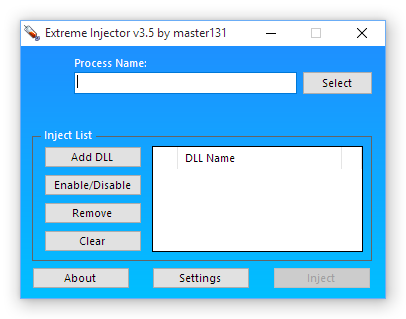


Features:

- Colourful and customizable GUI

- Process List

- Multi-DLL injection (with options to enable/disable DLLs to inject)

- Auto-Inject

- Stealth Inject

- Close on inject

- DLL Scrambling (scrambles DLLs on injection to make hacks harder to detect and make detected hacks work again)

- 'Un-inject' DLLs

- Mutiple injection methods (Standard, LdrLoadDll Stub, LdrpLoadDll Stub, Thread Hijacking and Manual Map)

- Drag and drop support

- 64-bit injection support

- Automatic Visual C++ depedency installer


How to use:

- Download and extract the attachment

- Run Extreme Injector v3.exe

- (optional) Click Settings and then Start in Secure Mode to avoid Anti-Cheat detection of the injector itself.

- Type in a process name into the box (including the extension). If you want to target a specific process or select by window name, use the Select button.

- (Note) If you are injecting into Combat Arms, make sure to type in Engine.exe

- Add the DLLs you want by clicking on the Add DLL button. You can also drag and drop them into the DLL list.

- You can disable/enable which DLLs to inject so you can keep your favourite DLLs without needing to find them each time.

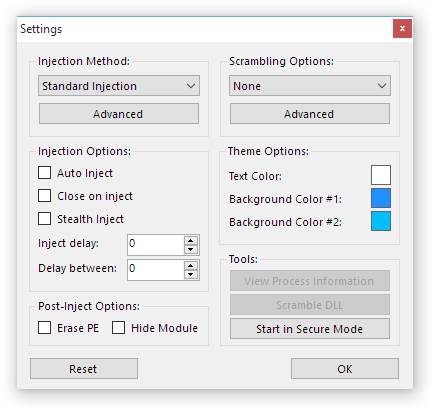
- Go into Settings and customise the settings to your liking. Everything should be straight forward (do not mess around with Advanced settings unless you know what you are doing).

- (Note) If you are injecting into Combat Arms, make sure to tick Auto-Inject and start the game.

- Click Inject and enjoy! (or wait for the process to start and let it auto-inject if you ticked auto-inject)

Please explain the Injection Methods!

This version of the injector introduces 2 new injection techniques.

- Standard - This is the injection technique used in nearly every injector out there. It uses CreateRemoteThread and LoadLibrary and is the most reliable injection technique.

- LdrLoadDll Stub - This is similar to the Standard injection technique except it goes 1 level deeper into LoadLibrary.

- LdrpLoadDll Stub - This goes even another level deeper into LdrLoadDll. It may crash or cause errors on OSes newer than Windows 8.1 as it can change.

- Thread Hijacking - This is a pretty stable method of injection that takes over already executing code to inject your DLL and is not used by many injectors.

- Manual Map - This is the most secure injection technique. So secure that even Windows won't even know about the injected DLL. It may not work properly on OSes newer than Windows 8.1, you will be told what to do by the injector in that case.

Please explain the Scramble Options!

With the new version of Extreme Injector v3, there are way too many options to explain so I've created handy presets to make things easier:

None - As the name implies, this means that DLL scrambling is disabled completely.

Basic - This applies basic scrambling that should work with most DLLs.

Standard - This applies even more scrambling options that should work with most DLLs.

Extreme - Applies all scrambling options (the best/strongest preset) that could break some DLLs but should work with most.

Please explain the Post-Inject Options!

These post-inject techniques are often seen within hacks to try prevent detection from anti-cheats but this injector can do it externally if the hack doesn't do it already.

- Erase PE - This erases the PE headers at the start of the injected DLL, making it hard for anti-cheats to identify that a DLL exists at a specific location.

- Hide Module - This hides the DLL from the process' module list so if an anti-cheat were to search through a process' module list, it would not appear.

Warning: Most modern anti-cheats these days can still easily detect DLLs even with these options enabled. The most secure method would be using manual map.

Known bugs/limitations:

- Thread Hijacking is not supported at all on XP 64-bit.

- LdrpLoadDll has only been tested on XP, Vista, 7, 8 and 8.1. It will probably not work on anything newer than that.

- "Create new entrypoint" under scrambling advanced options does not support 64-bit DLLs.

When using 'Start in Secure Mode'....

If your anti-virus detects a threat/virus when you click on it, please ignore it or temporarily disable your anti-virus, it's a false positive. I would never infect any users with anything. Note that you should NOT add an exclusion to the Temp folder as any REAL viruses that emerge there might get through.

Injection failed...?

Try another injection method and see what happens. Feel free to take a screenshot or copy and paste the error message here so I can look into it. Make sure to mention what OS you are running.


What's the Visual C++ depedency installer?


If Extreme Injector detects that a hack you are adding requires MSVCR<version>.dll or MSVCP<version>.dll and you do not have it installed, it will offer to automatically download the correct version (x86 or x64) from the Microsoft website and install it for you. If it detects the hack you are adding requires MSVCR<version>D.dll or MSVCP<version>D.dll, it will automatically download the correct version (x86 ox x64) and save it to the correct folder (C:\Windows\system32 or C:\Windows\SysWOW64). This is all so people don't complain about non-working hacks and don't end up downloading and saving files to the wrong place.


Requirements:

.NET Framework 4

What's new?

Code:

Changes since version 3.3 (17th June 2014):
- Fixed bug where 1 CPU core was used because the injector was waiting for *itself* to close (no, it wasn't because of a RAT).
- Fixed bug where attempting to unload a module on a 64-bit process resulted in an exception.
- Fixed bug where the injector threw an exception from writing a scrambled DLL that was in use.
- Added support for LdrpLoadDll on Windows 8.1 Update 1 (64-bit).
- Added missing dependency required for ZIP extraction to work correctly (made the injector crash during Visual C++ Debug dependency installation).
- Added a threads list to the process information window.
- Added a new "Strip section characteristics" option to the Extreme preset of scrambling options.
- Added a new "Shift section memory" option to the Extreme preset of scrambling options, should *significantly* improve the ability for hacks to evade anti-cheat detection. This option is much more powerful on 32-bit DLLs, but is still somewhat effective on 64-bit DLLs.

Changes since version 3.2 (9th June 2014):
- Fixed bug where auto-inject did not seem to work
- Addressed possible crashing from messages failing to display during injection

Changes since version 3.1 (3rd June 2014):
- Fixed bug where a message box would appear randomly if a Visual C++ dependency was missing (leftover from testing code)
- Fixed bug where selecting "No" from the prompt under Advanced in Injection Method would untick the wrong box
- Injector now displays a message box saying that injection was successful

Changes since version 3.0 (31st May 2014):
- Complete rewrite from scratch (same and familiar look from previous versions)
- All injection techniques are now 100% compatible with 64-bit DLLs
- Drag-and-drop fixed when run as administrator on newer OSes
- Automatically elevates without asking if it knows you have administrator rights
- Better scaling on displays with a DPI higher than 96
- Added a Visual C++ Dependency Installer
- Manual map now supports DLLs that use SEH to work (better packer support, eg. Themida, Enigma, etc)
- New injection technique: LdrpLoadDll
- Better exception/error reporting
- New scrambling engine, more scrambling methods
- Removed "Append Random Data" as it just wasted disk space and is ineffective
- Improved detection of different OS versions
- Dynamic assembly code generation (powered by AsmJit)
- Seperate process, thread and window manager, does not rely on .NET Process class anymore
- "Start in Secure Mode" creates an even more "secure&quot; instance of Extreme Injector

Credits:

DarthTon - Better manual map code (originally coded in C++, ported to C# by me, licensed under MIT).

Darawk - Thread hijacking code concept.

@master131 - For creating this amazing injector!

Virus Scans:

https://www.virustotal.com/en/file/7...34dc/analysis/

Extreme Injector v3.3 - by master131.rar - Jotti's malware scan

At the time of posting this thread, VirusTotal reported (3/54) and Jotti reported (2/21). This is expected to increase as AV vendors flag this injector as a hack tool. The injector itself is not malicious, please ignore these warnings.

If your anti-virus detects this as a virus, ignore it or add an exclusion. It is not a virus, you can run it under a sandbox and log every single thing it does, it's harmless.

If you copied your settings.xml from a previous version, please double-check your scrambling options as it may appear as "Custom" because of the newly added options.

Download:
Hidden Content


Reply to this thread to unlock the contents

As always, use caution. This file is provided for archival purposes. SickGaming cannot be held liable.

Attached Files

.rar
Extreme_Injector_v3.3_-_by_master131_sickgaming.net.rar

  [Grand Theft Auto V] Extreme Injector v3.5.2 (Download)

01-20-2016, 04:04 AM · Forum: PC Discussion - No Replies
Extreme Injector v3.5.2

Game: Grand Theft Auto V

Details

Extreme Injector v3.5.2

Visit here for the latest version:

https://sickgaming.net/thread-114893.html

Sorry guys, bugs fixed now. Thanks @klurosu for helping me spark a lightbulb moment.

For those on v3.5 and getting an update notification, please note that I made an emergency update 10 hours after release.

A powerful and advanced injector in a simple GUI! If you're wondering, this was coded in C#. This is a rewrite of the widely known v2.1 which can be found here.
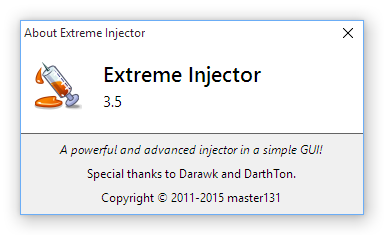


Features:

- Colourful and customizable GUI

- Process List

- Multi-DLL injection (with options to enable/disable DLLs to inject)

- Auto-Inject

- Stealth Inject

- Close on inject

- DLL Scrambling (scrambles DLLs on injection to make hacks harder to detect and make detected hacks work again)

- 'Un-inject' DLLs

- Mutiple injection methods (Standard, LdrLoadDll Stub, LdrpLoadDll Stub, Thread Hijacking and Manual Map)

- Drag and drop support

- 64-bit injection support

- Automatic Visual C++ depedency installer

- Execute exported functions after injection

How to use:

- Download and extract the attachment

- Run Extreme Injector v3.exe

- (optional) Click Settings and then Start in Secure Mode to avoid Anti-Cheat detection of the injector itself.

- Type in a process name into the box (including the extension). If you want to target a specific process or select by window name, use the Select button.

- (Note) If you are injecting into Combat Arms, make sure to type in Engine.exe

- Add the DLLs you want by clicking on the Add DLL button. You can also drag and drop them into the DLL list.

- You can disable/enable which DLLs to inject so you can keep your favourite DLLs without needing to find them each time.

- Go into Settings and customise the settings to your liking. Everything should be straight forward (do not mess around with Advanced settings unless you know what you are doing).

- (Note) If you are injecting into Combat Arms, make sure to tick Auto-Inject and start the game.

- Click Inject and enjoy! (or wait for the process to start and let it auto-inject if you ticked auto-inject)

Please explain the Injection Methods!

This version of the injector introduces 2 new injection techniques.

- Standard - This is the injection technique used in nearly every injector out there. It uses CreateRemoteThread and LoadLibrary and is the most reliable injection technique.

- LdrLoadDll Stub - This is similar to the Standard injection technique except it goes 1 level deeper into LoadLibrary.

- LdrpLoadDll Stub - This goes even another level deeper into LdrLoadDll. It may crash or cause errors on OSes newer than Windows 10 as it can change.

- Thread Hijacking - This is a pretty stable method of injection that takes over already executing code to inject your DLL and is not used by many injectors.

- Manual Map - This is the most secure injection technique. So secure that even Windows won't even know about the injected DLL. It may not work properly on OSes newer than Windows 10, you will be told what to do by the injector in that case.

Please explain the Scramble Options!

With the new version of Extreme Injector v3, there are way too many options to explain so I've created handy presets to make things easier:

None - As the name implies, this means that DLL scrambling is disabled completely.

Basic - This applies basic scrambling that should work with most DLLs.

Standard - This applies even more scrambling options that should work with most DLLs.

Extreme - Applies all scrambling options (the best/strongest preset) that could break some DLLs but should work with most.

Please explain the Post-Inject Options!

These post-inject techniques are often seen within hacks to try prevent detection from anti-cheats but this injector can do it externally if the hack doesn't do it already.

- Erase PE - This erases the PE headers at the start of the injected DLL, making it hard for anti-cheats to identify that a DLL exists at a specific location.

- Hide Module - This hides the DLL from the process' module list so if an anti-cheat were to search through a process' module list, it would not appear.

Warning: Most modern anti-cheats these days can still easily detect DLLs even with these options enabled. The most secure method would be using manual map.

Known bugs/limitations:

- Thread Hijacking is not supported at all on XP 64-bit.

- LdrpLoadDll has only been tested on XP, Vista, 7, 8, 8.1 and 10. It will probably not work on anything newer than that.

- "Create new entrypoint" under scrambling advanced options does not support 64-bit DLLs.

When using 'Start in Secure Mode'....

If your anti-virus detects a threat/virus when you click on it, please ignore it or temporarily disable your anti-virus, it's a false positive. I would never infect any users with anything. Note that you should NOT add an exclusion to the Temp folder as any REAL viruses that emerge there might get through.

Injection failed...?

Try another injection method and see what happens. Feel free to take a screenshot or copy and paste the error message here so I can look into it. Make sure to mention what OS you are running.

OMG, why is the injector connecting to the internet?

So people can stay up to date, I've added a simple update check which connects to my WP blog. It does not offer any direct links or download anything by itself, it only tells you to go to wherever you downloaded the injector or to visit my blog for more information.

What's the Visual C++/DirectX depedency installer?

What is the exported functions feature useful for?

Please refer to my blog for more information.

Requirements:

.NET Framework 4

What's new?

Code:Copy

Changes since version 3.5/3.5.1/3.5.2 (31st July 2015):
- Fixed exception that occurs on DEP enabled processes on Windows 10.
- Fixed bug with GUI under Advanced Options for injection.
- The Disable SEH Validation option now actually does what it says.
- Fixed critical bug relating to code that resolves exports for Windows 10 modules.
- Fixed bug where exception would be thrown when no export function parameters were specified.
- Fixed manual map support for Windows 8.1 (broken in 3.4).

Changes since version 3.4 (29th July 2015):
- General stability fixes (crashes with 64-bit).
- Updated compatbility with Windows 8.1 and 10 (blame Microsoft and their compatibility "fixes").
- Secure Mode now closes previous instance.
- Fixed critical bug that would have prevented hacks using exception handlers (mainly packed/protected DLLs) from working in manual map mode.
- Added DirectX dependency detection.
- Added the ability to call exported functions after injection (use the ... button next to the listed DLL)
- Added a simple update notification.

Changes since version 3.3 (17th June 2014):
- Fixed bug where 1 CPU core was used because the injector was waiting for *itself* to close (no, it wasn't because of a RAT).
- Fixed bug where attempting to unload a module on a 64-bit process resulted in an exception.
- Fixed bug where the injector threw an exception from writing a scrambled DLL that was in use.
- Added support for LdrpLoadDll on Windows 8.1 Update 1 (64-bit).
- Added missing dependency required for ZIP extraction to work correctly (made the injector crash during Visual C++ Debug dependency installation).
- Added a threads list to the process information window.
- Added a new "Strip section characteristics" option to the Extreme preset of scrambling options.
- Added a new "Shift section memory" option to the Extreme preset of scrambling options, should *significantly* improve the ability for hacks to evade anti-cheat detection. This option is much more powerful on 32-bit DLLs, but is still somewhat effective on 64-bit DLLs.

Changes since version 3.2 (9th June 2014):
- Fixed bug where auto-inject did not seem to work
- Addressed possible crashing from messages failing to display during injection

Changes since version 3.1 (3rd June 2014):
- Fixed bug where a message box would appear randomly if a Visual C++ dependency was missing (leftover from testing code)
- Fixed bug where selecting "No" from the prompt under Advanced in Injection Method would untick the wrong box
- Injector now displays a message box saying that injection was successful

Changes since version 3.0 (31st May 2014):
- Complete rewrite from scratch (same and familiar look from previous versions)
- All injection techniques are now 100% compatible with 64-bit DLLs
- Drag-and-drop fixed when run as administrator on newer OSes
- Automatically elevates without asking if it knows you have administrator rights
- Better scaling on displays with a DPI higher than 96
- Added a Visual C++ Dependency Installer
- Manual map now supports DLLs that use SEH to work (better packer support, eg. Themida, Enigma, etc)
- New injection technique: LdrpLoadDll
- Better exception/error reporting
- New scrambling engine, more scrambling methods
- Removed "Append Random Data" as it just wasted disk space and is ineffective
- Improved detection of different OS versions
- Dynamic assembly code generation (powered by AsmJit)
- Seperate process, thread and window manager, does not rely on .NET Process class anymore
- "Start in Secure Mode" creates an even more "secure" instance of Extreme Injector

Credits:

DarthTon - Better manual map code (originally coded in C++, ported to C# by me, licensed under MIT).

Darawk - Thread hijacking code concept.

Virus Scans:

https://www.virustotal.com/en/file/2...is/1438350537/

https://virusscan.jotti.org/en-US/fi...job/4ogarh4wws

If your anti-virus detects this as a virus, ignore it or add an exclusion. It is not a virus, you can run it under a sandbox and log every single thing it does, it's harmless. Once the injector gets more popular, it will be labelled as "riskware". This means that using it can be risky because the DLLs you inject could be malicious. I am not responsible for the hacks you download.

If you get "System.Expection: The injection method used returned NULL", please right-click on the DLL you are injecting > Properties > Unblock > OK or use Manual Map injection.

Download:
Hidden Content


Reply to this thread to unlock the contents

As always, use caution. This file is provided for archival purposes. SickGaming cannot be held liable.


Attached Files

.rar
Extreme_Injector_v3.5.2_-_by_master131_sickgaming.net.rar

  [Grand Theft Auto V] Jordans Menu v1.0 [1.31|CONTROLLER] (Download)

01-19-2016, 12:29 AM · Forum: PC Discussion - No Replies
Jordans Menu v1.0 [1.31|CONTROLLER]

Game: Grand Theft Auto V

Details


Features Include

Crash protection against clone crash attempts

Player aimbot/triggerbot with selectable targets

RP Increaser

A variety of vehicle mods including acceleration/braking force and engine power/torque adjustment

Ability to spawn vehicles for the entire lobby

Ability to teleport individual/all nearby players vehicles to a waypoint

Hotkeys for quick access to a number of functions

Full controller support

Plus much more

Requirements

Visual C++ Redistributable 2015 (x64, x86) - IMPORTANT

Visual C++ Redistributable 2013 (x64, x86)

.NET Framework 4.5.2

.NET Framework 4.0

An injector such as Extreme Injector v3.6.1, Extreme Injector v3.5.2, or Xenos Injector

Instructions

To change the default settings, edit JordanConfig.txt and place it in your C directory

If you used a previous version, delete the old JordanConfig.txt file

Inject Jordans Menu v1.0.dll when singleplayer has loaded

Open the menu with Numpad * (keyboard) or LB + DPAD Right (controller)

If using alt controller open option, open the menu with RB + X

Navigate the menu with Numpad 8 2 4 6 or DPAD

Select option with Numpad 5 or Controller A

Go back with Numpad 0 or Controller B

Toggle the anti crash cam with F4 or LB + DPAD Down

Initiate anti crash routine manually with F8 or RB + DPAD Right

Hotkeys

Hancock mode - ] and [

Vehicle rockets - Numpad plus(+) or press horn

Teleport to waypoint - =+

Invisibility - ;:

Fix player and fix/clean car - Caps lock

Reset downforce vehicle mod - Numpad Divide

Speed boost - Numpad 9 or RT + A

Instant stop - Numpad 3 or LT + DPAD Down

Remove attached objects - F11

Disable spectate mode - F12

Notes

-If you wish to sell low end spawned vehicles, disable the prevent kick option in spawn settings

-Keyboard and mouse users should disable controller support in Misc Options

-Money spawning is a high ban risk

-If the rp increaser doesn't work, try increasing the delay

-If the menu doesn't open, make sure num lock is on

-Clone detection 2 should detect clones faster, but can cause false positives when using the model changer

-To keep any spawned in vehicle (non blacklisted) - Drive a street car to your garage door with the menu open, highlighting

the car you wish to keep. During the garage animation, spawn the selected vehicle when the car begins to move

Changelog

Updated to work on patch 1.31

Added the new DLC vehicles

Added custom vehicle spawn option for individual/all players

Added vehicle custom RGB to the config file

Added more money props (mikebooner's suggestions)

Attachment detection now detaches and deletes the ped if there is only 1 clone

Max upgrade vehicle now includes more lowrider components

Moved the lowrider vehicles into their correct categories

Removed all mass griefing options and some individual griefing options

Credits

Menu developer:

Jordan787

Special thanks to:

s0biet - m0d-s0beit-v

gir489 - m0d-s0beit-v Redux

MAFINS - Menya Baes

Virus Scans

https://www.virustotal.com/en/file/3...520b/analysis/

https://virusscan.jotti.org/en-US/fi...job/32b0mr107u

Download:
Hidden Content


Reply to this thread to unlock the contents

As always, use caution. This file is provided for archival purposes. SickGaming cannot be held liable.

Attached Files

.zip
Jordans_Menu_v1.0_sickgaming.net.zip

  Civilization V Cheats and Trainer for Steam (Download)

01-17-2016, 07:31 PM · Forum: PC Mods - No Replies
[Image: attachment.php?aid=2711]
This is the official discussion topic of the Civilization V Trainer and Cheats in the WeMod app. Please post any suggestions, bug reports, or praise that you may have for the cheats in here!

Hidden Content


Reply to this thread to unlock the contents

Download the trainer or find it in the WeMod app.

Trainer Options and Cheats:

Code:
1. Minimum Money Amount 2. Minimum Money Per Turn Amount 3. Money Gain Multiplier 4. Minimum Faith Amount 5. Faith Per Turn Minimum Amount 6. Faith Multiplier 7. Research Multiplier 8. Unlimited HP 9. One-Hit Kills 10. Unlimited Movement 11. Unlimited Attacks 12. Minimum City Production 13. City Production Multiplier 14. Set Golden Age Points to Max

Important Notes:

Click here to view important information about these cheats.

Launch the game on Steam/ Xbox platform before clicking Play on Wand to load the mods.

Mods do not work for Scenarios.

Screenshot:

[Image: attachment.php?aid=2712]

Supported Game Versions:

We strive to keep our trainers up to date with the latest game versions. WeMod automatically detects which version you have installed and activates the mods accordingly. So there’s no need to worry about which version of the game you have!

Updates and Changes:
  • 03/16/2017

    Started development

  • 03/16/2017

    Released trainer with 8 cheats

  • 04/11/2017

    Bug fixes and game compatibility improvements

  • 04/20/2017

    Bug fixes and game compatibility improvements

  • 05/04/2017

    Bug fixes and game compatibility improvements

  • 06/01/2017

    Bug fixes and game compatibility improvements

  • 12/20/2023

    Edit Gold cheat added

    Add 100 Policy Points cheat added

    Add 100 Faith cheat added

    Add 100 Golden Age Points cheat added

    Unlimited Golden Age Duration cheat added

    One Turn Research cheat added

    One Turn Building cheat added

    Updated notes

  • 10/10/2024

    Bug fixes and game compatibility improvements

    Updated notes

  • 09/21/2025

    Minimum Money Amount cheat added

    Minimum Money Per Turn Amount cheat added

    Money Gain Multiplier cheat added

    Minimum Faith Amount cheat added

    Faith Per Turn Minimum Amount cheat added

    Faith Multiplier cheat added

    Research Multiplier cheat added

    Unlimited HP cheat added

    One-Hit Kills cheat added

    Unlimited Attacks cheat added

    Minimum City Production cheat added

    City Production Multiplier cheat added

    Set Golden Age Points to Max cheat added

    Updated notes

Attached Files

Attached images