| |
| XONE - Zoo Tycoon: Ultimate Animal Collection |
|
Posted by: xSicKxBot - 12-05-2017, 01:09 PM - Forum: New Game Releases
- No Replies
|
 |
Zoo Tycoon: Ultimate Animal Collection
The wildly popular Zoo Tycoon series gets fully-remastered and set to crank up the excitement, challenge, and fun of building the ultimate zoo. Let your imagination run wild with Zoo Tycoon: Ultimate Animal Collection? Choose from almost 200 visually stunning animals and the largest, most detailed selection of environments ever, then build, manage, and maintain your dream zoo alone or with up to four players on Xbox LIVE. This zoo simulation will charm animal lovers of all ages.
Easy to start and easy to play, Zoo Tycoon on Xbox gets you up close and interacting with the animals and zoo, offering intuitive controls and fun tutorials that allow players of all ages to have fun. Play smart as animals and guests will react to your creative choices and ultimately decide your chances to become a Zoo Tycoon. Publisher: Microsoft Game Studios Release Date: Oct 31, 2017
|

|
|
| XONE - Assault Android Cactus |
|
Posted by: xSicKxBot - 12-05-2017, 01:09 PM - Forum: New Game Releases
- No Replies
|
|
Assault Android Cactus
Assault Android Cactus is an intense arcade style twin stick shooter - pick from one of nine unique synthetic heroines and blast your way through overwhelming robots hordes to save the ship from its own workforce. Supports single player and local co-op game modes. Publisher: Witch Beam Release Date: Nov 07, 2017
|
|
|
|
| XONE - Outcast: Second Contact |
|
Posted by: xSicKxBot - 12-05-2017, 01:09 PM - Forum: New Game Releases
- No Replies
|
|
Outcast: Second Contact
Outcast: Second Contact is an open world action-adventure game taking the player to an extra-terrestrial planet as dangerous as it is beautiful. You take the role of Cutter Slade, an elite soldier sent on a mission to Adelphi, home of an ancient and advanced alien civilisation. Your choices and actions will determine humanity's survival.
Outcast: Second Contact is the complete remaster of the cult game Outcast. The first open, 3D world in the history of video games and a true pioneer in the action-adventure genre -- the original game won over 100 awards including adventure game of the year! Publisher: Maximum Games Release Date: Nov 07, 2017
|
|
|
|
| News - Zero Escape dev Spike Chunsoft opens North American publishing branch |
|
Posted by: xSicKxBot - 12-05-2017, 01:09 PM - Forum: Lounge
- No Replies
|
|
Zero Escape dev Spike Chunsoft opens North American publishing branch
 Developer and publisher Spike Chunsoft has announced that it is opening up a North American subsidiary to handle its global publishing and localization strategy.
Specifically, the Long Beach-based Spike Chunsoft, Inc. will act as a global publisher for all of Spike Chinsoft’s own releases in addition to handling projects developed by the Japanese company Mages Inc.
In a press release, the company notes that the decision to open the new office was driven, in part, by the rising popularity of Japanese games worldwide and those games’ subsequent elevation beyond the status of just niche titles.
“Even as information is more easily shared, the world still holds a wealth of undiscovered entertainment. As Spike Chunsoft, it is our goal to cultivate this potential into something new and memorable that transcends time, genre, and nationality,” said Spike Chunsoft CEO Mitsutoshi Sakurai in a statement.
“Until now, our titles were produced in Japan and distributed worldwide by our business partners. But given how the instantaneous speed of information has become the norm, we believe that communicating with our overseas audience directly is a new avenue for us to create joy.”
|
|
|
|
| News - Get a job: Stoic is hiring a Tools Programmer |
|
Posted by: xSicKxBot - 12-05-2017, 01:09 PM - Forum: Lounge
- No Replies
|
|
Get a job: Stoic is hiring a Tools Programmer
 The Gamasutra Job Board is the most diverse, active and established board of its kind for the video game industry!
Here is just one of the many, many positions being advertised right now.
Location: Seattle, Washington
Our team at Stoic, 4-time BAFTA nominated indie video game company, is seeking a Game Engine Programmer for development of Banner Saga and our next projects to join us in bustling downtown Seattle.
As Game Tools Programmer, you will support and facilitate art and design by improving their tools. The Banner Saga is built on a custom set of content tools that will be maintained, expanded, and improved for some time. You will also be essential to crafting new tools for Stoic’s next generation of games.
You will use your ability to understand the design of the game and extrapolate that into a vision of the most effective methods for our creative team to implement their ideas. Together we will discover areas for improvement and iterate on the tools to make them better and better. We encourage the use of validated UX methodologies to establish what our best possible outcome can be, and work toward the goal of maintaining a high quality standard.
You will collaborate with a diverse range of programmers, artists, designers, and writers and use your interpersonal skills to help everyone function at their highest potential by providing excellent tools. Together we will continually look for training opportunities to ensure that the tools are being used to the best effect.
We have built our success on aspiring to the highest quality possible, using our skills and attention to detail to their best effect. Will your unique perspectives and skills help our studio reach the next level of success?
Role and Responsibilities
You will participate in the game design process from inception to completion, providing feedback and input, and establishing a deep personal understanding and investment in the games. You will approach the tools design by imagining the best possible UX and work with project managers to estimate and prioritize the work required.
You will accomplish deep learning of our existing tools, both through personal use, discussion with content developers, and direct observation of content developer workflow. Your knowledge in this area will allow you to make high value improvements to the existing tools and keep production flowing smoothly.
Your understanding of these game systems and tools will enable you to address existing problems and shortcomings, and to build new features as necessary. Together we will craft automation for asset pipelines, content creation, and tool delivery.
- Key Points
- Collaborate with all facets of development team
- Train and mentor content developers in the best use of the tools
- Use technology and UX to provide satisfying workflows
- Demonstrate dedication to high quality standards
Qualifications
You have worked on a variety of different tools and user interface projects, video game related or otherwise, and you have participated on multiple video game projects specifically. You take personal pride in your passion for user experience optimization, and are continually learning and growing in your field.
You are capable in several programming languages, technologies, techniques, and environments. You have an empathetic and scientific approach to understanding how people use your tools, and how they want to get their work done, both user-focused and motivated by data. You use well-established methods to handle technological challenges, such as source control, continuous integration, unit testing, and automation.
Your approach to supporting content developers is generous and enthusiastic in your desire to facilitate their work and vision. We value the effort that goes into using technology to streamline the creative workflow, do you?
- Key Points
- College degree in the Sciences or Engineering
- Experience with game tools programming
- Competency in a broad range of software technologies
- Scientific and empathetic approach toward UX design
- Loves working with creative people
- Detail oriented and quality driven
- Passionate about learning
We want to enhance our team with a Tools Programmer who shares our vision and can be a catalyst for growth and improvement. Do you want to be this person?
We are an equal opportunity employer and value diversity at our company. We do not discriminate on the basis of race, religion, color, national origin, gender, sexual orientation, age, marital status, veteran status, or disability status.
Interested? Apply now.
Whether you’re just starting out, looking for something new, or just seeing what’s out there, the Gamasutra Job Board is the place where game developers move ahead in their careers.
Gamasutra’s Job Board is the most diverse, most active, and most established board of its kind in the video game industry, serving companies of all sizes, from indie to triple-A.
Looking for a new job? Get started here. Are you a recruiter looking for talent? Post jobs here.
|
|
|
|
| Xbox Wire - This Week on Xbox: November 24, 2017 |
|
Posted by: xSicKxBot - 12-05-2017, 01:09 PM - Forum: Xbox Discussion
- No Replies
|
|
This Week on Xbox: November 24, 2017
We know you’re busy and might miss out on all the exciting things we’re talking about on Xbox Wire every week. If you’ve got a few minutes, we can help remedy that. We’ve pared down the past week’s news into one easy-to-digest article for all things Xbox! Or, if you’d rather watch than read, you can feast your eyes on our weekly video show above. Be sure to come back every Friday to find out what’s happening This Week on Xbox!
Bundle up Next to December’s Games with Gold
Greetings, gamers! It’s time to welcome the holidays with a new collection of games coming to Games with Gold this December. Starting with the fantastical co-op first-person shooter Warhammer: End Times – Vermintide, followed by another great Telltale adventure game as we rejoin Marty and Doc on a new time-traveling escapade in Back to the Future: The Game – 30th Anniversary Edition… Read more
Getting the Best 4K, HDR Experience with Xbox One S and Xbox One X
With Xbox One X officially out in the wild, we imagine many of you are eyeing a fancy new 4K television, like the Samsung QLED 4K TV, to grace your living room. And with Black Friday only days away, we thought it might be good to give a quick overview on how to enable 4K and HDR output settings from your Xbox One X and Xbox One S… Read more

Last Call for the Sea of Thieves Technical Alpha – Invitations for All!
Hello, pirates! 2017 has been a jam-packed year for Rare and Sea of Thieves, and as we angle our sails towards that long-awaited launch in early 2018, we’re also coming up on a full year of the Sea of Thieves Technical Alpha. It’s served the game incredibly well and given thousands upon thousands of budding buccaneers a chance to hit the seas on Xbox One and Windows 10 PC – and we’ll soon be waving goodbye to the Technical Alpha in its current form… Read more
Dovetail Games Euro Fishing’s Le Lac d’Or Available Now on Xbox One
A picturesque lake nestled in the middle of the French countryside, log cabins, picnic areas and swims for multiple people to fish at one time. Sounds good, right? These are just some of the features you will find in the new Euro Fishing add-on lake: Le Lac d’Or (The Golden Lake). Set in the French countryside, this 25-acre lake contains over 700 fish ranging from small Roach right up to a monstrous 126lb Catfish that will be guaranteed to put up a fight… Read more

December’s Xbox Game Pass Update Brings Gears of War 4, Darksiders, Mass Effect and $1 Game Pass for Limited Time
Hello, fellow gamers! Welcome to your action-packed December Xbox Game Pass update. In addition to over 100 great games already included in your Xbox Game Pass membership, we’re excited to share the addition of yet another seven games starting December 1. Titles including Gears of War 4, Darksiders: Warmastered Edition, Sherlock Holmes: The Devil’s Daughter and more! Plus, tune in to Mixer on December 1 and watch our favorite streamers get hands-on with the latest additions… Read more
Co-op Spellcasting Adventure Nine Parchments Coming Soon to Xbox One
Nine Parchments is a type of game that we like to call a blast’em up, where you play as a bunch of wizarding students on a quest to find powerful spell parchments. All the apprentice students use magic and therefore the game centers on spellcasting and using your wizard powers. Your goal in Nine Parchments is to blast your way through foes and to keep your teammates alive. You can play in single-player or with up to four players in co-op… Read more

Xbox and Doritos Team up with YouTube Stars to Play Bold
Starting on November 11, Xbox fans in the UK, Ireland, Netherlands and Spain will find some very bold content on their Xbox dashboards! Fans will come across several interactive videos, where they will get the chance to find out who is truly the ‘boldest’ gamer in Europe. The Doritos #PlayBold challenge is simple. It challenges the talents of Ali-A, Jelly and AlphaSniper to prove that not only are they kings of gameplay, they can even take on the games in real life… Read more
Inside Xbox One X Enhanced: World of Tanks
Today, we’ll be chatting with Wargaming’s TJ Wagner, Creative Director and Executive Producer on the action-packed World of Tanks. What specifically is your development team doing to enhance World of Tanks for Xbox One X? Our renderer uses a physically-based model which preserves high… Read more
|
|
|
|
| News - Video: Digital Foundry Gives Its Tech Analysis for Xenoblade Chronicles 2 |
|
Posted by: xSicKxBot - 12-05-2017, 01:09 PM - Forum: Nintendo Discussion
- No Replies
|
|
Video: Digital Foundry Gives Its Tech Analysis for Xenoblade Chronicles 2
Xenoblade Chronicles 2 arrived recently, pretty much the last major retail release on the Switch for this year. It’s another triumph for Monolith Soft and Nintendo, and is sure to keep fans busy into 2018. That said, one thing we said in our review was that, although it’s a handsome game in various ways, it has one of the “biggest docked / portable gulfs yet on the Switch”. It looks pretty nice on a TV, but detail and resolution are rather different on the portable.
Now our chums at Digital Foundry have done their thing and given a tech analysis on the Switch title. It’s an interesting watch and puts some more detail and numbers on the resolution, framerate and so on. Check it out below.
We think anyone playing the game will accept that it has some technical flaws – on the other hand it’s a sizeable and ambitious title, so it’s unsurprising. Perhaps, like with the year’s other massive adventure in The Legend of Zelda: Breath of the Wild, there’ll be some updates and patches to smooth out some issues.
Let us know how you’re getting on with the game, or if you’re planning to pick it up for the festive period.
|
|
|
|
| News - This Week At Bungie – 11/02/2017 |
|
Posted by: xSicKxBot - 12-05-2017, 01:09 PM - Forum: Lounge
- No Replies
|
|
This Week At Bungie – 11/02/2017
 This week at Bungie, we announced “Curse of Osiris.”
Our 2017 World Tour isn’t over yet. At Paris Games Week, we announced your next adventure in Destiny 2. If you missed the trailer, check out the mysteries that await.
[embedded content]
We know you have a lot of questions about what you saw. Osiris has that effect on even his most devout Followers. We have answers coming soon.
As promised at TwitchCon, there will be three Bungie livestreams in November. We’ll use them to unpack more of what you’ll find in Expansion One.
Curse of Osiris – Stream One – New Stories to Tell
11AM Pacific, Wednesday, November 15
Learn about the places you’ll go, the characters you’ll meet, and the enemies you’ll fight.
Curse of Osiris – Stream Two – New Ways to Play
11AM Pacific, Tuesday, November 21
Watch us preview some of the new activities that will challenge you and your Fireteam.
Curse of Osiris – Stream Three – New Gear to Earn
11AM Pacific, Wednesday, November 29
Inspect the new inventories and see it all in action on a brand new Crucible map.
Many members of the Bungie development team will be in the hot seats to tell you all about what they’ve been working on. We hope you’ll join us to be a part of the moment and sound off in chat.
Choosing Sides
You’re about to be called again to declare your loyalty during another week of Faction Rallies. If you are a new player who missed the first event, this will be an opportunity for you to define your character, join a movement, and earn some awesome gear. From November 7 until November 13, follow the call to action from your chosen leader to earn reward packages full of armor, weapons, and more. Your efforts in game will determine which faction is crowned the winner and given the right to sell their weapon as an additional reward.
Last time, Dead Orbit won the day. Can a new faction unseat them and become champions? Or will they defend their title and create a dynasty that will last forever?
If you read the 1.0.6 Patch Notes this morning, you may have noticed a few changes we’ve made since the last event. Senior Designer Tim Williams can elaborate.
Tim Williams: During the first Faction Rallies, we had a chance to learn a lot about how the activities motivated gameplay. We looked at the time invested compared to the rewards and made the following adjustments:
Faction Rallies
- Strikes now reward faction tokens at a range of 5 to 9 faction tokens per completion (up from 3 to 7)
-
- Nightfall now rewards 10 to 18 faction tokens on first completion per character
- Completing Heroic Public Events now rewards 5 faction tokens (down from 8)
- Destroying enemy resources no longer rewards faction tokens
-
- Opening Lost Sector Chests now rewards 3 faction tokens for each fireteam member
Strikes should feel more worthy of the time you invest in them. We noticed that players felt Lost Sectors were useful, but disliked the fact that they couldn’t enjoy them with a fireteam, so we moved the faction tokens from the destructible items to the chest at the end of the activity. The destructibles will still be featured as a daily milestone and are still available to help your fireteam clear out the Lost Sector.
We’re all excited to see which faction the players will help to win this faction rally. We’ll be watching and looking to improve the Faction Rallies over time, so please keep the feedback coming!
In addition to the changes Tim talked about, we also added some new weapons for you to obtain from your faction of choice. Here is a look at what we added to the packages, and what each side has to offer if they emerge victorious.
New Monarchy Weapons
Future War Cult Weapons
Dead Orbit Weapons
The winning faction – and ONLY the winning faction – will sell the weapon they’ve selected to lure you into their ranks. Aside from all the gear you stand to earn, this is what you’re fighting for.
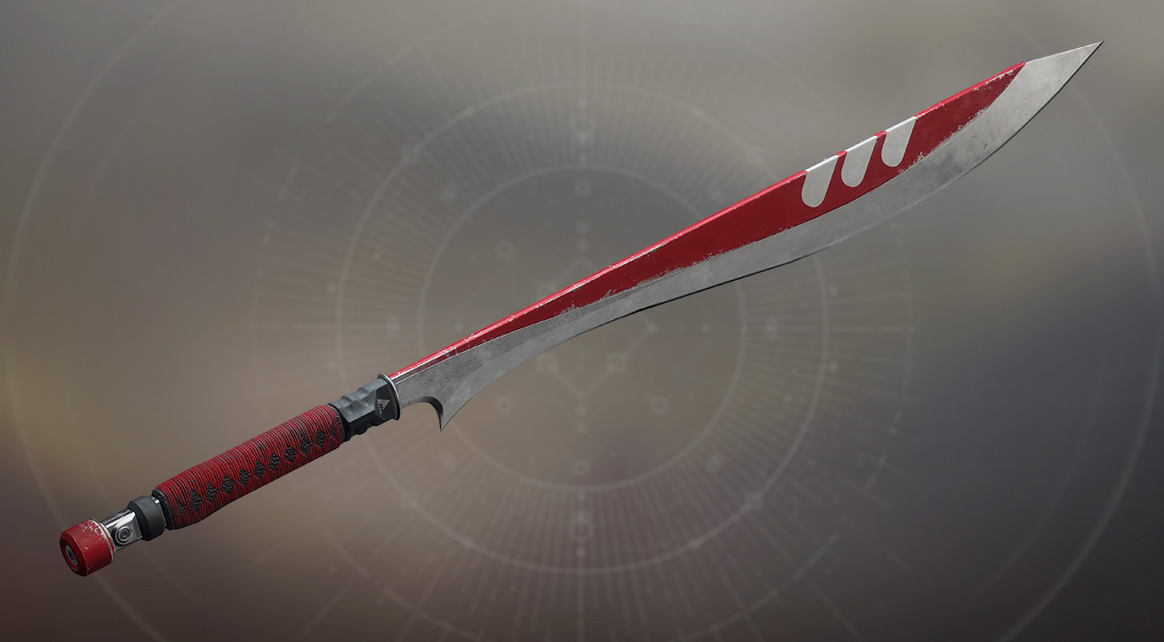
New Monarchy Sword
Future War Cult Fusion Rifle
Dead Orbit Grenade Launcher
Depending on who emerges the victor, you’ll be able to claim one of these rewards during the week following the ritual. If you pledged loyalty to the winner, you can pick it up for 1,000 Glimmer. For everyone else, it’s 50,000 Glimmer. That’s the price for disloyalty in the Tower.
Good luck, and may the best faction win!
Good Will Hunting
The Bungie Bounty is back. This time, we’ll be playing on Xbox One. Another brave soul has volunteered to host the Bungie team on their own stream. SheSnaps will be the target. Match with her in Quickplay and win during the time indicated below to claim your emblem.
When: November 3rd, 2017
6:00–8:00 p.m. (Pacific)
Playlist: Quickplay
Console: XB1
SneSnaps won’t be going it alone. We have an all-Bungie fireteam backing her up.
L0SE – Joel Acosta, BVT Tester
OppDef – Richard Meier, PVP Tester
This will not be a reveal stream like the ones we talked about above. We’ll just be confronting the community in the Crucible and giving out emblems to anyone who can beat us. Don’t expect any revelations about Osiris. We’re saving that for later.
About that emblem. Here is a peek at what the Sign of Mutual Combat looks like:
All winners will receive their emblem in the Collections section of their vault within a week. I’ll make the announcement on Twitter. You can see the emblems in your vault at any of the social spaces. For more info you can check out this Bungie Bounty Guide. Look alive, PC Players! The next Bungie Bounty will be on your platform.
Fall Back!
As we welcome a wider variety of machines that play our game, Destiny Player Support is working around the clock to identify issues and communicate fixes. They have more info about a patch we deployed this morning, along with the impending time change this weekend.
This is their report.
Daylight Saving Time (Fall Back):
Ritual reset times are subject to change during Daylight Savings Time. Starting Sunday November 5, Daily and Weekly Reset will occur at 1:00 AM Pacific (9:00 AM UTC). For additional information concerning ritual resets, please see this Help Article. PC Issue updates:
Since the launch of Destiny 2 on PC, we have been investigating various reports of crashes, performance degradation, framerate hitches, and alternate issues with players on the #Help forum. The following issues have been identified, investigated, and resolved:
- SSSE3 processor requirement: Hotfix 1.0.5.1 was deployed to remove the SSSE3 processor requirement. Players experiencing crashes due to this requirement should no longer be blocked from playing Destiny 2, but these processors remain below the below minimum spec and are not officially supported.
- AMD Vega Crashes: Players experiencing crashes when attempting to play through the mission “Six” or during general Destiny 2 gameplay may resolve these issues by downloading the most recent Driver Updates. Players may experience elevated crashes if their drivers have not been updated to version 17.8 or higher, and are advised to update when possible.
- Clan Rosters: Players should now be able to interact with Clan Rosters after accepting Hotfix 1.0.6.1
- Performance Degradation: Hotfix 1.0.6.1 also addressed an issue where players would experience performance degradation over time.
For a list of all known PC issues, please see the PC Known Issue and Vital Information thread. Please note we are actively investigating reports of Destiny 2 PC frame rate stuttering after accepting Hotfix 1.0.6.1. We advise all players to use the PC Reporting Issues template when posting to the PC Support forum, as this provides valuable information to our internal teams that is used throughout our investigations. Trials of the Nine
Following Hotfix 1.0.6, Trials of the Nine is set to return this Friday (11/3), also making its first appearance on PC. Players are required to complete the Destiny 2 Campaign, finish the Call to Arms Milestone once, have a minimum Power level of 260, and have a pre-made fireteam of four to access this event.
For additional information concerning Trials of the Nine, please see this Help Article. White Gloves, Gold Standards
With each new release, the #Help forum receives new players in search of assistance. Whether it be general gameplay questions or players seeking information on how to configure their network, Community Mentors are at the ready to lend a helping hand. Prior to Destiny 2 launching in September, an invitation to the Welcoming Committee was offered to players we frequently see sharing Help Articles, Bungie Communications, and troubleshooting steps within the forums. We’d like to extend a belated welcome to the following members:
- DMHSutter
- DMHTosh
- Blackfayaman
- TheCatalyyyst
With a forum badge and the ability to mark answers within the #Help forum, each member is also granted the unique “Vigilant Console” emblem within Destiny 2 as thanks for their dedication to the community.
If you see this emblem in the wild, know you’re in good company.
Set the Stage
Good news! This morning’s patch fixed our ability to grant the Lens of Fate emblem. We will be sending it out to this week’s winners and all previous winners since the launch of Destiny 2 who have been patiently waiting . Do you want to win and be one of the next lucky Guardians to receive this emblem? Submit your movie to the Creations page and you will have your shot. Here are this week’s winners.
Move of the Week: Sector 13
[embedded content]
Honorable Mention: Warlocks are Good With Guns
[embedded content]
Honorable Mention: A Warlock’s Tale
[embedded content]
We’re excited that Trials of the Nine is coming back tomorrow. This will be the first time PC players get to experience the thrill of playing through a scorecard with the chance of unlocking the mysteries of the spire and earning sweet loot.
New things to do are on the way. You have a roadmap of when we will be sharing some more details about Curse of Osiris and what else you can expect when Season Two begins with it on December 5. In the meantime, we will continue to monitor the conversation.
<3 Cozmo
|
|
|
|
| PS4 - L.A. Noire |
|
Posted by: xSicKxBot - 11-18-2017, 05:27 AM - Forum: New Game Releases
- No Replies
|
|
L.A. Noire
Amid the post-war boom of Hollywood's Golden Age, Cole Phelps, an LAPD detective is thrown headfirst into a city drowning in its own success. Corruption is rampant, the drug trade is exploding, and murder rates are at an all-time high. In his fight to climb the ranks and do what's right, Phelps must unravel the truth behind a string of arson attacks, racketeering conspiracies and brutal murders, battling the L.A. underworld and even members of his own department to uncover a secret that could shake the city to its rotten core. Using groundbreaking new animation technology that captures every nuance of an actor's facial performance in astonishing detail, L.A. Noire is a violent crime thriller that blends breathtaking action with true detective work to deliver an unprecedented interactive experience. Search for clues, chase down suspects and interrogate witnesses as you struggle to find the truth in a city where everyone has something to hide. Publisher: Rockstar Games Release Date: Nov 14, 2017
|
|
|
|
|