| |
| News - Colonial Marines modder finds big AI fix by changing one letter of code |
|
Posted by: xSicKxBot - 07-17-2018, 02:37 AM - Forum: Lounge
- No Replies
|
 |
Colonial Marines modder finds big AI fix by changing one letter of code
 Word is spreading over on ResetEra today about how an experienced modder of Gearbox’s 2013 bomb Aliens: Colonial Marines discovered a way to significantly improve the game’s AI by changing one letter of code.
Specifically, a modder who goes by James Dickinson published a note on ModDB last October explaining that they’d discovered a typo in a line of the game’s AI code that, when fixed, notably improved the way enemies in the game track and follow targets.
The line in question, which at least one ResetEra user claims to have found in their own copy of the game’s code, reads “ClassRemapping=PecanGame.PecanSeqAct_AttachXenoToTether -> PecanGame.PecanSeqAct_AttachPawnToTeather.” When the “a” is cut from “Teather”, at least one ResetEra user claims that the game’s enemies become far more mobile and challenging.
“Why is this line important?” Dickinson wrote. “There are two reasons : 1) AttachXenoToTeather doesn’t do anything. It’s basically empty or stripped 2) AttachPawnToTether does ALOT. It controls tactical position adjustment, patrolling and target zoning.”
When a Xeno is spawned, it is attached to a zone tether,” they continued. “This zone tells the Xeno what area is its fighting space and where different exits are. In Combat, a Xeno will be forced to switch to a new tether (such as one behind you) so as to flank, or disperse so they aren’t so grouped up etc. (*disclaimer* this is inferred opinion, I cant see the actual code only bits.)”
It’s a good reminder that modders often play a vital role in deconstructing and improving games post-launch, even a game like Colonial Marines, which sparked a class action lawsuit against Gearbox and publisher Sega after it launched in 2013 looking much different than it did in promotional materials. Gearbox was eventually dropped from the suit in 2015.
|

|
|
| Xbox Wire - Next Week on Xbox: New Games for July 10 – 13 |
|
Posted by: xSicKxBot - 07-17-2018, 02:37 AM - Forum: Xbox Discussion
- No Replies
|
|
Next Week on Xbox: New Games for July 10 – 13
Welcome to Next Week on Xbox, where we cover all the new games coming soon to Xbox One! Every week the team at Xbox aims to deliver quality gaming content for you to enjoy on your favorite gaming console. To find out what’s coming soon to Xbox One, read on below and click on each of the game profiles for pre-order details (dates are subject to change).
July 10, 2018
Take to the skies in this immersive flight simulation where each mission is a high-risk expedition. Manage everything from fuel, ammo, hydraulics and more in your very own physics-based bomber, which can be customized with an array of liveries and paint jobs. Also available on Xbox Game Pass.
July 10, 2018
Join your friends and become an Ark Hunter in a massive cooperative online shooter like no other. Choose from an array of fully customizable weapons and classes, explore a unique futuristic open world, and engage in epic fast-paced third-person shooter combat.
July 10, 2018
Sail away on a monster-filled adventure with Dracula, Mavis, and their friends on the mysterious Lost Islands — and only you, in command of lovable little creatures, the Impa, can save them! Explore the islands, discover new Impa abilities, and rescue Frankenstein, Murray, and Wayne from fearsome enemies.
July 10, 2018
The official video game of the Motocross Championship is back! Live the MXGP experience as a pro, tweak your bike’s configuration like a mechanic, and master the race with new in-game physics. Practice in the Compound, a track where you can freely explore or compete against the AI, or tackle career mode with your custom rider and become MXGP champion.
July 10, 2018
Play as Yuma Ilvern and stop the Empire from exploiting the power of the ancient dragons, including the soul of the Shining Dragon within you. With the help of your friends, realize your destiny, save Astoria, and unleash the strength you’ve always had locked away. Demo Available on Xbox One
July 11, 2018
Jump and shoot your way through ever-changing levels, collect awesome new powers, and battle mighty bosses in the name of saving the human race… maybe. 20XX is a roguelike action platformer that you can play with a friend featuring full co-op either locally on your couch or online.
July 11, 2018
Ghost 1.0 is a metroidvania where two super hackers hire a mysterious agent to infiltrate the Nakamura Space Station and steal the greatest electronic secret ever. Of course, the station is well-protected with its heavy defenses, never-ending arsenal of weapons, and mysterious artifacts. It will all have to be destroyed.
July 11, 2018
A retro space shooter that pits you against a dreaded enemy: a scoreboard. With multiple modes and high-scores that can be attained by yourself and players all over the globe, this is a game that will put you on the path of achieving a score as high as you can possibly muster. So, if you are a fan of old-school shooters, be prepared to feel right at home.
July 11, 2018
Xbox One X Enhanced – Warhammer: Vermintide 2 is the sequel to the critically acclaimed Warhammer: End Times – Vermintide. Fight together with your friends against the forces of Chaos and Skaven in this epic 4-player co-op game set in the Warhammer Fantasy Battles world. Vermintide 2 expands the intense first-person combat with a brand-new enemy faction, 15 new career paths, talent trees, new weapons, an improved loot system, and more. Also available on Xbox Game Pass.
July 13, 2018
Earthfall is a four-player cooperative shooter that challenges players to survive hordes of ruthless alien drones and their inscrutable masters. Traverse the Pacific Northwest with friends or AI teammates in a desperate guerrilla war against an invading extraterrestrial force. Fight against the ever-changing horde and save what’s left of humanity, utilize futuristic weaponry, upgrade deployable barricades with fire or electricity, control mounted turrets, and battle through 10 levels of story-driven co-operative play.
July 13, 2018
A year has passed since the epic battle that decided the fate of mankind and claimed the life of the beloved Angela. Dark omens once again tell of the return of an evil presence. Ushi, the last remaining master of the ancient art of Shin-Ken, calls upon Tetsuo, his disciple and adopted son, to investigate some strange happenings in a faraway farming village outside the city in this throwback to classic co-op arcade brawlers.
July 13, 2018
Compete in intense one-on-one duels, lead a riotous robot rebellion through randomly generated survival arenas, and overthrow a malevolent robot despot in an epic single-player campaign. Battle with a collection of 46+ diverse robots in five hostile environments, augment the droids as you progress, and embark on an epic journey filled with peril and twists across a decaying robot dystopia.
July 13, 2018
A challenging, first-person puzzle game set in the near future where you will explore a striking art-deco hotel that holds a deep-seeded mystery surrounding your current stay. Your desire to unearth the truth is obstructed by an array of color-coded puzzles, mind-bending physics challenges, and the growing fear of exposing your true intentions.
|
|
|
|
| News - Pixel-Art Escape Thriller STAY Will Be Breaking Out On Switch This Summer |
|
Posted by: xSicKxBot - 07-17-2018, 02:37 AM - Forum: Nintendo Discussion
- No Replies
|
|
Pixel-Art Escape Thriller STAY Will Be Breaking Out On Switch This Summer
PQube has announced that STAY, an award-winning, pixel-art escape adventure, will be arriving on Nintendo Switch “this summer”.
The game, which launched on Xbox One and PC this spring, follows the path of Quinn – a therapist who wakes up alone in a strange, locked room with nothing but a computer hooked up to an internet chat room for company. Luckily for him, though, you’re also in this chat room, and it’s up to you to try and help Quinn escape, making suggestions in real time that will either guide him to safety, or closer to his ultimate end.
STAY has been nominated for various awards during its relatively short life, picking up the gong for ‘Best Original Idea’ at Gamelab Barcelona this year, but players on Steam have left mixed-to-positive reviews and several critics have noted that the game’s premise feels more exciting than the gameplay itself. It certainly seems intriguing, though, and could well be one to look out for. Here’s the official feature list if you’re interested:
FEATURES:
– Real-time play – the clock never stops: STAY plays out in real-time, meaning that every minute spent away from the game is a minute Quinn is left alone. Drop out of conversations or leave Quinn to fend for himself for too long and there may be consequences to your actions.
– Raise your empathy: Quinn is on edge, and every response matters. Prove yourself a compassionate ally and he’ll learn to trust you and share both his findings and deepest thoughts. Fail, and his emotions may work against you.
– Interactive storytelling: Featuring 24 chapters, seven different endings, dozens of life-altering choices and entire webs of conversation, STAY is designed to be replayed multiple times. Explore myriad rooms and unearth hidden secrets in subsequent playthroughs to piece together the full story.
– Uncover the truth: Webcams around the environment and on the computer enable you to watch and analyse Quinn’s reactions, mental state and actions while he is Away From Keyboard. Pick up on his lies, use that knowledge to your advantage and uncover the truth at the heart of STAY.
– Solve mind-bending puzzles: Help Quinn get the better of the conundrums he encounters inside his prison by taking direct control of his actions during numerous puzzle sections.
Do you like the sound of this one? Have you played the game already on other platforms? Let us know your thoughts below.
|
|
|
|
| News - Minecraft 1.13 Pre-Release 9 |
|
Posted by: xSicKxBot - 07-17-2018, 02:37 AM - Forum: Minecraft
- No Replies
|
|
Minecraft 1.13 Pre-Release 9

We’re now on pre-release 9 and we expect this to be the last pre-release before the full release. That said, unless any major show stopper pops up, we aim to release Update Aquatic for Minecraft: Java Edition on Wednesday, July 18th.
A full change log can be found on Minecraft.net.
- Added a few missing subtitles
- Improved performance
- Fixed bugs!
FIXED BUGS IN 1.13-PRE9
- MC-131821 – Cory Scheviak does not appear in credits
- MC-131822 – Nondescript / confusing error message when attempting to join servers <= 1.13-pre2 using >=1.13-pre3
- MC-132652 – Username tab completion on non-empty starting strings is offset
- MC-132657 – Username tab completion appears on the left when invoked without a starting string in the middle of the chat entry line
- MC-133337 – Crash in org.lwjgl.opengl.GL11.glDrawArrays when opening language settings (caused by Couldn’t find glyph for character Ʞ (\ua7b0))
- MC-133503 – Control settings from 1.12.2 can get completely lost when upgrading to 1.13
To get pre-releases, open your launcher and go to the “launch options” tab. Check the box saying “Enable snapshots” and save. To switch between the snapshot and normal version, you can find a new dropdown menu next to the “Play” button. Back up your world first or run the game on in a different folder (In the “launch options” page).
Please report any and all bugs you find in Minecraft to bugs.mojang.com.
Pre-releases can corrupt your world, please backup and/or run them in a different folder from your main worlds.
Share your thoughts on how 1.13 is shaping up in the comments below!
|
|
|
|
| News - Free Xbox One Games With Gold For July Out Now |
|
Posted by: xSicKxBot - 07-16-2018, 08:53 PM - Forum: Lounge
- No Replies
|
|
Free Xbox One Games With Gold For July Out Now
It's the middle of July, and that means it's time for Microsoft's Games With Gold offerings to cycle over into the next round. This week, Death Squared is being added to the Xbox One offerings, and Virtua Fighter 5 Final Showdown is swapping out for Splinter Cell: Conviction on Xbox 360. Assault Android Cactus for XBO remains free until the end of the month and Death Squared will go until mid-August. However, Sam Fisher appears to be suffering some technical setbacks. Larry Hryb (aka Major Nelson) tweeted that engineers are investigating reports that Splinter Cell isn't showing as free for some users. If it doesn't appear properly on the store when you check in, the problem will likely be fixed soon enough. As always, any new Xbox 360 games added to the Games with Gold service are backwards compatible, so you can play them on your Xbox One. They join a large and growing list of backwards compatible games, since Microsoft has made it adding new games a priority. Those are the inclusions with Gold, but separately, Microsoft also offers its Game Pass subscription service for $10 per month. That has a wide selection of its own, including all new first-party games alongside their regular releases. July 2018 Games With GoldXbox One - Assault Android Cactus (July 1-31)
- Death Squared (July 16-August 15)
Xbox 360 (playable on Xbox One) - Virtua Fighter 5: Final Showdown (July 1-15)
- Tom Clancy's Splinter Cell: Conviction (July 16-31)
|
|
|
|
| Fedora - 3 cool productivity apps for Fedora 28 |
|
Posted by: xSicKxBot - 07-16-2018, 08:53 PM - Forum: Linux, FreeBSD, and Unix types
- No Replies
|
|
3 cool productivity apps for Fedora 28
 Productivity apps are especially popular on mobile devices. But when you sit down to do work, you’re often at a laptop or desktop computer. Let’s say you use a Fedora system for your platform. Can you find apps that help you get your work done? Of course! Read on for tips on apps to help you focus on your goals.
All these apps are available for free on your Fedora system. And they also respect your freedom. (Many also let you use existing services where you may have an account.)
FocusWriter
FocusWriter is simply a full screen word processor. The app makes you more productive because it covers everything else on your screen. When you use FocusWriter, you have nothing between you and your text. With this app at work, you can focus on your thoughts with fewer distractions.
FocusWriter lets you adjust fonts, colors, and theme to best suit your preferences. It also remembers your last document and location. This feature lets you jump right back into focusing on writing without delay.
To install FocusWriter, use the Software app in your Fedora Workstation. Or run this command in a terminal using sudo:
sudo dnf install focuswriter
GNOME ToDo
This unique app is designed, as you can guess, for the GNOME desktop environment. It’s a great fit for your Fedora Workstation for that reason. ToDo has a simple purpose: it lets you make lists of things you need to get done.

Using ToDo, you can prioritize and schedule deadlines for all your tasks. You can also build as many tasks lists as you want. ToDo has numerous extensions for useful functions to boost your productivity. These include GNOME Shell notifications, and list management with a todo.txt file. ToDo can even interface with a Todoist or Google account if you use one. It synchronizes tasks so you can share across your devices.
To install, search for ToDo in Software, or at the command line run:
sudo dnf install gnome-todo
Zanshin
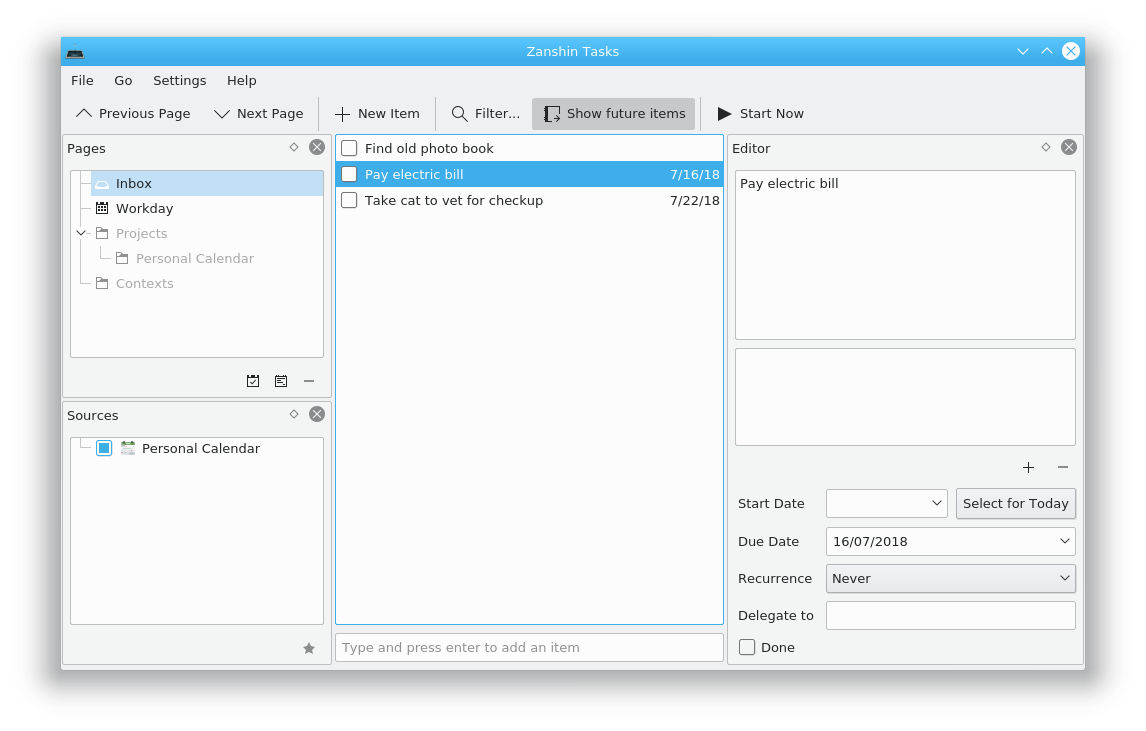
If you are a KDE using productivity fan, you may enjoy Zanshin. This organizer helps you plan your actions across multiple projects. It has a full featured interface, and lets you browse across your various tasks to see what’s most important to do next.

Zanshin is extremely keyboard friendly, so you can be efficient during hacking sessions. It also integrates across numerous KDE applications as well as the Plasma Desktop. You can use it inline with KMail, KOrganizer, and KRunner.
To install, run this command:
sudo dnf install zanshin
Photo by Cathryn Lavery on Unsplash.
|
|
|
|
| Exploring Azure App Service – Azure Diagnostics |
|
Posted by: xSicKxBot - 07-16-2018, 08:53 PM - Forum: C#, Visual Basic, & .Net Frameworks
- No Replies
|
|
Exploring Azure App Service – Azure Diagnostics
 If you’ve followed our previous posts about using Azure App Service to host web apps in the cloud (1. Introduction to App Service, 2. Hosting web apps that use SQL) you’re already familiar with how easy it is to get an app running in the cloud; but what if the app doesn’t work correctly (it’s crashing, running too slow, etc.)? In this post we’ll explore how to use Azure’s Application Insights to have always on diagnostics that will help you find and fix these types of issues.
Azure Application Insights provides seamless integration with Azure App Service for monitoring, triaging and diagnosing code-level issues. It can easily be enabled on an existing web app with a single button click. Profiler traces and exception snapshots will be available for identifying the lines of code that caused issues. Let’s take a closer look at this experience.
Enable Application Insights on an existing web app to investigate issues
We recommend you follow along using your own application, but if you don’t have one readily available we will be using the Contoso University sample. The instructions on how to deploy it to App Service are in the readme file.
If you are following along with Contoso University, you will notice the Instructors page throws errors. In addition, the Courses tab loads a bit slower than others.

Let’s turn on Application Insights to investigate. After the app is deployed to App service, Application Insights can be enabled from the App Service portal by clicking the button on the overview blade:


Fill out the Application Insights enablement blade the following way:
- Create a new resource, with an appropriate name.
- Leave all default options for Code-level diagnostics on. The added section Code level diagnostics is on by default to enable Profiler and Snapshot Debugger for diagnosing slow app performance and runtime exceptions.
- Click the ‘OK’ button. Once prompted if to restart the web app, click ‘Continue’ to proceed.

Once Application Insights is enabled, you will be able to see its connection status. You can now navigate to the Application Insights overview blade by clicking on the link next to the green check mark:


Generate traffic for your web app in order to reproduce issues
Let’s generate some traffic to reproduce our two issues: a) Courses page loading slowly, b) Instructors page throwing errors. You are going to use performance test with Azure portal to make requests to the following URLs:
- http://<your_webapp_name>.azurewebsites.net/Courses
- http://<your_webapp_name>.azurewebsites.net/Instructors
You are going to be creating two different performance tests, once for each URL. For the Courses page you are going to simulate 250 users over a duration of 5 minutes, since you are experiencing a performance issue. For the Instructors page you can simulate 10 users over 1 minutes since we’d generally expect less instructors than users on the site at any given time.


Profile your app during performance tests to identify performance issues
A performance test will generate traffic, but if you want to understand how you app performs you have to analyze its performance while the test is running using a profiler. Let’s do exactly that, using the Performance | Configure Profiler blade while one of our performance tests is running:

Later on we will walkthrough how to use the profiler to identify the exact lines of code responsible for the slow-down. For now, let’s focus on simply profiling . After clicking on “Profile now”, wait until the performance test finishes and the profiler has completed its analysis. After a new entry in the section “Recent profiling sessions” appears, navigate back to the Overview blade.
Diagnose runtime exceptions
If your web app has any failed requests, you need to root cause and solve the issues to ensure your app works reliably. After running your performance test on the Instructors page you have some example failed requests to take a look at:
Let’s go to Failures blade to investigate what failed.

On the Failures blade, the top failed operation is ‘GET Instructors/Index’ and the top exception is ‘InvalidOperationException’. Click on the ‘COUNT’ column of the exception count to open list of sample exceptions. Click on the suggested exception to open the End-to-End Transaction blade.

In the End-to-End Transaction blade, you can see ‘System.InvalidOperationException’ exceptions thrown from GET Instructors/Index operation. Select the exception row and click on ‘Open debug snapshot’.

If it’s the first time you use Snapshot Debugger, you will prompt to request RBAC access to snapshots to safeguard the potentially sensitive data shown in local variables:

Once you get access, you will see a snapshot view like the following:

From the local variables and call stack, you can see the exception is thrown at InstructorsController.cs line 56 with message ‘Nullable object must have a value’. This provides sufficient information to proceed with debugging the app’s source code.

To get a better experience, download the snapshot and debug it using Visual Studio Enterprise. You will be able to interactively see which line of code caused the exception:

Looking at the code, the exception was thrown because ‘id’ is null and you are missing the appropriate check. When your app is running in the cloud, resources are dynamically provisioned and destroyed and so may not always get the chance to access the state of a failed component before it is reset. The Snapshot Debugger is a powerful tool that can maintain the failed state of the component even after the component’s state has been reset, by capturing local variables and call stack at the time the exception is thrown.
Diagnose bad performance from your web app
The server response time chart on the overview blade provides quick information on how performant your web app is over time. In the Contoso example, we see some spikes on the chart indicating there is a short period of time where users experienced slow responses for the requests they made.

To investigate further, navigate to the Performance blade in App Insights portal:

Zoom into the time range 6pm-10pm in the ‘Operation times: zoom into range’ chart to see spikes on the Request count.

Sort the Operations table by duration and request count to figure out where your web app spent the most time. In our example GET Courses/Index operation has the longest average duration. Let’s click on it to investigate why this operation takes so long.

The right side of the blade provides insights based on the Course/Index operation.

From the chart you can see although most operations only took around 400ms, the worst ones took up to 35 seconds. This means some users are getting really bad experience when hitting this URL and you should address it. Let’s look at Profiler traces to troubleshoot why GET Courses/Index was being so slow.

You should see profiler traces similar to the following:

The code path that’s taking the most time is prefixed with the flame icon. In this particular request, most time was spent on reading the list of courses from the database. Browsing to the code CourseController.cs we can see that when loading the list of courses the AsNoTracking() optimization option is not used. By default, Entity Framework will turn on tracking which caches the results to compare with what’s modified. This could add an approx. ~30% overhead to your app’s performance. For simple read operation like this one, we can optimize the query performance by using the AsNoTracking() option.
Conclusion
We hope that you find it easy to use Application Insights to diagnose performance and errors in your web apps. We believe Azure App Service is a great place to get started hosting and maintaining your web apps. You don’t have to enable App Insights upfront; the option is always there to be turned on when and as needed without re-deployment.
If you have any questions or issues, let us know by leaving comments below.

Catherine Wang Program Manager, VS and .NET
Catherine is on Azure developer experience team and is responsible for Azure diagnostics, security and storage tools.
|
|
|
|
| Users, Groups and Other Linux Beasts: Part 2 |
|
Posted by: xSicKxBot - 07-16-2018, 05:29 PM - Forum: Linux, FreeBSD, and Unix types
- No Replies
|
|
Users, Groups and Other Linux Beasts: Part 2

In this ongoing tour of Linux, we’ve looked at how to manipulate folders/directories, and now we’re continuing our discussion of permissions, users and groups, which are necessary to establish who can manipulate which files and directories. Last time, we showed how to create new users, and now we’re going to dive right back in:
You can create new groups and then add users to them at will with the groupadd command. For example, using:
sudo groupadd photos
will create the photos group.
You’ll need to create a directory hanging off the root directory:
sudo mkdir /photos
If you run ls -l /, one of the lines will be:
drwxr-xr-x 1 root root 0 jun 26 21:14 photos
The first root in the output is the user owner and the second root is the group owner.
To transfer the ownership of the /photos directory to the photos group, use
chgrp photos /photos
The chgrp command typically takes two parameters, the first parameter is the group that will take ownership of the file or directory and the second is the file or directory you want to give over to the the group.
Next, run ls -l / and you’ll see the line has changed to:
drwxr-xr-x 1 root photos 0 jun 26 21:14 photos
You have successfully transferred the ownership of your new directory over to the photos group.
Then, add your own user and the guest user to the photos group:
sudo usermod <your username here> -a -G photos

sudo usermod guest -a -G photos
You may have to log out and log back in to see the changes, but, when you do, running groups will show photos as one of the groups you belong to.
A couple of things to point out about the usermod command shown above. First: Be careful not to use the -g option instead of -G. The -g option changes your primary group and could lock you out of your stuff if you use it by accident. -G, on the other hand, adds you to the groups listed and doesn’t mess with the primary group. If you want to add your user to more groups than one, list them one after another, separated by commas, no spaces, after -G:
sudo usermod <your username> -a -G photos,pizza,spaceforce
Second: Be careful not to forget the -a parameter. The -a parameter stands for append and attaches the list of groups you pass to -G to the ones you already belong to. This means that, if you don’t include -a, the list of groups you already belong to, will be overwritten, again locking you out from stuff you need.
Neither of these are catastrophic problems, but it will mean you will have to add your user back manually to all the groups you belonged to, which can be a pain, especially if you have lost access to the sudo and wheel group.
Permits, Please!
There is still one more thing to do before you can copy images to the /photos directory. Notice how, when you did ls -l / above, permissions for that folder came back as drwxr-xr-x.
If you read the article I recommended at the beginning of this post, you’ll know that the first d indicates that the entry in the file system is a directory, and then you have three sets of three characters (rwx, r-x, r-x) that indicate the permissions for the user owner (rwx) of the directory, then the group owner (r-x), and finally the rest of the users (r-x). This means that the only person who has write permissions so far, that is, the only person who can copy or create files in the /photos directory, is the root user.
But that article I mentioned also tells you how to change the permissions for a directory or file:
sudo chmod g+w /photos
Running ls -l / after that will give you /photos permissions as drwxrwxr-x which is what you want: group members can now write into the directory.
Now you can try and copy an image or, indeed, any other file to the directory and it should go through without a problem:
cp image.jpg /photos
The guest user will also be able to read and write from the directory. They will also be able to read and write to it, and even move or delete files created by other users within the shared directory.
Conclusion
The permissions and privileges system in Linux has been honed over decades. inherited as it is from the old Unix systems of yore. As such, it works very well and is well thought out. Becoming familiar with it is essential for any Linux sysadmin. In fact, you can’t do much admining at all unless you understand it. But, it’s not that hard.
Next time, we’ll be dive into files and see the different ways of creating, manipulating, and destroying them in creative ways. Always fun, that last one.
See you then!
Learn more about Linux through the free “Introduction to Linux” course from The Linux Foundation and edX.
|
|
|
|
| PC - Seeking Dawn |
|
Posted by: xSicKxBot - 07-16-2018, 05:21 PM - Forum: New Game Releases
- No Replies
|
|
Seeking Dawn
Welcome to Seeking Dawn, a multiplayer survival VR adventure that takes you far beyond the solar system. Step into the shoes of a soldier discovering a hostile planet, where predators roam free and enemies are ruthless.
Publisher: Multiverse Games Release Date: Jul 12, 2018
|
|
|
|
|