| |
| Mobile - Review: Element RTS |
|
Posted by: xSicKxBot - 11-09-2018, 05:37 PM - Forum: New Game Releases
- No Replies
|
 |
Review: Element RTS
 At last, another mobile RTS enters the field. Element has been a PC game for a long time, undergoing playtesting in Steam’s Early Access program, so the version we’ve got on iOS now (sorry Android), is fat-free and beautiful.
Element‘s design is simple and incredibly refined. One might even be tempted to call it… elemental. Everything fits into overlapping matrices of three. There are three unit types: attack units shoot at other structures, defense units shoot at incoming bullets, and resource units generate energy. Each of these can be either a land, water, or air unit, depending on where it is placed, with a rock/paper/scissors strength relationship between them. Each can also be one of three strengths, being more effective for a higher energy cost. So in the end you have 36 different units, but so tightly organised they feel like far fewer. In addition, you have your base unit, mines, drones that can directly heal damaged structures, and missiles that directly attack the enemy.
This highly-structured approach to units is welcomed because the actual real-time strategy gameplay is very unique and very intense. First of all, the game is played not on a two dimensional map, but on a sphere that can be rotated and constructed upon all over. That means there may be something horrible happening on the dark side of the planet, attacks come from six directions, and you will probably lose your bearings on a regular basis. This is compounded by each side’s ability to place units almost anywhere they want, which means you may find the enemy on your doorstep in a heartbeat. Rather than the traditional base buildings and mobile attack units, you will contend with sudden sprouts of enemy turrets and attack satellites that orbit the planet to regularly harass your bases. Because attacks can happen so suddenly, it becomes incredibly important to carefully manage your economy, balancing your energy expenditures. Each planet has a slightly different challenge. One will be mostly water, another will be tiny, another will have an extremely well-established enemy base you need to destroy.
Furthermore, you have a two-pronged goal for each level. Not only do you have to destroy the enemy base (mercifully, not every enemy unit) but also mine more than half of the planet’s limited elemental resource before the enemy does. The AI often starts ahead of you, with several mines already pumping out whatever element is under dispute, so you have to work quickly, efficiently, and ruthlessly to destroy their ability to mine, build up your own, and defend your territory before you can finally destroy their base. It’s impossible to simply rush to attack because you’ll fail the mission if you haven’t mined at least half the element, so each round is a delicate five-minute balancing act with orbital lasers.

The AI is ruthless on later levels, taking advantage of any weakness in your defenses and pouncing if you overextend yourself. It can sometimes feel unfair when the AI starts with an advantage as well but the game’s difficulty curves well. Early missions are simple and straightforward, maybe even too easy. At the halfway point, you might be ready to throw your phone against the wall… but you won’t, because trying again will just take you five more minutes.
Not only are matches short and intense, they control beautifully on mobile. Swipes rotate the map, and a targeting reticule in the center selects a territory. Thanks to the organized units, it’s easy and fast to build the structure you want from the left-side menu. The right-side menus keep you up-to-date on all the necessary information you need to win.

While the game design is incredibly tight, other parts of the game are not as thoughtful. Even at larger sizes, the units and buildings are very similar-looking. Everything is a grey or black tower with neon lighting, and while over time you can learn to recognize each one, the similarity definitely hinders comprehension. They could be more architecturally distinctive, for instance, by making defensive structures dome-shaped and attacking structures thornier. Even your own units can be mistaken for the enemy when you are spinning the planet quickly.
Despite the emphasis on quick battles, a lot of the game takes on a slow-motion 2001: A Space Odyssey aesthetic. This works well when you’re trying to handle a half dozen attack satellites and missiles, but other times becomes irritating. With everything moving so slowly, yet so inexorably, it would be nice if the game speed controls were a little more accessible, rather than behind the pause menu. Likewise, the opening menu pace is too leisurely, delaying your entry into a match while you slowly watch the camera pan over outer space. It’s pretty, but not necessary.

The last big missing piece is multiplayer, which is totally absent. That’s a big shame, because Element‘s chess-like perfectly balanced design, dual objectives, and three-dimensional playing field deserve to be the object of some serious strategizing by some obsessive expert players. I’d love to see what kind of bluffs and counter-bluffs they come up with. If Element adds multiplayer in the future, I think it will be a must-buy for mobile strategy gamers.
For now, Element is a tight, unique design that works perfectly on mobile. If you are looking for a real strategic challenge, or just something not quite like anything you’ve never played before, Element is your game.
|

|
|
| How to Move Files Using Linux Commands or File Managers |
|
Posted by: xSicKxBot - 11-09-2018, 09:47 AM - Forum: Linux, FreeBSD, and Unix types
- No Replies
|
|
How to Move Files Using Linux Commands or File Managers
 Learn how to move files with Linux commands in this tutorial from our archives.
There are certain tasks that are done so often, users take for granted just how simple they are. But then, you migrate to a new platform and those same simple tasks begin to require a small portion of your brain’s power to complete. One such task is moving files from one location to another. Sure, it’s most often considered one of the more rudimentary actions to be done on a computer. When you move to the Linux platform, however, you may find yourself asking “Now, how do I move files?”
If you’re familiar with Linux, you know there are always many routes to the same success. Moving files is no exception. You can opt for the power of the command line or the simplicity of the GUI – either way, you will get those files moved.
Let’s examine just how you can move those files about. First we’ll examine the command line.
Command line moving
One of the issues so many users, new to Linux, face is the idea of having to use the command line. It can be somewhat daunting at first. Although modern Linux interfaces can help to ensure you rarely have to use this “old school” tool, there is a great deal of power you would be missing if you ignored it all together. The command for moving files is a perfect illustration of this.
The command to move files is mv. It’s very simple and one of the first commands you will learn on the platform. Instead of just listing out the syntax and the usual switches for the command – and then allowing you to do the rest – let’s walk through how you can make use of this tool.
The mv command does one thing – it moves a file from one location to another. This can be somewhat misleading, because mv is also used to rename files. How? Simple. Here’s an example. Say you have the file testfile in /home/jack/ and you want to rename it to testfile2 (while keeping it in the same location). To do this, you would use the mv command like so:
mv /home/jack/testfile /home/jack/testfile2
or, if you’re already within /home/jack:
mv testfile testfile2
The above commands would move /home/jack/testfile to /home/jack/testfile2 – effectively renaming the file. But what if you simply wanted to move the file? Say you want to keep your home directory (in this case /home/jack) free from stray files. You could move that testfile into /home/jack/Documents with the command:
mv /home/jack/testfile /home/jack/Documents/
With the above command, you have relocated the file into a new location, while retaining the original file name.
What if you have a number of files you want to move? Luckily, you don’t have to issue the mv command for every file. You can use wildcards to help you out. Here’s an example:
You have a number of .mp3 files in your ~/Downloads directory (~/ – is an easy way to represent your home directory – in our earlier example, that would be /home/jack/) and you want them in ~/Music. You could quickly move them with a single command, like so:
mv ~/Downloads/*.mp3 ~/Music/
That command would move every file that ended in .mp3 from the Downloads directory, and move them into the Music directory.
Should you want to move a file into the parent directory of the current working directory, there’s an easy way to do that. Say you have the file testfile located in ~/Downloads and you want it in your home directory. If you are currently in the ~/Downloads directory, you can move it up one folder (to ~/) like so:
mv testfile ../
The “../” means to move the folder up one level. If you’re buried deeper, say ~/Downloads/today/, you can still easily move that file with:
mv testfile ../../
Just remember, each “../” represents one level up.
As you can see, moving files from the command line, isn’t difficult at all.
GUI
There are a lot of GUIs available for the Linux platform. On top of that, there are a lot of file managers you can use. The most popular file managers are Nautilus (GNOME) and Dolphin (KDE). Both are very powerful and flexible. I want to illustrate how files are moved using the Nautilus file manager (on the Ubuntu 13.10 distribution, with Unity as the interface).
Nautilus has probably the most efficient means of moving files about. Here’s how it’s done:
-
Open up the Nautilus file manager.
-
Locate the file you want to move and right-click said file.
-
From the pop-up menu (Figure 1) select the “Move To” option.
-
When the Select Destination window opens, navigate to the new location for the file.
-
Once you’ve located the destination folder, click Select.
This context menu also allows you to copy the file to a new location, move the file to the Trash, and more.
If you’re more of a drag and drop kind of person, fear not – Nautilus is ready to serve. Let’s say you have a file in your home directory and you want to drag it to Documents. By default, Nautilus will have a few bookmarks in the left pane of the window. You can drag the file into the Document bookmark without having to open a second Nautilus window. Simply click, hold, and drag the file from the main viewing pane to the Documents bookmark.
If, however, the destination for that file is not listed in your bookmarks (or doesn’t appear in the current main viewing pane), you’ll need to open up a second Nautilus window. Side by side, you can then drag the file from the source folder in the original window to the the destination folder in the second window.
If you need to move multiple files, you’re still in luck. Similar to nearly every modern user interface, you can do multi-select of files by holding down the Ctrl button as you click each file. After you have selected each file (Figure 2), you can either right-click one of the selected files and the choose the Move To option, or just drag and drop them into a new location.

The selected files (in this case, folders) will each be highlighted.
Moving files on the Linux desktop is incredibly easy. Either with the command line or your desktop of choice, you have numerous routes to success – all of which are user-friendly and quick to master.
|
|
|
|
| News - Star Wars Live-Action Cassian Andor Show Confirmed |
|
Posted by: xSicKxBot - 11-09-2018, 06:41 AM - Forum: Lounge
- No Replies
|
|
Star Wars Live-Action Cassian Andor Show Confirmed
The second live-action Star Wars TV show for Disney+, Disney's upcoming streaming service, has been revealed. The series will focus on the adventures of Cassian Andor, the character played by Diego Luna in the movie Rogue One, and will go into production next year. Disney confirmed that Luna will reprise his role. The series will be set before the events of Rogue One, and is described by the studio as a "rousing spy thriller" that will "explore tales filled with espionage and daring missions to restore hope to a galaxy in the grip of a ruthless Empire." In a statement, Luna said: "Going back to the Star Wars universe is very special for me. I have so many memories of the great work we did together and the relationships I made throughout the journey. We have a fantastic adventure ahead of us, and this new exciting format will give us the chance to explore this character more deeply." The Andor show does not yet have a title or release date. Disney has also announced that the new streaming service will be called Disney+, and confirmed that they are making a new Marvel series centered on Loki. Disney+ launches in 2019. Production on The Mandalorian, the first live-action Star Wars show to be announced for Disney+, is currently underway. It is being overseen by Jungle Book director Jon Favreau, and while the cast is yet to be announced, the first image was released last month. We've also had an official description, which stated that the series will "follow the travails of a lone gunfighter in the outer reaches of the galaxy far from the authority of the New Republic." In addition, some of the directors lined up to helm episodes have been revealed, including Thor Ragnarok's Taika Waititi and Jurassic World star Bryce Dallas Howard.
|
|
|
|
| Fedora - How Do You Appreciate Fedora? |
|
Posted by: xSicKxBot - 11-09-2018, 06:41 AM - Forum: Linux, FreeBSD, and Unix types
- No Replies
|
|
How Do You Appreciate Fedora?
 This week is the first annual Fedora Appreciation Week. As an extension of the How Do You Fedora? series, this article presents how past interviewees appreciate Fedora. The Fedora Project defines four common values that it encourages all contributors and community members to uphold. Those values are known as the Four Foundations. One such value, Friends, represents the vibrant community of contributors and users from across the world, all working towards the same goal: advancing free software.
Like any community, the Fedora community evolves over time. Each contributor’s story is a little different. That diversity is what makes the Fedora community so strong. Kernel contributor Justin Forbes puts it succinctly:
Fedora is the community. So much of what Fedora is now came as a direct result of community effort.
Fedora is successful today because of the many contributors, both past and present, who have put their time and effort into the project. Here are some of their stories, and how they appreciate others in the community.
You can click on any of the story headers to see our original interviews with these notable people.
Fedora has been a huge part of my personal and professional life, so choosing a top moment would leave several fantastic stories behind. I do remember that first time I went to a Flock and meet personally people that I had been interacting, learning from and teaching for almost 5 years. For people like us who spend most of our time behind a screen, having that personal meeting can be life changing. That particular moment is not about the goals or the tasks that need to be done, that moment is the prize to people who work for a common well, for those who change people’s life without asking anything in return, it’s the moment when you put a face to those commits and bugs, to those wallpapers and docs; it’s the moment when we stop being a random robot name to be real… that moment when we hug each other and greet, that has to be the best moment in all Open Source History.
Maria has two favorite wallpapers from Fedora releases:

She sends a special thank you to appreciate Máirín Duffy, who leads the Fedora design team:
Definitely my hero, mo (mizmo). She pushed me to be the designer I am today, always had a chat to solve any doubt I had, and is the most friendly person you can meet.
Maria’s most memorable release was early on:
Probably Fedora 6, since it was the first time I did any artwork at all for the community.
Without a doubt the best Fedora memory with friends would have to be celebrating the Fedora “Beefy Miracle” release back in 2012 at LinuxTag in Berlin where the Fedora booth played it so well and was serving up free hot dogs to go with the delicious beverages of the region. Lots of good catching up with open-source contributors, discussing new ideas, and more during the wonderful community-driven open-source events particularly in Europe.
Michael’s favorite Fedora desktop wallpaper will be familiar to current readers of the Magazine. It’s the brand new wallpaper for Fedora 29:

Michael also sent a special thank you to a very special contributor who died in 2013:
The late Seth Vidal earns much respect for his contributions to Fedora, Yum, and Red Hat communities. His technical achievements were great and he was a kind and interesting person at conferences, etc.
His favorite release was Fedora Core 3:
Fedora Core 3 certainly holds a special place in my heart as it was the first Fedora release I really became intrigued by as it was in much better shape than FC1/FC2. Since there it improved while overall from say Fedora 26 and newer, each release has felt particularly polished and keeps getting better — including Fedora 29 and my experience with it thus far on many test boxes.
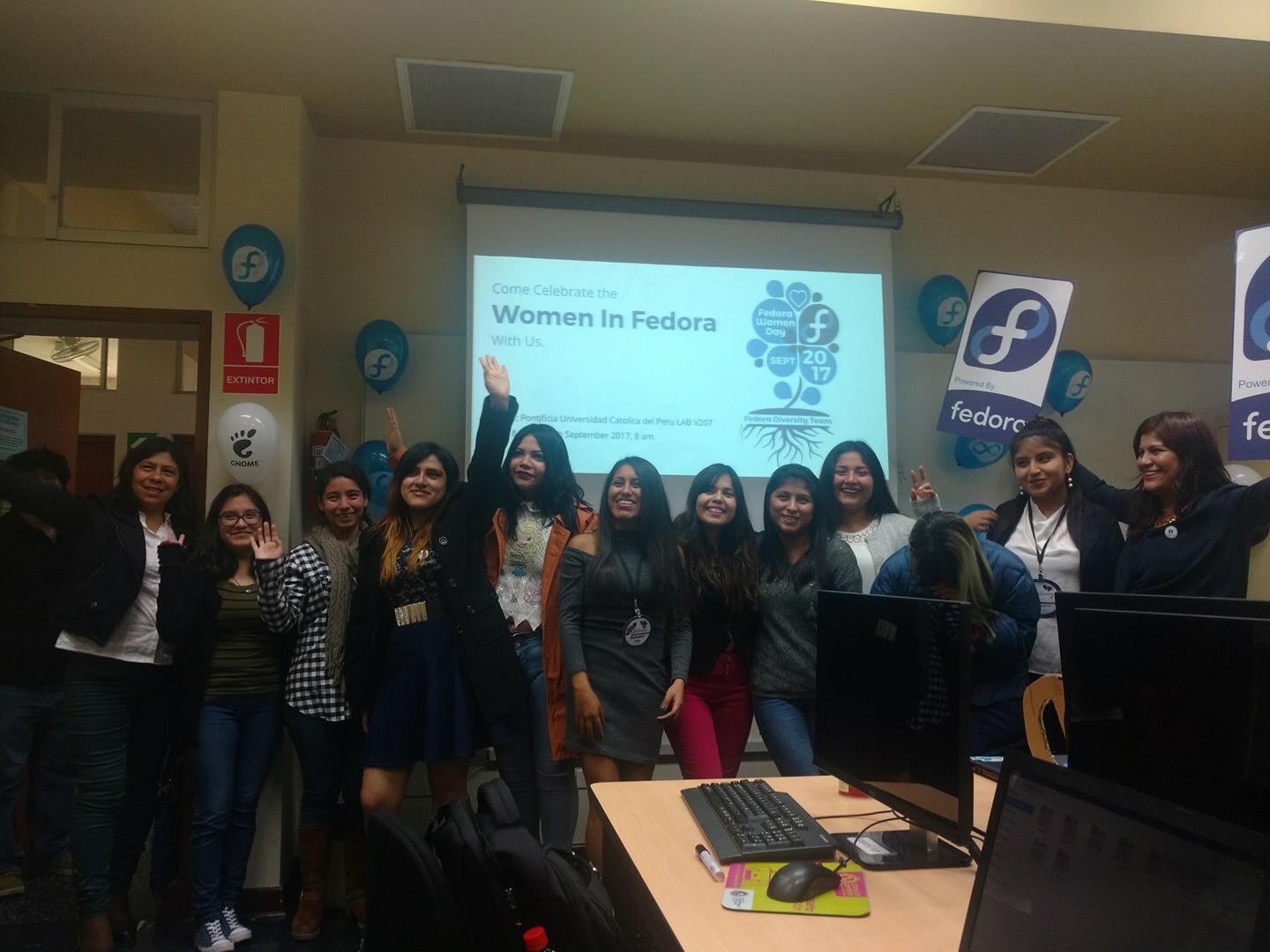
Julita shared with us this photo from a recent Women in Fedora event, celebrating the positive impact and contributions of women in the Fedora community:

Her favorite Fedora wallpaper is from the Fedora 17 release:

Julita also took time to appreciate one of Fedora’s amazing Czech community contributors and organizers:
The person I admired since the beginning was Jiri Eischmann! He is a polite person and very active in his community. He continues to inspire me to this day! I hope to soon attend a celebration of Fedora in Europe where I am living now.
Author’s Postscript
As a fellow Fedoran I would like to thank each of the people who responded to my questions and all of the previous interviewees. Writing the How Do You Fedora? series has been immensely rewarding for me. I have learned about lots of new applications and uses of Fedora. The greatest impact of the series is that it reignites my faith in the goodness of the people who make up the Fedora community with each installment.
|
|
|
|
| Microsoft - Power BI Desktop adds dataflows, enterprise reporting and more |
|
Posted by: xSicKxBot - 11-09-2018, 06:41 AM - Forum: Windows
- No Replies
|
|
Power BI Desktop adds dataflows, enterprise reporting and more
 As organizations embrace a data culture to drive business decisions, they need an enterprise business intelligence platform that can meet their sophisticated needs – from self-service BI to full enterprise governance, from paginated reports to full interactive data exploration, and from small data sets to petabytes of data.
In July, we laid out the roadmap for Power BI to help organizations unify modern and traditional BI on one enterprise platform, and empower business analysts by expanding self-service data prep for big data. Since then, we’ve shipped a number of capabilities that deliver on this roadmap: Premium multi-geo allows customers to address data residency requirements, aggregations enable data analysis over petabyte sized datasets with trillions of rows of data, and the new Power BI Home landing page and dashboard commenting make it easier to get to your most important content and collaborate across the enterprise.
Today, we’re announcing the availability of several new capabilities that we laid out in our July roadmap.
Dataflows expand self-service data prep in Power BI
Power BI already includes robust self-service data preparation capabilities in Power BI Desktop through the familiar Power Query based experiences that are used by millions of users worldwide. We are excited to announce the public preview of dataflows in Power BI, taking self-service data preparation to the next level.
- Dataflows enable business analysts to create data preparation logic that can be reused across multiple Power BI reports and dashboards.
- Dataflows can be linked together to create sophisticated data transformation pipelines that enable business analysts to build on each other’s work. A new recalculation engine automatically tracks dependencies and recomputes data as new data is ingested.
- Dataflows can be configured to store the data in the customer’s Azure Data Lake Storage Gen2 instance, fueling collaboration across roles. Business analysts can seamlessly operate on data stored in Azure Data Lake Storage, taking advantage of its scale, performance, and security. Meanwhile, data engineers and data scientists can extend insights with advanced analytics and AI from complementary Azure Data Services like Azure Machine Learning, Azure Databricks, and Azure SQL Data Warehouse.
- Dataflows support the Microsoft Common Data Model, giving organizations the ability to leverage a standardized and extensible collection of data schemas (entities, attributes and relationships)
Columbia Sportswear uses Power BI to empower a broad group of employees to self-discover, share and monitor insights across a diverse range of data sources in the cloud and on-premises. Dataflows unlocks new possibilities for their analysts leveraging large datasets.
“Dataflows are one of the more exciting additions to Power BI,” said Chris Weis, Senior Analytics Product Manager at Columbia Sportswear. “It amplifies Power BI’s ability to handle large datasets. Our analysts can now scale large data transformations beyond the resources of their PC, and accelerate PowerQuery performance in a big way.”
For more background on dataflows, check out Adi Regev’s blog.
SQL Server Reporting Services technology now in Power BI
A modern, compliant and unified enterprise BI platform for business analytics is easier than ever with our latest enterprise operational reporting capabilities.
Our popular SQL Server Reporting Services technology is now part of Power BI and available in public preview, providing a unified, secure, enterprise-wide reporting platform accessible to any user across devices. Pixel-perfect paginated reports can now be included alongside Power BI’s existing interactive reports.

“The availability of paginated reports in the Power BI service removes the last technical barrier to running all types of reports in the cloud,” said John White, Power BI MVP and Chief Technology Officer of Tygraph. “The choice of on premises or in the cloud no longer needs to be a feature decision. Customers with a significant investment in reporting services can now move to Power BI knowing that their reports can move right along with them.”
For more background on Paginated reports in Power BI, check out Chris Finlan’s blog.
Power BI Desktop November Update
We continue to innovate at a rapid pace with weekly updates for the Power BI service and monthly updates for Power BI Desktop. The November update for Power BI Desktop, shipping next week, includes several features the Power BI community has asked for:
-
Follow-up questions for Q&A explorer. You can now ask follow-up questions inside the Q&A explorer pop-up, which means the question will take into account the previous questions you asked as context. For example, you can ask “List customers in London” and then ask the follow up question “What did they buy” and the result for that second question will only be for London customers.
-
New modeling view makes it easier to work with large models. You can now have multiple diagram layouts, customize and save them, leverage display folders, and several additional enhancements that improve performance and experience – available in preview.
-
Expand and collapse matrix row headers. Row headers on the matrix visual now work like Excel PivotTables, with the ability to expand and collapse individual row headers.
-
Copy and paste between PBIX files. You can copy and paste visuals between PBIX files, greatly improving usability and speeding up the process of creating new reports.
Learn more about the public preview of dataflows and SQL Server Reporting Services technology in Power BI during the PASS Summit at the day 1 keynote. For a deeper dive, please join our session Power BI: the Future for Modern and Enterprise BI on November 8th. Attendees will see the new capabilities in action and hear more about what’s coming.
We have other fantastic content at PASS that you also won’t want to miss, including sessions covering our latest announcements with Introducing Advanced Data Preparation using Power BI Dataflows and Modern Enterprise Reporting with Power BI Report Server and the Power BI Service.
|
|
|
|
| PC - Total War: WARHAMMER II - Curse of the Vampire Coast |
|
Posted by: xSicKxBot - 11-09-2018, 06:05 AM - Forum: New Game Releases
- No Replies
|
|
Total War: WARHAMMER II - Curse of the Vampire Coast
Night falls on Lustria. As you stand on the dock and peer seawards through the gathering mists, strain your ears. The jungle sounds behind you fade, and in their place comes a wet thudding, as of rotten rigging against a mouldy mast. The sound multiplies, and with it, the groan of a thousand breathless voices, joined in something part-shanty, part-dirge. Dread prows pierce the gloom ahead, and the ghastly truth is laid bare: upon the ghoul-winds come the swollen hulks and decaying vessels of the Vampire Coast! Run now ? run hard and fast. For it is all you can do.
Publisher: Sega Release Date: Nov 08, 2018
|
|
|
|
| News - God Of War Black Friday 2018 Early Deals For PS4 |
|
Posted by: xSicKxBot - 11-09-2018, 12:39 AM - Forum: Lounge
- No Replies
|
|
God Of War Black Friday 2018 Early Deals For PS4
It's that time again where we slowly round up the latest deals and discounts for many of the year's most impressive games. Though Black Friday doesn't kick off until November 23, we've already seen some interesting details pop up, which include God of War. As one of the PS4's most impressive games of 2018, this reboot of the over-the-top and grand action-adventure series kicks off a surprising heartfelt new story. The Target ad for Black Friday 2018 led the way, confirming God of War will be on sale for $25. Since then, we've also gotten both Walmart and Best Buy ads, with both of those retailers offering the same discount. However, these sales won't be active until Black Friday, November 23. Still, it's good to stay up on the latest games now before the rush begins. Coming from Sony Santa Monica, the newest God of War game picks up many years after God of War III. Moving on from the setting of Ancient Greece, Kratos--the demi-god and son of Zeus--lives a life of solitude in a realm immersed in Norse mythology. As a single-player action-adventure game, it moved away slightly from the ultra-violence and schlocky style of the original games, telling a more personal story that dealt with fatherhood and coming to terms with your past--all while killing off monsters and other gods in gory fashion. In our review of God Of War, managing editor Peter Brown gave it a 9 and stated: "In many ways God of War is what the series has always been. It's a spectacular action game with epic set pieces, big-budget production values, and hard-hitting combat that grows more feverish and impressive as you progress. What may surprise you is how mature its storytelling has become. Like Kratos, God of War recalls the past while acknowledging the need to improve. Everything new it does is for the better, and everything it holds onto benefits as a result. Kratos is no longer a predictable brute. God of War is no longer an old-fashioned action series. With this reboot, it confidently walks a new path that will hopefully lead to more exciting adventures to come." If you want to see where you can find these deals for God of War, then check out our roundup below. Expect many more deals to pop up in the days approaching Black Friday. As a reminder, these deals aren't active yet, so stick with GameSpot to see when you can take advantage of them and if more deals from other retailers come up. God Of War
|
|
|
|
| gRPC Load Balancing on Kubernetes without Tears |
|
Posted by: xSicKxBot - 11-09-2018, 12:39 AM - Forum: Linux, FreeBSD, and Unix types
- No Replies
|
|
gRPC Load Balancing on Kubernetes without Tears
Many new gRPC users are surprised to find that Kubernetes’s default load balancing often doesn’t work out of the box with gRPC. For example, here’s what happens when you take a simple gRPC Node.js microservices app and deploy it on Kubernetes:

While the voting service displayed here has several pods, it’s clear from Kubernetes’s CPU graphs that only one of the pods is actually doing any work—because only one of the pods is receiving any traffic. Why?
In this blog post, we describe why this happens, and how you can easily fix it by adding gRPC load balancing to any Kubernetes app with Linkerd, a CNCF service mesh and service sidecar.
Read more at Kubernetes Blog
Click Here!
|
|
|
|
| World of Warships Free Ishizuchi Key for everyone! |
|
Posted by: xSicKx - 11-08-2018, 07:51 PM - Forum: PC Discussion
- No Replies
|
 |
Hello everyone! Bringing you new free steam items right here on SickGaming.net
Today I have a key for a free Ishizuchi on World of Warships!
![[Image: 300px-2016_WoWS_Key_Art.png]](https://wiki.gcdn.co/images/thumb/7/7b/2016_WoWS_Key_Art.png/300px-2016_WoWS_Key_Art.png)
World of Warships - free online warships game battles based on World War 2 and the modern Navy from Wargaming. Read recent WoWS news.
Hidden Content
Reply to this thread to unlock the contents
Enjoy!
|
|
|
|
| News - Video: Boss battle design fundamentals |
|
Posted by: xSicKxBot - 11-08-2018, 07:31 PM - Forum: Lounge
- No Replies
|
|
Video: Boss battle design fundamentals
 The boss battle is an awe-inspiring gameplay culmination that evaluates and breaks acquired skills, reveals more of the story, and serves as a major, memorable test of strength for the player.
In this GDC 2018 session, Untame’s (known for the puzzle-platformer Mushroom 11) Itay Keren discusses the various aspects that make a well-designed, effective and memorable boss battle.
Through providing a retrospective of classic to modern game moments, Keren discusses the design fundamentals of boss battles while evoking memories of players’ favorite video game encounters.
It’s an insightful talk that’s still worth watching, so developers shouldn’t miss the opportunity to do so now that it’s freely available on the official GDC YouTube channel!
In addition to this presentation, the GDC Vault and its accompanying YouTube channel offers numerous other free videos, audio recordings, and slides from many of the recent Game Developers Conference events, and the service offers even more members-only content for GDC Vault subscribers.
Those who purchased All Access passes to recent events like GDC or VRDC already have full access to GDC Vault, and interested parties can apply for the individual subscription via a GDC Vault subscription page. Group subscriptions are also available: game-related schools and development studios who sign up for GDC Vault Studio Subscriptions can receive access for their entire office or company by contacting staff via the GDC Vault group subscription page. Finally, current subscribers with access issues can contact GDC Vault technical support.
Gamasutra and GDC are sibling organizations under parent UBM Americas.
|
|
|
|
|