11th November 1916, a young photographer leaves Canada to join the Western Front in Europe. The same day, a German technician is told that his son is missing in action on the front? They will discover the reality of war, crossing paths, on the front, and the rear, trying to preserve their humanity for their loved ones in the face of disastrous events? If they can come back. At 11am the 11th Day of the 11th Month of year 1918, they will face the biggest decision of their lives? This is the moving story of the end of World War One. [Bandai Namco]
Posted by: xSicKxBot - 11-13-2018, 10:47 AM - Forum: Lounge
- No Replies
Red Dead Redemption 2 Guides, Tips, And Cheat Codes
Red Dead Redemption 2 is finally here. Rockstar's new open-world western game is now available on both PS4 and Xbox One, and it presents players with a massive, deep open world to explore. The main story alone will take you in the neighborhood of 50 hours to complete, and that's before engaging in much of its side content--and all of this is to be followed by Red Dead Online in November, the game's online multiplayer component.
To help you make the most of the experience, we've put together numerous guides and tips, tackling both specific aspects of the game and a broader array of things you should be aware of before starting. Rockstar has opted not to hold your hand with many features in the game, leaving it to you to either discover them or find them hidden away in menus. We'll also be taking a look at some of these examples to ensure you're aware of everything the game has to offer.
We've got plenty of other guides and tips on the way, and we'll continue to update the list below with all of them. While you wait to actually get your hands on the game, be sure to check out our RDR 2 review.
Cheats
One potentially big aspect of the new game is cheat codes. Like GTA V before it, RDR 2 allows you to use cheats and even has an entire menu available for the feature. However, at this early stage, we don't actually know what all of them are; at least some are cleverly hidden in newspapers in-game. We'll be doing our best to hunt these down and will report back as they are uncovered--you can see those we've been able to confirm in our list of all the Red Dead 2 cheats. In the meantime, we've also got a rundown on the best RDR2 cheats that are worth a try.
Do You Need To Play Red Dead Redemption First?
Red Dead Redemption 2 is the third game in the Red Dead series, though it's only closely connected to its direct predecessor. However, RDR 2 is a prequel, taking place years before the events of the first RDR. If you've played the previous game, you'll recognize the names and faces of many of its characters, including RDR protagonist John Marston. We dive into whether you should play RDR first in our feature, but whatever choice you make, you should give our Red Dead Redemption story recap a look to refresh your memory--or fill in the holes for the first time.
Tips To Know Before Starting
As with any game, it can be useful to start with certain knowledge in hand. That's certainly true of RDR 2, which is a dense game full of various systems that interact with each other. With that in mind, we've put together a list of key tips you should know before booting up the game for the first time. We've kept spoilers to a minimum, but you'll want to be aware, for instance, that side missions can expire if you don't get to them quickly enough.
How To Make Money Fast
As an outlaw, you're after money, but not necessarily out of sheer greed. Whether your motivation is the betterment of your gang and its members or because you simply want a new gun and horse, you're going to want to get your hands on as much money as possible. With that in mind, we've put together a guide on how to make money quickly.
Outfits And Climates
Among the ways Red Dead 2 tries to immerse you in its world is with its climates. You'll have to account for temperatures if you want to maximize your performance, wearing appropriate clothing depending on where in the world you are. We've rounded up all of the outfits we've come across so far to give you an idea of what you can find.
Things The Game Doesn't Tell You
As you play and share stories with friends, you may come to realize there are any number of things the game doesn't tell you. There are various interesting details and tidbits you could miss because Rockstar isn't throwing them in your face, so we've done our best to round up a number of these so you don't miss out on some opportunities during the course of your adventures.
How Do Morality And Honor Work?
Among the many systems you'll find in Red Dead 2 is honor. Arthur Morgan may be a criminal no matter what choices you make, but there are degrees to which he is a bad guy. That comes into play with morality and honor, as your actions will either boost or lower your honor. Pressing down on the D-pad allows you to see this at any time, and something as simple as greeting a passerby will allow you to build it up. Aside from how people react to you, it's worth being aware of the implications of your honor--Good Guy Arthur will get discounts at stores, which is one way to save some cash.
Some Side Missions Can Expire
If you're a completionist, the thought of optional missions disappearing is downright awful. But whatever your approach to playing games like Red Dead 2, you should absolutely engage with some of the optional content involving your gang. These sequences feature some of the best character moment in the game, but if you advance far enough in the story, some of these missions will go away whether or not you've done them. You can find out more about how this works in our PSA on side missions expiring.
How Do I Fast Travel?
Fast travel does exist in RDR2, although it's not something you'll do by selecting a point on your map and warping there. The means for quickly moving around involve using actual modes of transportation, such as stagecoaches. Provided you have the patience, you're much better off running or taking your horse, because you'll encounter some of the game's most interesting content that way. But if speed is of the essence, consult our explanation of how fast travel works.
All The Guns
As noted above, money is at a premium, so you don't necessarily want to buy every weapon you lay your eyes on. You may want to plan ahead, so we've rounded up all of the guns we've discovered so far in order to give you a sense of what awaits.
Health, Stamina, Dead Eye, And Horse Cores And Bars Explained
One of the many new wrinkles in Red Dead 2 is the Core system, which dictates a variety of aspects of your character. It can be a bit complex to wrap your head around, with Cores influencing bars but bars being used before Cores, among other thing. Do yourself a favor and get a good grasp on this key system by checking out our guide to how Cores work.
Fishing Tips
Early in the game, you'll gain the ability to fish, which can be a fun mini-game to kill some time with. You can get by without much strategy, but if you're interested in getting the biggest, legendary fish that existing in Red Dead's world, you should consult our fishing guide for tips and legendary fish locations.
How To Find The Legendary Animals And Pelts
During Chapter 2, you'll encounter your first Legendary Animal--an enormous Grizzly Bear. From here, you'll be able to track and hunt the game's rarest animals, some of which will require added firepower. If you want to know the location of every single elusive animal in Red Dead 2's world, go check out our Legendary animal sand pets guide for guidance on how to find them, and what to do with that legendary bear pelt.
Perks Guide: Trinkets, Talismans, And The Crafting Components You Need
Perks offer improvements to Arthur's overall abilities that are unlocked by obtaining Talismans and Trinkets, which are primarily crafted at Fences. You'll need parts from Legendary Animals to craft them. Others are rewarded to you by completing specific missions under special conditions. Check out our Perks guide offering a detailed run down all of the Talismans we've found so far, what they do, and what you need to unlock them.
The Best Horses And Where To Find Them
There is no singular "best horse" in the game. There are only strong breeds that fair much better than the standard breeds you encounter early on. Speaking on the different types: the Arabian, Turkoman, and Missouri Fox Trotter breeds stand out as the most well-rounded and top-tier. Here's our best horses guide offering details on each.
Hidden Weapons You May Have Missed
There are a number of weapons to find in the massive world of Red Dead 2. However, some of these can't be bought from weapon shops, and they can be easily missed if you aren't paying attention. With this in mind, we pulled together a list of weapons that can take some extra effort to find, but are among the game's most interesting tools for combat. In addition to personalized six-shooters from legendary Gunslingers, there are also melee weapons that can be traced back to ancient cultures lost to time. Go check out our guide on how to find these hidden weapons.
Where To Sell Stolen Items: Every Fence Location In Red Dead Redemption 2
Fences--merchants, not boundary markers--in Red Dead Redemption 2 are the only businesses that will buy goods you've found while looting strangers and rifling through private property, and by gum, they sure are hard to find. Considering the size of RDR2's map, and that there are only four fences in all the land, odds are you may be wondering where they're hiding. We've got a handy reference guide to help locate the black-market traders that peddle in illicit goods.
How To Start All The Challenges
As you play Red Dead 2, you'll start to see notifications informing you that you've completed a challenge. Now this all sounds fine and dandy, but you're likely asking yourself: "What does completing challenges do? Heck, why should I even bother completing them?" That's a fair question, and we're here to answer it. Here's our challenge guide containing details our each, as well as specifics on what you earn.
Posted by: xSicKxBot - 11-13-2018, 10:47 AM - Forum: Windows
- No Replies
Educators: Prep for computer science week in Nov. 20 TweetMeet
Calling all classrooms with up-and-coming coders and app makers-to-be: Computer Science Education Week is happening on December 3 – 9 this year. In celebration of this event, our 14 global hosts are excited to offer you a new #MSFTEduChat TweetMeet on Computer Science, Hour of Code and Computational Thinking.
Joining from all over the world, our hosts hope to inspire you in empowering your students to prepare for their futures. For a glimpse of what’s in store, catch up on the most recent #HackTheClassroom event and watch some changemakers in action.
This month’s TweetMeet also dives into Voyage Aquatic, a brand-new Minecraft Hour of Code tutorial just launched in close partnership with Code.org (@codeorg).
We offer a total of 8 language tracks this month: In addition to English, you can also participate in Español (Spanish), Italiano (Italian), Português (Portuguese),اللغةالعربية (Arabic), Sprski (Serbian), Deutsch (German) and Nederlands (Dutch).
For each language track, we have one or more hosts to post the translated questions and respond to educators. As always, we’re super grateful to all current and former hosts who are collaborating closely to provide this service.
The #TweetMeetXX hashtags for non-English languages are to be used together with #MSFTEduChat so that everyone can find the conversations back in their own language. For example: Portuguese-speaking people use the combination #TweetMeetPT #MSFTEduChat. English-speaking educators may all use #MSFTEduChat on its own.
Post-event summary: We will publish a new post after this #MSFTEduChat event summarizing the key lessons from the conversations during the TweetMeet. The hosts will collaborate to curate a top selection of the tweets and trends they found most significant. For even more highlights from the TweetMeet, the blog post will offer multiple Twitter Moments – curated stories and conversations from Twitter. Look for this blog post soon after the event.
TweetMeet fan? Show it off on your Twitter profile: Every month more people discover the unique nature of the TweetMeets and become passionate about them. Well, you can now show your passion for the TweetMeets right from your Twitter page. The dimensions of our Twitter Header Photo are 1500×500 – the perfect size for your Twitter profile. Get this month’s image here: #MSFTEduChat Twitter Header Photo.
Why join the #MSFTEduChat TweetMeets?
TweetMeets are monthly recurring Twitter conversations about themes relevant to educators, facilitated by Microsoft Education. The purpose of these events is to help professionals in education to learn from each other and inspire their students while they are preparing for their future. The TweetMeets also nurture personal learning networks among educators from across the globe.
We’re grateful to have a support group made up exclusively of former TweetMeet hosts, who volunteer to translate communication and check the quality of our questions and promotional materials. They also help identify the best candidates for future events, provide relevant resources, promote the events among their networks, and, in general, cheer everybody on.
When and how can I join?
Join us Tuesday, November 20 from 10 a.m. to 11 a.m. PDT on Twitter using the hashtags #MSFTEduChat, #CS, #HourofCode, #CSEdWeekand#MicrosoftEDU (which you can always use to stay in touch with us). To find the event time for your specific location, use this time zone announcer.
From our monthly surveys we know that you may be in class at event time, busy doing other things or maybe even asleep – well, no problem! All educators are most welcome to join after the event. Simply take a look at the questions below and respond to these at a day and time that suit you best. You can also schedule your tweets in advance. In that case, be sure to quote the entire question and mention the hashtag #MSFTEduChat, so that everyone knows the right question and conversation to which you are responding.
How can I best prepare?
To prepare for the #MSFTEduChatTweetMeet, have a look at the questions we crafted this time.
[embedded content]
We’ve also lined up the following resources that cover Minecraft’s Code Builder, a useful Computer Science curriculum and a convenient course on how you can bring Computational Thinking into your classroom:
Our hosts have also assembled this great Flipgrid:
TweetMeet Questions
Hosts
All 14 hosts have been carefully recruited from across the globe based on their expertise in and passion for engaging their students in Computer Science, Hour of Code and Computational Thinking:
Alfred Thompson @alfredtwo (High school computer science teacher from New Hampshire, USA)
Amanda Calitz @AmandaCalitz (MIE Expert, MIE trainer 21CLD lecturer at the University of the Witwatersrand- Johannesburg, South Africa)
Amanda Ford @aford78 (West College Scotland Games lecturer, MIE Expert, CoderDojo Mentor & Mini Game Jam organiser – Glasgow, Scotland)
Areej Alghamdi @Areejabdullahsa (MIE Expert, MIE trainer – Jeddah city, The Kingdom of Saudi Arabia)
Brian Dang @8bitclassroom (Program Manager on Microsoft PowerApps, maker of educational apps – Bellevue, WA USA)
Francisco Tejeira @ftejeirab (ICT Coordinator and Digital Design Teacher at SEK Alborán International School, MIE Expert – Almerimar, Spain)
Marco Neves @mbrasneves (MIE Expert, Computer Science Teacher, Educational Project Coordinator and Teacher Trainer – Batalha, Portugal)
Michael Drezek @m_drez (District Technology Integrator/TOSA at Lake Shore CSD. MIE, Minecraft Global Mentor, Flipgrid Global Rockstar, Ignite Speaker – Angola, NY, USA)
Monia Mahmoudi @mannou77 (MIE Expert, Computer science teacher, International School Award coordinator ,leading teacher of Europe code week in my country – Sidi Bouzid, Tunisia)
Olalekan Adeeko @lincolndemo (ICT Teacher, MIE Expert and co-founder of Codeliners – Abeokuta, Ogun State, Nigeria )
Patricia Gartland @p_gartland (CEO/Superintendent School District No. 43 – Learning Without Boundaries – Success In Life For All, International Educator – Coquitlam, BC, Canada)
Pauline Maas @4pip (Teacher ICT Special Education Needs, Author of 5 coding books for children, giving lots of lectures and workshops to teachers how they can implement Computational Thinkings in their schools – Netherlands)
Sacha van Straten @svanstraten (Head of ICT, Computing & Digital Learning. MIE. MA in Computing Education – Windsor, England)
As of November 2018, the TweetMeet Team is proud to be joined by Anica Tričković. This educator from Serbia is well-known among Microsoft educators for coordinating the highly popular, multi-lingual SuperSway TweetMeet invitations that the hosts collaborate on every month. As a member on the TweetMeet Team, Anica will continue to collaborate with the hosts, guide them through their preparations for the event, and keep the resources up-to-date. You can follow Anica on Twitter @AnicaTrickovic.
What are #MSFTEduChat TweetMeets?
Every month Microsoft Education organizes social events on Twitter targeted at educators globally. The hashtag we use is #MSFTEduChat. A team of topic specialists and international MIE Expert teachers prepare and host these TweetMeets together. Our team of educator hosts first crafts several questions around a certain topic. Then, before the event, they share these questions on social media. Combined with a range of resources, a blog post and background information about the events, this allows all participants to prepare themselves to the full. Afterwards we make an archive available of the most notable tweets and resources shared during the event.
Please connect with TweetMeet organizer Marjolein Hoekstra @OneNoteC on Twitter if you have any questions about TweetMeets or helping out as a host.
C&C Rivals is A Great Mobile RTS with a Monkey on its Back
By Brandon Casteel13 Nov 2018
Players first thought EA had killed the Command & Conquer franchise in 2010, when they discovered Command & Conquer 4 had made radical departures from the series’ standards and that the campaign was something of a dumpster fire. Players then thought EA had killed C&C in 2012, when Tiberium Alliances took the franchise into the world of the then-popular browser-based grind of ‘MMORTS’.
They for sure thought EA had killed C&C in 2013 when the company announced, then canned, Command & Conquer Generals 2.
But then, in the year of our Lord 2018, we saw Uncanny Valley Kane in the ad for a new… mobile C&C title called ‘Rivals’, and we knew it had finally jumped the shark. This was the end, we were in the darkest timeline.
[embedded content]
Only Command & Conquer Rivals is a surprisingly good game. It’s been in beta since August, and, well, it’s impressed many. The gameplay is deep and responsive, the unit designs are fun; the dev studio has managed to create an accessible and enjoyable strategy game that just so happens to be Command & Conquer flavored.
It’s due to release on December 4th as a Free-to-Play game although mobile developers (especially attached to big publishers) struggle to find pay models that make everyone happy. So far, EA have done admirable work at minimizing the impact of freemium mechanics on the game, but that’s unlikely to convince anyone who fundamentally dislikes loot box economics.
Core Gameplay Experience
Before we look at how EA is hoping to get people to pay for things, let’s look at what it is people are paying for. What is Command & Conquer Rivals and how does it work? When evaluating this title, let’s first leave out the “Command & Conquer” part, and just evaluate it on the game’s own merits.
When you look at the game this way, you find Rivals actually a really solid mobile strategy game. Far from being the 0-dimensional money grab that people often fear (or assume) that mobile games often are, Rivals has a well-considered and solid gameplay structure. It starts with the player choosing one of the game’s factions (either GDI or Nod) and building a ‘deck’ of units to bring into battle.
Battle itself starts with the player and their opponent loading into the battlefield. Unlike the vast majority of PC RTS, C&C: Rivals shows you the whole map at once; no panning or zooming is allowed or even necessary. While this might seem off-putting to the PC RTS enthusiast, it works really well on mobile. The reality of panning around while trying to direct your army by tapping on the game space is less than ideal, and plenty other games have fallen fowl of this.
You’ll quickly find that the watchword for Rivals’ design is ‘focus’. Base-building sort-of exists in the game, but it serves more as a mechanism for gating access to certain unit types behind the cost of the structure that unlocks the unit. So, pay 40 Tiberium for the War Factory, and you can instantly access any units any units in your deck that require that structure. The systems are pared down to the most straightforward implementation, with substantial care taken to preserve depth.
Ultimately players are fighting for control over 2 or 3 control points on the map. Own more of them than your opponent and you’ll start working on building up the missile launch timer. Whoever owns the missile when it finally launches, gets a hit on their opponent’s base structure. Two such hits, the base is down and you win.
So far, I’ve been truly impressed with the unit design and the nuance and control you can get out of the game. Unlike popular mobile RTS-likes Clash Royale and clones, you have full control of your units, which is a wonderful breath of fresh air in the mobile competitive strategy space.
About That Monkey…
Yeah, now it’s time to talk about the ugly bugbear of mobile games: The freemium economy. Clash Royale fans will have a good idea of how this all breaks down. If not, allow me to illuminate you.
You earn loot boxes by playing the game. Some of them come from winning, and some come on a Pavlovian schedule: every 12 hours, you have a new crate of goodies to open. Inside of crates are a couple of things: cash to upgrade your units, Diamonds (sometimes) to do so more cost efficiently.
Diamonds, of course, are mostly acquired via real currency. That is, your hard-earned money.
You can spend Diamonds to acquire better loot boxes that contain better stuff: more cards, more rare card types, and all of that jazz. Cards themselves, of course, are used in conjunction with cash to upgrade units. There are some differences from the standard system, as there is in every mobile game that’s trying to feel original, but they don’t have a lot of oomph to them.
Cards are the lifeblood of the economy of games like this. You need them to unlock new unit types, which in Rivals are also locked behind your player level. You don’t get access to more complex unit types until you’ve stuck around for a while to prove yourself. That’s not to say that you’re screwed unless you’ve put tons of hours into the game: the most-used units, even in the higher leagues, are quite often the starter units you acquire early. These units, like Nod attack bikes or Flame Troopers, GDI Talon and Titan, the Nod Rockworm… a lot of the starter units are really consistent and well performing.
But, there’s always an exception that proves the rule. There are some really high-impact units that can feel downright unfair to not have. One of the best examples of this is Nod’s Inferno bomber, and the GDI Disruptor vehicle. While not in every deck, these are such high impact units that it can REALLY feel nasty to fight against them without having used them yourself.
It’s probably intentional, right? You put enough time into the game to see these units, but not enough to earn them. You lose to one and think it’s so unfair that you don’t have it yet. Maybe, you’re tempted to plop some cash down to acquire some of those units, or to level up a unit that is under performing. This stuff probably happens a bit.
Keeping Up with the Joneses
Full disclosure here, I’ve personally spent $30 on the game myself. Not all at once mind: I was in the beta for quite some time before they introduced the store at all, but my purchases can be broken down as follows:
I bought a $10 pack when the store launched, mostly just out of gratitude and appreciation for the gameplay experience.
I later bought another $10 bundle when the Shockwave Trooper infantry was released, and I really wanted to level mine up after unlocking them. They’re one of my favorite units in the game and having a GDI answer to the Nod flame trooper was a good feeling to me. $10 worth of feelings, apparently.
The other $10 I spent on the game was on Diamonds, the game’s premium currency.
Another one of my favorite units is the Nod Tick Tank, which burrows into the ground when it stops moving and takes 50% less damage when burrowed. It had a $40 or $50 USD bundle when it launched, and I flatly refused to purchase the unit cards for that price. Likewise, the $20 bundle for the Nod Chemical Buggy unit when it released. I can’t bring myself to spend more than $10 at a time on a mobile game, and so far, I’ve spent about the equivalent of a full-priced PC game.
Regarding the Diamonds – I’ve earned a decent amount of them for free, which was then boosted by the $10 exchange I purchased. I spent them on, mostly, the game’s free coin currency, which you spend to level up units. One of the more vaguely frustrating (though well meaning) design choices is the fact that you level up units 3 times with coins for every one time you spend cards to level them. This makes sense to me, as far as it goes: you can still make your units more powerful without having to have acquired the 350 cards or whatever it’d take to level them all the way up to the next big power bracket. 350 cards is the bracket to take a Common type unit to level 9, if you’re wondering.
Skinner’s Box
I will admit I’m probably close to being an ideal customer for this kind of game. I have the liquid funds to spend, so $5 or $10 isn’t that big of a deal if the urge strikes me. Saying that, I don’t obsess over unit level or unlocking absolutely everything. I happily ignored the Nod Stealth Tank, for instance, until I unlocked it naturally, and I’m not sure I’ve ever used it in combat. Ditto the GDI Sniper (though this does seem like a fun unit to play with) or GDI Mammoth Tank. There’s actually a decent percentage of units I don’t bother leveling up or messing with, because they don’t really support how I want to play.
I can be induced into spending $5 here or there on coins to lessen the frustration of earning coins by playing. And that adds up over time. $30 looks like a lot when you see it all at once and is a bit disconcerting when it’s staring me in the face like that. You can spend $20 on AirMech on PC, for instance, and get the core experience. In Rivals, you can just happily shell out $5 or $10 a month as long as you play the game, if you’re not careful.
And what, after all, did that $30 get me? Perhaps a slight bump to the power level of some of my units? It’s perhaps had a cumulative effect on my ability to win games; being able to get that Shockwave Trooper, which is a really solid choice for combating both early and late game infantry, might’ve won me a match or two. But I haven’t touched the new Drone unit that’s been popular in the game lately: I don’t really care about keeping up with the meta that way. I win about 55-65% of my games, and have won matches against players with higher, and lower, level units than myself. The game has a very strong counter system, so if you’re pointing your units at the right targets and keeping your enemy on the back foot, it can be really hard to pin any particular victory or loss to what the player might’ve spent.
There are outliers of course: I’ve faced people who have probably paid a lot more into the game than I have: maxed out units while I’m running around with some under levelled cards. Some have turned my way, some haven’t.
Something that is both interesting and frustrating about the loot box pay mode is, since it’s random and many of the individual loot items mean so little, it’s really tricky to pinpoint what progress or success can be specifically tied to money spent. There is a measurable impact of course, but it’s obfuscated through randomness and mitigated by the aforementioned counter system.
That being said, I do greatly enjoy the game. I don’t mind tipping a nod to the developers every now and again, if their prices suit my spending requirements.
But even though C&C Rivals is a surprisingly good game, it doesn’t really excuse the pay model. The loot box system popularized by Clash Royale is still one of the friendlier ones out there, but it can definitely put a bad taste in the mouth of even someone who doesn’t have a conceptual problem with free to play systems.
Like everything else with the game, the pay model has been trending in the right direction. The developers are learning and seem to really care about keeping their players happy. Hopefully they’ll continue to move in that direction and launch and beyond will see them able to iterate their way to a point where non-paying players are happy.
We’ll be back with our official thoughts when Command & Conquer Rivals launches worldwide (for iOS and Android) on December 4th.
Posted by: xSicKxBot - 11-13-2018, 06:10 AM - Forum: Lounge
- No Replies
Strategy guide publisher Prima Games is shutting down
Newsbrief: Prima Games, a longtime mainstay in the printed strategy guide business, is closing its doors for good. The publisher’s parent company DK announced this week that the company is winding down operations and will close down after 28 years in business.
The shutdown comes as a result of what DK described as a “significant decline” in its video game business, reflecting a years-long change that has seen strategy guides shift from a printed resource to a primarily online one.
According to sources speaking to EGM, all three of the companies offices are being shut down as a result. While details about the New York office are unknown, the Roseville location is due to close later this month, while the Indianapolis office will continue on with a reduced staff until March 2019 to publish the remainder of Prima’s currently announced strategy lineup.
Posted by: xSicKxBot - 11-13-2018, 06:10 AM - Forum: Lounge
- No Replies
Nintendo is ending video streaming support on the Wii
Nintendo is ending support for Netflix and all other video streaming services on the Wii. Netflix subscribers were notified of the coming change via email, and Netflix’s website now lists the 3DS as the only Nintendo system that supports its streaming service.
According to a copy of that email shared on Reddit, the switch is officially being flipped on January 31, 2019. After that, the Netflix Wii “channel” (and seemingly other streaming services like Hulu and Amazon Instant Video as well) will no longer function on the system.
This is also the same expiration date Nintendo put on the Wii Shop Channel itself last year, meaning that January 31, 2019 sees both the end of streaming video support for the Wii as well as the closure of its digital game and app store.
Additionally, Nintendo has yet to bring Netflix to the Switch, its current-generation console. That system launched in March 2017 and has been slow to introduce support for video apps as a whole. So far, the Switch introduced a Hulu app in November 2017 and, just this week, brought a YouTube app to its eShop.
We know you’re busy and might miss out on all the exciting things we’re talking about on Xbox Wire every week. If you’ve got a few minutes, we can help remedy that. We’ve pared down the past week’s news into one easy-to-digest article for all things Xbox! Or, if you’d rather watch than read, you can feast your eyes on our weekly video show above. Be sure to come back every Friday to find out what’s happening This Week on Xbox!
The Abyss Seasonal Update is Now Available for No Man’s Sky on Xbox One Hello, everyone! We wanted to share with you our seasonal update, The Abyss, releasing free for all No Man’s Sky players. We wanted to focus on improving underwater, and also on some of the eerier elements of the game. Oceans are now a huge part of our gameplay, and a new story, The Dreams of the Deep, brings context to the depths… Read more
A Letter from Chris Charla: ID@Xbox Celebrates Release of 1,000 Titles Through the Program Before we announced the ID@Xbox program, we did a listening tour in 2012 with more than 50 developers to help us shape a program that really worked for developers. At the time, it felt like a lot of people! It’s almost surreal that we’re now looking at thousands of talented people working at more than 3,000 studios… Read more
New Games with Gold for November 2018 Welcome to another Games with Gold reveal for Xbox One and Xbox 360! In November on Xbox One, engage your enemies in the critically acclaimed shooter Battlefield 1, then test your nerves and dexterity in Race the Sun. On Xbox 360 and Xbox One via Backward Compatibility, relive the game that started it all in Assassin’s Creed… Read more
Your Nightclub Bouncer Job Just Got Real in Out of the Box on Xbox One Our club is finally open, so get in line and prepare to enjoy Out of The Box on Xbox One! So, what is Out of The Box? Well, it’s a quirky, cartoonish bouncer simulator. Players not only get to do a bouncer’s job, meeting all sorts of strange characters and getting physical with some of them, they also get to experience a bloody… Read more
1,000 ID@Xbox Titles, Infinite Memories We’ve made so many memories since the launch of the ID@Xbox program in 2013, and we’re still floored that we’ve seen over 1,000 titles release through the program. From the 1930s inspired, hand-drawn run-and-gun Cuphead to the brain-bending puzzle-platformer Inside, these uniquely crafted experiences… Read more
Scary Games to Play on Xbox One This Halloween So, you drew the short straw and got placed on candy duty, leaving you at home waiting for trick-or-treaters to arrive looking for a sweet treat — what a perfect time for you to visit some of our favorite and scariest games to play on Xbox One! From survival horror to post-apocalyptic wastelands, there’s a little something… Read more
Play Just Cause 3 for Free This Weekend with Xbox Live Gold Need more Just Cause in your life? Who doesn’t?! To celebrate the imminent launch of Just Cause 4 on December 4, we’re spoiling you this week with more Just Cause mayhem than ever before. It’s time to wingsuit back into Medici! Starting at 5:00 p.m. PDT on Tuesday, October 30 and running until 9:00 a.m. PDT on Monday, November 5… Read more
Halloween Comes to Kingdom: New Lands Things are about to get spookier in Kingdom: New Lands as Halloween descends upon us. In the spirit of trick or treat, you might notice an evil grin on the moon during night time and haunted mansions in the far distance across the islands of Kingdom. Even the greedy creatures are dressed up in pumpkin masks… Read more
Welcome to Season 2 Today, our friends at Mixer announced Mixer Season 2, the next major evolution of Microsoft’s interactive livestreaming platform. At its core, Mixer is a place where community comes first so Season 2 covers new investments in innovation that ensure the community has a more active and engaging experience. Building upon… Read more
San Francisco 49ers’ Richard Sherman Takes on Forza Horizon 4 Live on Mixer, Nov. 5 Forza, football, and 49ers fans, get ready to grab your favorite cup of tea and headsets because NFL cornerback for the San Francisco 49ers, Richard Sherman, will take on Great Britain and the open world driving of Forza Horizon 4 in our next Xbox Live Sessions episode! Tune in for all the fun on the Mixer Xbox Channel… Read more
Xbox and Fallout 76 Partnering with the Philadelphia 76ers Xbox is pleased to announce a partnership with publisher Bethesda Softworks and the Philadelphia 76ers during the month of November to celebrate the upcoming launch of Fallout 76 on Xbox One. As part of the partnership, Xbox and Fallout 76 will be taking over an upcoming home game between the 76ers… Read more
Celebrate Día de los Muertos with Forza Horizon 4 Dia de los Muertos, or Day of the Dead, is a global holiday that originated in Mexico where friends and family gather to celebrate the lives of their loved ones and to support their spiritual journeys. To pay tribute to the holiday, the Forza Horizon 4 team partnered with three artists, Sam Rodriguez, Juan Puente, and Axis… Read more
A Soldier’s Guide to the Maps of Battlefield V: Holland and North Africa We’re starting our world tour of the eight maps available in Battlefield V at launch with a detailed look at the first four. From close-quarters urban warfare to expansive vehicle-focused combat, the maps set in Holland (Rotterdam and Devastation) and North Africa (Hamada and Aerodrome) offer players… Read more
Celebrate the Release of “Incredibles 2” in 4K Ultra HD on Xbox One To celebrate the release of “Incredibles 2,” Disney/Pixar and Xbox are excited to announce the Xbox One X Incredibles 2 Custom Console Sweepstakes. In “Incredibles 2,” Helen is called on to lead a campaign to bring Supers back, while Bob navigates the day-to-day heroics of “normal” life at home with… Read more
Next Week on Xbox: New Games for November 6 – 9 Welcome to Next Week on Xbox, where we cover all the new games coming soon to Xbox One! Every week the team at Xbox aims to deliver quality gaming content for you to enjoy on your favorite gaming console. To find out what’s coming soon to Xbox One, read on below and click on each of the game profiles for pre-order details (dates are subject to… Read more
Team Xbox Looks Back on Their Favorite ID@Xbox and Indie Game Memories All of us here on Team Xbox are tremendous fans of the talent involved in the creation of games, especially those that come into the ID@Xbox program. From cartoon platformers to adventure games to strategy simulators, there’s a robust catalog of titles that deliver countless memories from those gaming worlds… Read more
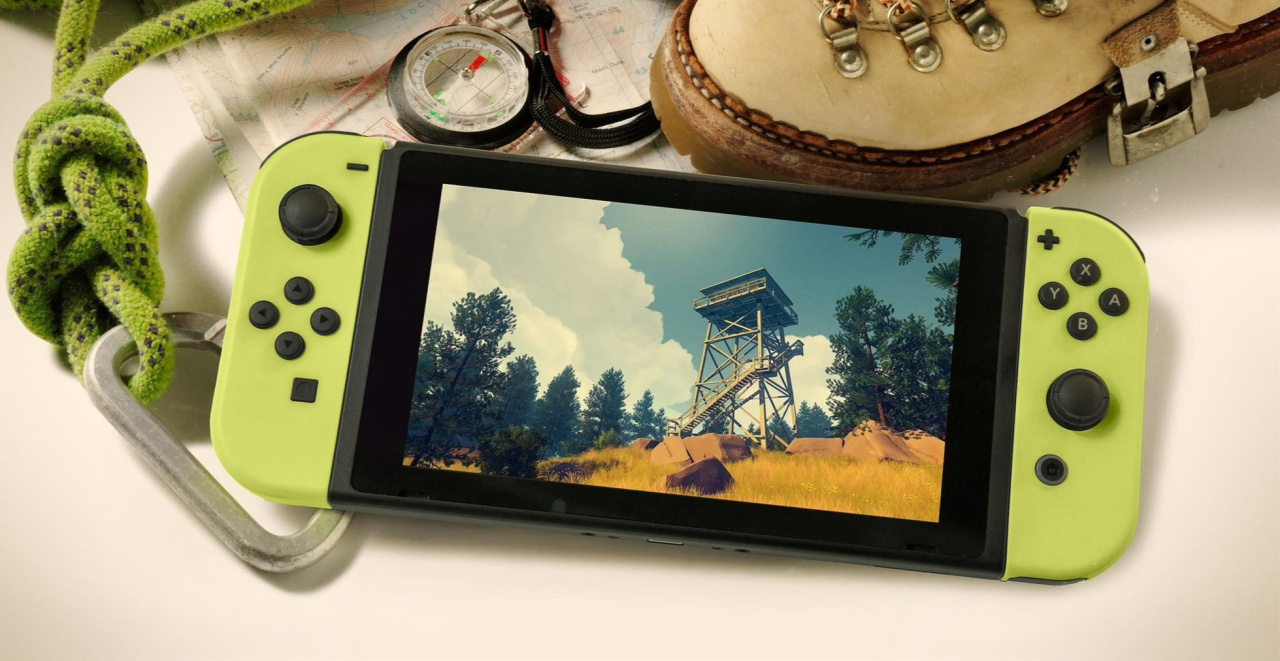
Campo Santo Co-Founder Says Firewatch Is “Very Close” To Release On Switch
Campo Santo’s award-winning 2016 title Firewatch was revealed for the Nintendo Switch earlier this year in April and has since gone missing. When it was originally announced, it was said to be arriving at some point in the near future. With 2018 nearly over, it’s left us wondering if it will still show up before the end of the year.
According to Campo Santo co-founder Jake Rodkin, the game is “very close” to release. Rodkin delivered this information in a reply to a Twitter user asking about the availability of the game on the Switch. This followed his original tweet about how “ridiculously nice” the Switch version of the game looked. Here’s the initial tweet and latest screenshots:
If you haven’t heard about Firewatch before, it’s a traditional ‘walking simulator’ mixed with a linear narrative and set in Shoshone National Forest located in the US. You take on the role of Henry who is a fire lookout. Being in complete isolation, the only person Henry has contact with is his supervisor Delilah via radio communication. Take a look at the game’s original 2016 trailer below:
Have you experienced this indie hit previously? Are you a fan of story-driven walking sims? Tell us in the comments.
Video: Learn About Nintendo’s Failed Harry Potter Pitch For The N64
With the sequel to Fantastic Beasts arriving in cinemas worldwide on 16th November, there’s no better time to talk about the secret history of the Harry Potter video game series. In a new Did You Know Gaming video, independent game researcher Liam Robertson takes a look at Nintendo’s failed Harry Potter pitch during the N64 era.
Prior to J.K Rowling’s franchise becoming a global phenomenon in 1999, Nintendo of America’s management decided it wanted to get the jump on developing the popular book series into video games. This followed the success of Rare’s GoldenEye 007 game in 1997 – which was based on the James Bond license. Although Nintendo’s headquarters in Japan had the final say, its American branch assigned Nintendo Software Technology Corporation (a studio located just down the road in Redmond, Washington) to work on ideas for Harry Potter games.
Of course, in order to gain an understanding of the wizarding world, the team responsible for coming up with these ideas were required to read every entry in the Harry Potter book series from cover to cover. At the time, NST was also busy developing multiple other titles. Eventually, it had two teams split off – with one working on a pitch for a Harry Potter game based on the main adventures and a separate team focusing on the fictional sport of Quidditch. Both of these titles were targeting a Nintendo 64 release. Full prototypes never saw the light of day, but there were art animations and mock 3D demos created. Only a few pitch documents and concepts still exist.
In the end, Nintendo made demands for exclusive rights to the franchise and talks with J.K. Rowling’s reps broke down. Ultimately, the license went to Warner Bros. and Electronic Arts in order to reach the widest audience possible. Noticeably, the platform Nintendo had originally pitched its own ideas for never actually got a Harry Potter game.
Take a look at the full story in the above video and tell us if you would have liked a Harry Potter game on the Nintendo 64.
Steel Rats™ is Now Available on Steam and is 15% off!*
Wreck and ride in a visceral and ground-breaking evolution of the 2.5D action arcade genre, fusing destructive, octane-fuelled, motorbike combat and death-defying stunt gameplay, set in a visually stylised retro future world. Switch between four unique characters as you wreak havoc!