* Melee heroes below 300 base movement speed increased by 5
* Tranquil Boots: Movement speed reduced from +28% to +24% * Power Treads: Attribute bonus increased from 12 to 14 * Phase Boots: Now has the active again instead of the passive * Mask of Madness: Movement speed changed from +12% to +25 constant * Yasha: Movement speed changed from +8% to +25 constant * Manta Style: Movement speed changed from +8% to +25 constant * Sange and Yasha: Movement speed changed from +12% to +35 constant * Yasha and Kaya: Movement speed changed from +12% to +35 constant * Wraith Band: Recipe cost increased from 220 to 240 * Bracer: Recipe cost increased from 220 to 240 * Null Talisman: Recipe cost increased from 220 to 240
* Axe: Counter Helix damage reduced from 75/110/145/180 to 60/100/140/180 * Axe: Level 15 Talent reduced from +4 Mana Regen to +3 * Brewmaster: Primal Split cooldown increased from 140/120/100 to 140/130/120 * Brewmaster: Level 10 talent reduced from +30 Damage to +20 * Clinkz: Burning Army damage type changed from Pierce to Hero type (50% vs heroes to 100%) * Clinkz: Burning Army base attack time increased from 1.5/1.35/1.2 to 1.75/1.6/1.45 * Dazzle: Intelligence gain reduced from 3.4 to 3.2 * Dazzle: Bad Juju cooldown reduction reduced from 30/40/50% to 20/35/50% * Elder Titan: Level 25 Talent changed from Astral Spirit Grants Spell Immunity to +600 Echo Stomp Wake Damage * Ember Spirit: Base armor increased by 1 * Faceless Void: Time Lock chance reduced from 10/15/20/25% to 10/14/18/22% * Faceless Void: Level 10 Talent reduced from +20 Damage to +15 * Grimstroke: Ink Swell max damage reduced from 160/240/320/400 to 100/200/300/400 * Grimstroke: Ink Swell max stun duration reduced from 2/2.6/3.2/3.8 to 1.7/2.4/3.1/3.8 * Grimstroke: Soul Bind cooldown increased from 80/65/50 to 90/70/50 * Io: Tether heal/mp transfer rate from 1.2/1.3/1.4/1.5 to 1.05/1.2/1.35/1.5 * Juggernaut: Omnislash now removes debuffs on cast * Juggernaut: Level 15 Talent reduced from +25 Attack Speed to +20 * Keeper of the Light: Will-o-Wisp now has a 100/125/150 gold bounty * Keeper of the Light: Will-o-wisp manacost increased from 200/300/400 to 250/350/450 * Lich: Base movement speed reduced from 315 to 310 * Magnus: Empower cleave damage reduced from 30/45/60/75% to 20/38/56/74% * Magnus: Level 15 Talent reduced from +15 Strength to +12 * Magnus: Level 20 Talent reduced from +12 Armor to +10 * Monkey King: Mischief invulnerability duration reduced from 0.3 to 0.2 * Nature’s Prophet: Agility gain increased from 2.8 to 3.3 * Nature’s Prophet: Wrath of Nature’s max targets increased from 16 to 18 * Phantom Assassin: Phantom Strike attack speed duration reduced from 2.5 to 2.25 * Phantom Assassin: Blur now has a 0.4 second cast point * Phantom Assassin: Coup de Grace damage reduced from 230/340/450% to 210/330/450% * Puck: Dream Coil stun duration from 1.5/2.25/3 to 1.8/2.4/3 * Rubick: Telekinesis cooldown increased from 28/26/24/22 to 34/30/26/22 * Rubick: Telekinesis lift duration reduced from 1.1/1.5/1.9/2.3 to 1/1.4/1.8/2.2 * Sand King: Sand Storm cooldown from 40/32/24/16 to 40/34/28/22 * Sand King: Burrow Strike stun duration from 1.9/2/2.1/2.2 to 1.6/1.8/2/2.2 * Sand King: Level 15 Talent reduced from +50 Sand Storm DPS to +40 * Slark: Leash distance increased from 350 to 400 * Slark: Shadow Dance movement speed reduced from 30/40/50% to 20/35/50% * Slark: Level 25 Talent reduced from +100s Essense Shift Duration to +80s * Spirit Breaker: Greater Bash damage reduced from 12/20/28/36% to 8/16/24/32%
“Come in, come in! Even you Guardians can catch a chill. Things have certainly changed since I last called this place home. But the Dawning is always here for us: just as we should always be here for each other.”
—Eva Levante
When the Dawning last came to the City, a new Golden Age had just begun. Humanity had faced their greatest threat and emerged victorious, if not unscathed. Our Light had returned, brighter than ever. We were dazzled by the infinite possibilities in the world, and every day brought something new.
The return of something familiar can be like a welcome visit from an old friend. This year’s Dawning is no exception. Our dear Eva Levante—who was instrumental in bringing the traditions of the Dawning to the Tower—returns with it.
Eva’s fond memories of the heroes who share her home—and the friends she’s made in her many years there—spurred her to write down some of her favorite recipes, and recall stories of Dawnings past. This year, she’ll share them with some of her favorite Guardians, and help bring the spirit of togetherness back to the Tower.
Baking the Goods
Eva has returned to the Tower and brought her baking supplies with her. All players of Destiny 2 are invited to join the celebration. She will provide the oven and some ingredients to get you started, but you will need to go out into world to gather more ingredients by defeating enemies and completing various activities in Destiny 2.
Once you have your ingredients, you can start combining them to create some tasty treats like Gjallardoodles or Chocolate Ship Cookies. We’ll give you a few recipes to get you started, but it’s up to you to try different combinations and discover which ones turn into the most delicious cookies. Be careful: mismatched ingredients result in burnt edges.
You might be asking: “What do I do with all these cookies?” Friends you’ve made throughout the solar system are eager to receive your baked good as gifts. They will show their thanks by rewarding you in their own ways. There will also be bounties to complete along with your cookbook. Here’s a preview of the rewards you’ll have a chance to earn:
Enhancement Cores
Mods
Legendary Gear
Avalanche Heavy Machinegun, featuring random rolls
That’s not all you will earn while you celebrate the Dawning. As you gather ingredients and bake items, you will also progress towards unlocking this festive new Sparrow.
Your new ride will come equipped with some very special perks.
Glimmer Boost
While boosting, the Sparrow spawns a glimmer present every few seconds, until boost runs out. Glimmer presents burst open after a moment so that players can acquire the glimmer.
Only active during the dawning.
Glimmer Trick
When the player lands a trick with the Sparrow, 3 to 5 glimmer presents are spawned.
Only active during the Dawning.
Instant Summon
Reduces Sparrow summon time significantly.
Dedicated bakers will also have triumphs to pursue. Those who unlock all the Triumphs during the Dawning will be flying in style.
Double Drops
A new event means new wares from Eververse. During the Dawning, we’re continuing the tradition of double Engram drops. All players who are at max level (depending on what content they own) will receive both a Bright Engram and a Dawning Engram on every level-up. There will also be a “knock-out” list on the Dawning Engram, preventing you from receiving duplicate items until you’ve earned all of the new items.
Introducing multiplayer emotes!
Also, get ready to throw down.
One Exotic emote will be exclusive to a bundle, available for direct purchase with Silver.
Do you have a stockpile of Bright Dust piling up? Tess will also offer ingredient packs in exchange for Bright Dust. If you don’t have a lot of Bright Dust and are worried about other players getting to bake all their goods without having to play, don’t worry—that won’t be the case. Eva’s Holiday Oven requires Essence of Dawning, which can only be acquired by playing activities in game. So even if you want to stock up on some ingredients with your extra Bright Dust, you still need to go out in the world to earn the fuel to fire up your oven.
For more information concerning the Dawning, be sure to check our Dawning Guide on help.bungie.net.
Thank you for another wonderful year. We hope you’ll join us in the Tower for this special celebration.
Persona 5's Joker Will Join Super Smash Bros. Ultimate As DLC Character
In an exciting, unexpected moment at The Game Awards, the first of Super Smash Bros. Ultimate's DLC characters was revealed. Joker, the protagonist of Atlus' Persona 5, will be playable in the new fighting game in the future.
During a segment where Geoff Keighley was on stage, the lights cut out and led to a trailer featuring dialogue with various characters from Persona 5. That in turn revealed Joker as a playable character, although we unfortunately didn't see any actual gameplay or learn anything about how he'll play.
Joker will be the first DLC character released for the game (outside of Piranha Plant) and will come included in Challenge Pack 1. Each DLC pack will be solid individually and includes a character, stage, and music. Alternatively, you can buy the Fighters Pass to get them all.
Reggie Fils-Aime came on-stage after the reveal to talk a little about the new, and he teased that all five DLC characters to come between now and February 2020 will be newcomers to the series. He also noted they will be ones "who you wouldn't anticipate" being included in Smash.
Guide: How Player Vs. Player Trainer Battles Work in Pokémon GO
PvP is finally coming to Pokémon GO, a feature fans have been desperate for since it launched back in 2016. When it launches later this month, you’ll be able to challenge friends and strangers alike to see who has the most powerful Pokémon. Do so and you’ll earn a bunch of new rewards and probably have a bunch of fun in the process.
In this guide, we’re going to explain how PvP works in Pokémon GO and what you can get for doing it. We’ll also provide a few tips and tricks here and there to help you have a much better time.
How to Challenge Someone to a PvP Battle in Pokémon GO
It’s actually surprisingly easy to initiate a battle against a nearby opponent. All you have to do is hit the button on the bottom right of your map screen (the one beneath the research tasks button) and choose the ‘Battle’ tab.
You’ll then see the nearby players that you can battle. To initiate one, simply get your opponent to scan your QR code and you’re good to go.
If you’re either Ultra or Best Friends with your opponent, you don’t even have to be near them. That’s just one of the many perks of having friends, we guess!
Feeling shy? You can get some practice in against the leaders of Team Valor, Mystic, and Instinct instead. That way you can try out strategies before you test your skills against a real player.
How PvP battles work in Pokémon GO
PvP battles are quite different from the gym and raid battles you’ve experienced so far in Pokémon GO. You pick three Pokémon, rather than the traditional six, and you can swap between them mid-battle at any point.
Battles remain rooted in real time though, which is good news, and you still hammer the screen to attack, unleashing your charge move when it’s, erm, charged. Speaking of charge moves, you now have two of them, opening up a lot more options in attack.
You have to unlock this second charge move on a Pokémon, when it will be selected from the pool of available moves. It costs Candy to do so, but not a lot. This feature will eventually roll out to gym and raid battles, too.
However, the big new change is Protect Shields, which you can deploy at any moment to temporarily defend against the most powerful Pokémon or attacks. You only have a limited number of these though, so you can’t just spam them and walk away with a victory.
PvP battles take place in a variety of different leagues too, including the Great, Ultra, and Master leagues. Aside from the Master, each league has a CP cap so you can’t just use your most powerful Pokémon and wipe the floor with everyone. Instead, you have to be smart and pick a Pokémon that you think will dominate the league with that CP cap in mind.
Finally, battles are timed, with the winner being the trainer with the most Pokémon left at the beginning of the battle if neither loses all Pokémon during the battle. If the number is equal, the trainer with the most HP left will win the battle instead.
What Rewards do you get for Participating in PvP in Pokémon GO?
Whether you win or lose, participate in a PvP battle in Pokémon GO and you’ll earn some Stardust and get a chance at an evolution item or Sinnoh Stone.
You can only get these rewards three times per day from PvP though, and only once if played against one of the AI team leaders. Of course, you’ll also make progress in the Ace Trainer medal track.
Have you been enjoying PvP battles in Pokémon GO? What’s your favourite feature? Do you have any requests for future features? Let us know in the comments section below.
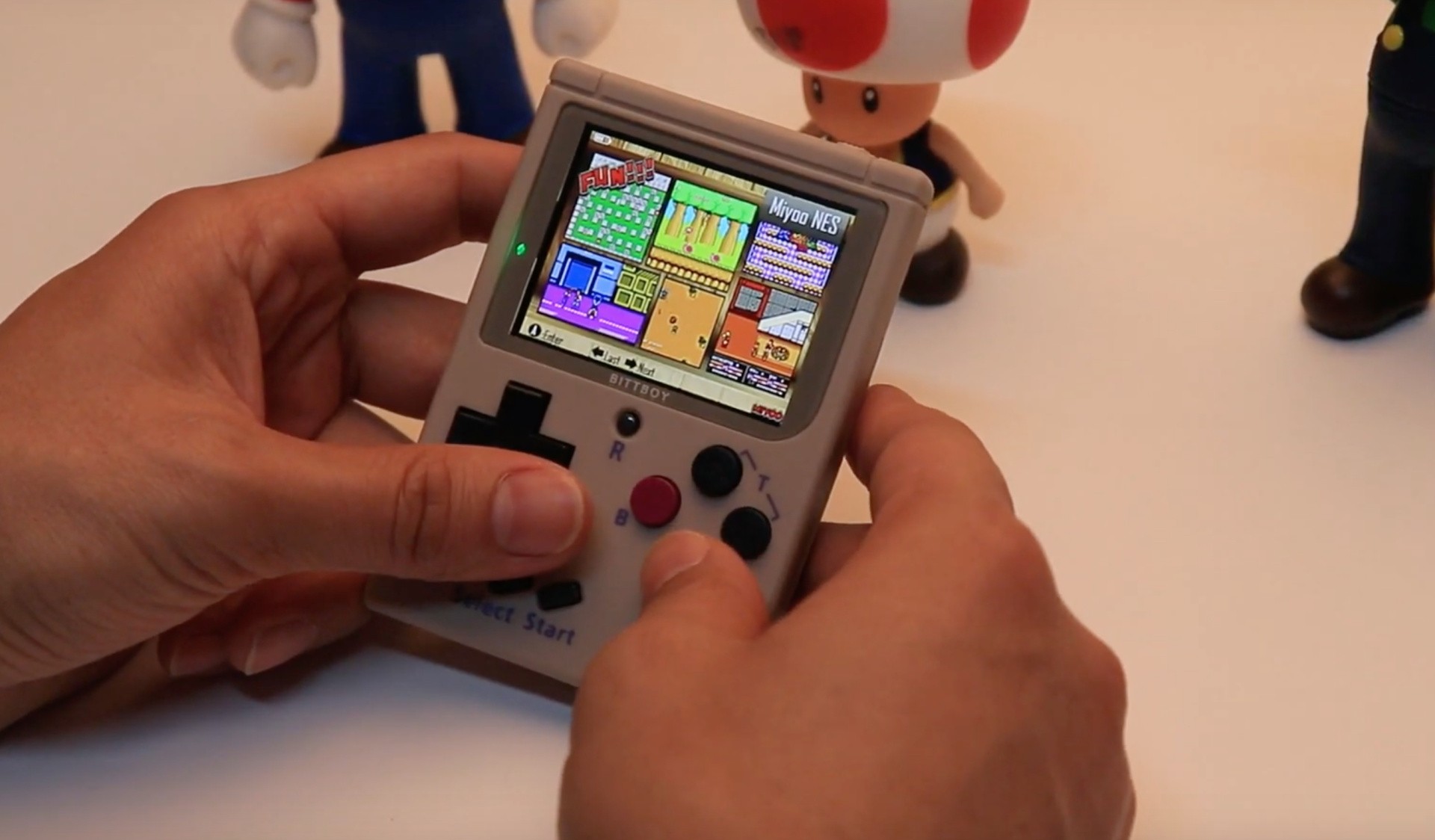
The New BittBoy Can Play NES, Game Boy And Game Boy Color (Ahem) Games
We reviewed the original BittBoy some time ago and found it to be a perfectly likeable – if legally questionable – handheld system. Now, the company behind it is releasing a successor, and while it retains the same basic design, there are a few extra features worth noting (and no, it’s no less dubious from a legal perspective).
This time around, the New BittBoy (for that is its name) supports MicroSD cards, which presumably means you can load up more (ahem) ‘games’. The console can play NES, Game Boy and Game Boy Color titles, and even has save state functionality.
Fashioned from ABS plastic and boasting measurements of 6.8×9.9×1.3cm, the BittBoy has a 2.4-inch IPS screen and a 3.5mm headphone socket. It’s all powered by a rechargeable 700mAh battery and for those times when you fancy the big-screen experience, there’s a TV-out option.
You can pre-order one of these right now for $39.99, which is a $20 saving on the typical price. Orders are expected to ship between the 15th and 20th December, so you’d better get in quick if you want one; once Soulja Boy hears about it, he’ll no doubt buy up all the stock and rechristen it the ‘SouljaBoy’.
Playing the bad guys is always a treat, what with all the contemptuous monologizing and the ‘I’ll show them what true power is!’ Plus, evil creatures are always way more interesting to command than boring noble goodies. That’s why Ironhide giving players the chance to captain the armies of the evil wizard Vez’nan is the best feature in this otherwise routinely excellent tower defense game. However, it may be more than just the player that turned to the Dark Side in this entry, since Ironhide has also walled-off a chunk of this premium game’s content behind a paywall.
Vengeance is the fourth entry in the mega-popular Kingdom Rush tower defense series and is the entry that makes the most changes to the gameplay, though still keeping it solidly within TD tropes. (It’s a little weird that you still play on the defense the entire game, given that your army is supposedly the invading force, but that’s the genre, so we’ll just have to roll with it.) The biggest gameplay update is in the way you choose and upgrade your towers.
Rather than leveling up your basic towers into more specialized variations in the middle of the level, you’ll have to do a little more planning. Between levels you get to choose five towers to take with you that have very different purposes: your basic towers give you ranged magical/non-magical damage, grunts to slow down the oncoming horde, or long-distance artillery. You gradually gain more towers by completing levels, so customizing your ‘hand’ of five towers becomes the metagame. You may end up with a few favorites that you always lean on, or you can customize your loadout each level for maximum efficacy against the given target. This makes for great replay value as you try to score the highest rating on each level.
Levels themselves are fairly long for a mobile title, taking about thirty minutes to complete, so there’s a lot of gameplay here even if you’re not a completionist. Each map is highly individualized (within a few themes) with few reused assets, so they never get dull. They often have amusing themes or cute details that let you play goofball fantasy Where’s Waldo in-between waves. The dwarf king will occasionally swim around in his gold like Scrooge McDuck, and there’s a smirkable Terminator reference in the smelting furnace level (you know what I’m talking about).
Special events will also frequently occur that change the landscape and open up new avenues of attack for your enemies, like Viking ships landing. It’s important not to get tunnel-vision on a few lanes or become complacent, because you never know when the tide will suddenly shift. This makes it tough to get a perfect score your first time through a level, but it also makes the game much more active than your average TD game.
Adding to the dynamism are the hero units that you can order about the battlefield. They all have a bevy of special abilities that you don’t have direct control of but do make them majorly useful for crowd control or taking down bosses. Each offers a slightly different playstyle. Your basic orc boss is a great tank, but you’ll soon get a rogue character that is good for debuffs and crowd control, and a mage that will do more damage-per-second. Finally, you can cast spells and summon instant minions to take care of any unexpected difficulties. In between missions, an upgrade tree lets you buff your hero, towers, minions and spells, giving you fun new abilities to play with beyond purely higher stats. There’s a lot going on inside and outside the levels, is basically what I’m saying.
You start with four towers and earn seven more by playing the game, and you quickly score two additional heroes beyond your starter. Eleven towers and three distinct heroes sounds pretty good … but there are another five towers and six more heroes locked behind *shudder* relatively expensive paywalls.
Is it too much monetization for an already-premium game? Fans of the series are divided. I think it’s important to remember that the base price, like just about any mobile game, is already absurdly low so the title can compete in the ridiculously cut-rate mobile market controlled by greedy gatekeepers. Yes, the IAP exist, but as long as you can ignore a persistent alert badge on one menu item, there’s little to no reminder that the developers want more of your money. It’s there, but it’s not obnoxious, and in this day and age maybe that’s all we can ask for.
The content included in the game is absolutely worth the purchase price, and I didn’t feel like I missed out on much by not spending more. The game is intensely engaging with a light-hearted tone that makes it a real pleasure to jump in to. Tweaks to the Kingdom Rush formula should please long-time fans and jaded TD players who have seen everything. If you’re new to this kind of game, Vengeance is a great, entertaining jumping off point.
Let loose your inner mage. Step into the shoes of a prodigal mage and, using the power of PS VR, tear your way through a vast castle in search of gold, treasure and a hidden family fortune. As a young mage recently returned from magic school, unleash your newfound powers on the former family home as you seek to oust a sneaky spiritual creditor who has cheated your family of their wealth.
Posted by: xSicKxBot - 12-08-2018, 08:32 AM - Forum: Lounge
- No Replies
Double Fine's Psychonauts 2 Gets New Trailer At The Game Awards
After relative radio silence from developer Double Fine, we finally got to see a new trailer for the upcoming Psychonauts 2. While the trailer--which you can watch above--featured a smattering of gameplay, it was mostly packed with story. Protagonist Rasputin stood front and center as he jumped to and fro on what we have to assume to be a mission as an officially sanctioned Psychonaut.
Other characters from the original appear. OG Psychonaut Ford Cruller appears to give Rasputin a lecture about the importance of being a Psychonaut. There's some fun comedy and glimpses of other familiar faces set in-between some action-packed platforming. But the most intriguing part of it all was the mysterious figure that appears at the end, whom we can only assume is the main antagonist of the game. If that intrigues you, then be sure to check out the trailer and see it all yourself.
Psychonauts is expected to launched in 2019 on PS4, Xbox One, and PC. It was actually first announced at The Game Awards in 2015 and was successfully crowdfunded on Fig, with more than 24,000 people contributing nearly $4 million to the project. Publisher Starbreeze will publish the game, while allowing Double Fine to retain the rights to the IP.
The original Psychonauts was released in 2005. Double Fine re-released the game on PS4, while the standalone VR adventure Psychonauts in the Rhombus of Ruin launched for Sony's PSVR.
You Can Now Battle With A Fancy McLaren 570S In Rocket League On Switch
As if its wonderfully addictive gameplay wasn’t enough, Rocket League keeps on getting new content to keep players hooked. Today publisher Psyonix, in partnership with the world-famous McLaren Automotive, launched the McLaren 570S Car Pack in the game. It will cost $1.99 or thereabouts in your local territory.
The pack introduces the ultimate modern sports car, the McLaren 570S Coupé in Battle-Car form, as well as two McLaren-themed player banners. Petrol-heads rejoice!
Check out the trailer above to see this nifty new battle-car and let us know if you’ll be picking up this DLC with a comment below.
There are so many reasons why you might need to record your Linux desktop. The two most important are for training and for support. If you are training users, a video recording of the desktop can go a long way to help them understand what you are trying to impart. Conversely, if you’re having trouble with one aspect of your Linux desktop, recording a video of the shenanigans could mean the difference between solving the problem and not. But what tools are available for the task? Fortunately, for every Linux user (regardless of desktop), there are options available. I want to highlight five of my favorite screen recorders for the Linux desktop. Among these five, you are certain to find one that perfectly meets your needs. I will only be focusing on those screen recorders that save as video. What video format you prefer may or may not dictate which tool you select.
And, without further ado, let’s get on with the list.
Simple Screen Recorder
I’m starting out with my go-to screen recorder. I use Simple Screen Recorder on a daily basis, and it never lets me down. This particular take on the screen recorder is available for nearly every flavor of Linux and is, as the name implies, very simple to use. With Simple Screen Recorder you can select a single window, a portion of the screen, or the entire screen to record. One of the best features of Simple Screen Recorder is the ability to save profiles (Figure 1), which allows you to configure the input for a recording (including scaling, frame rate, width, height, left edge and top edge spacing, and more). By saving profiles, you can easily use a specific profile to meet a unique need, without having to go through the customization every time. This is handy for those who do a lot of screen recording, with different input variables for specific jobs.
Simple screen recorder also:
Records audio input
Allows you to pause and resume recording
Offers a preview during recording
Allows for the selection of video containers and codecs
Adds timestamp to file name (optional)
Includes hotkey recording and sound notifications
Works well on slower machines
And much more
Simple Screen Recorder is one of the most reliable screen recording tools I have found for the Linux desktop. Simple Screen Recorder can be installed from the standard repositories on many desktops, or via easy to follow instructions on the application download page.
Gtk-recordmydesktop
The next entry, gtk-recordmydesktop, doesn’t give you nearly the options found in Simple Screen Recorder, but it does offer a command line component (for those who prefer not working with a GUI). The simplicity that comes along with this tool also means you are limited to a specific video output format (.ogv). That doesn’t mean gtk-recordmydesktop isn’t without appeal. In fact, there are a few features that make this option in the genre fairly appealing. First and foremost, it’s very simple to use. Second, the record window automatically gets out of your way while you record (as opposed to Simple Screen Recorder, where you need to minimize the recording window when recording full screen). Another feature found in gtk-recordmydesktop is the ability to have the recording follow the mouse (Figure 2).
Unfortunately, the follow the mouse feature doesn’t always work as expected, so chances are you’ll be using the tool without this interesting option. In fact, if you opt to go the gtk-recordmydesktop route, you should understand the GUI frontend isn’t nearly as reliable as is the command line version of the tool. From the command line, you could record a specific position of the screen like so:
To find out more about the command line options, issue the command man recordmydesktop and read through the manual page.
Kazam
If you’re looking for a bit more than just a recorded screencast, you might want to give Kazam a go. Not only can you record a standard screen video (with the usual—albeit limited amount of—bells and whistles), you can also take screenshots and even broadcast video to YouTube Live (Figure 3).
Kazam falls in line with gtk-recordmydesktop, when it comes to features. In other words, it’s slightly limited in what it can do. However, that doesn’t mean you shouldn’t give Kazam a go. In fact, Kazam might be one of the best screen recorders out there for new Linux users, as this app is pretty much point and click all the way. But if you’re looking for serious bells and whistles, look away.
The version of Kazam, with broadcast goodness, can be found in the following repository:
ppa:sylvain-pineau/kazam
For Ubuntu (and Ubuntu-based distributions), install with the following commands:
The Vokoscreen recording app is for new-ish users who need more options. Not only can you configure the output format and the video/audio codecs, you can also configure it to work with a webcam (Figure 4).
As with most every screen recording tool, Vokoscreen allows you to specify what on your screen to record. You can record the full screen (even selecting which display on multi-display setups), window, or area. Vokoscreen also allows you to select a magnification level (200×200, 400×200, or 600×200). The magnification level makes for a great tool to highlight a specific section of the screen (the magnification window follows your mouse).
Like all the other tools, Vokoscreen can be installed from the standard repositories or cloned from its GitHub repository.
OBS Studio
For many, OBS Studio will be considered the mack daddy of all screen recording tools. Why? Because OBS Studio is as much a broadcasting tool as it is a desktop recording tool. With OBS Studio, you can broadcast to YouTube, Smashcast, Mixer.com, DailyMotion, Facebook Live, Restream.io, LiveEdu.tv, Twitter, and more. In fact, OBS Studio should seriously be considered the de facto standard for live broadcasting the Linux desktop.
Upon installation (the software is only officially supported for Ubuntu Linux 14.04 and newer), you will be asked to walk through an auto-configuration wizard, where you setup your streaming service (Figure 5). This is, of course, optional; however, if you’re using OBS Studio, chances are this is exactly why, so you won’t want to skip out on configuring your default stream.
I will warn you: OBS Studio isn’t exactly for the faint of heart. Plan on spending a good amount of time getting the streaming service up and running and getting up to speed with the tool. But for anyone needing such a solution for the Linux desktop, OBS Studio is what you want. Oh … it can also record your desktop screencast and save it locally.
There’s More Where That Came From
This is a short list of screen recording solutions for Linux. Although there are plenty more where this came from, you should be able to fill all your desktop recording needs with one of these five apps.
Learn more about Linux through the free “Introduction to Linux” course from The Linux Foundation and edX.