Starting at 2:00 p.m. PST today, members of the Xbox One Preview Delta Ring will begin receiving a new 1902 Xbox One system update (rs5_release_xbox_dev_1902.190113-1920). Read on for more about the fixes and known issues in the latest 1902 system update.
Fixes:
System
Dashboard optimization on Home.
Attract mode performance fixes.
Localization fixes.
Known Issues:
Profile Color
Sometimes users may encounter the incorrect Profile color when powering on the console.
My Games and Apps
We are tracking an issue in which certain apps are displaying the error code 0xD0000189 when launching. Workaround reboot the console and launch the app.
Capcom’s riveting samurai adventure returns! This version includes the original game’s intense swordplay and dramatic revenge story, plus improved controls, widescreen display, a new soundtrack, and more. Experience this enhanced version of the best-selling action-adventure classic!
A mind map of yourself sounds a little far-fetched at first. Is this process about neural pathways? Or telepathic communication? Not at all. Instead, a mind map of yourself is a way to describe yourself to others visually. It also shows connections among the characteristics you use to describe yourself. It’s a useful way to share information with others in a clever but also controllable way. You can use any mind map application for this purpose. This article shows you how to get started using FreeMind, available in Fedora.
Get the application
The FreeMind application has been around a while. While the UI is a bit dated and could use a refresh, it’s a powerful app that offers many options for building mind maps. And of course it’s 100% open source. There are other mind mapping apps available for Fedora and Linux users, as well. Check out this previous article that covers several mind map options.
Install FreeMind from the Fedora repositories using the Software app if you’re running Fedora Workstation. Or use this sudo command in a terminal:
$ sudo dnf install freemind
You can launch the app from the GNOME Shell Overview in Fedora Workstation. Or use the application start service your desktop environment provides. FreeMind shows you a new, blank map by default:
FreeMind initial (blank) mind map
A map consists of linked items or descriptions — nodes. When you think of something related to a node you want to capture, simply create a new node connected to it.
Mapping yourself
Click in the initial node. Replace it with your name by editing the text and hitting Enter. You’ve just started your mind map.
What would you think of if you had to fully describe yourself to someone? There are probably many things to cover. How do you spend your time? What do you enjoy? What do you dislike? What do you value? Do you have a family? All of this can be captured in nodes.
To add a node connection, select the existing node, and hit Insert, or use the “light bulb” icon for a new child node. To add another node at the same level as the new child, use Enter.
Don’t worry if you make a mistake. You can use the Delete key to remove an unwanted node. There’s no rules about content. Short nodes are best, though. They allow your mind to move quickly when creating the map. Concise nodes also let viewers scan and understand the map easily later.
This example uses nodes to explore each of these major categories:
Personal mind map, first level
You could do another round of iteration for each of these areas. Let your mind freely connect ideas to generate the map. Don’t worry about “getting it right.” It’s better to get everything out of your head and onto the display. Here’s what a next-level map might look like.
Personal mind map, second level
You could expand on any of these nodes in the same way. Notice how much information you can quickly understand about John Q. Public in the example.
How to use your personal mind map
This is a great way to have team or project members introduce themselves to each other. You can apply all sorts of formatting and color to the map to give it personality. These are fun to do on paper, of course. But having one on your Fedora system means you can always fix mistakes, or even make changes as you change.
Posted by: xSicKxBot - 01-23-2019, 07:31 PM - Forum: Windows
- No Replies
Where they are now: Microsoft’s Council for Digital Good 6 months later
In July 2018, we concluded our inaugural Council for Digital Good, an initiative involving 15 teens from 12 U.S. states, selected to help advance our work in digital civility: promoting safer and healthier online interactions among all people. Six months later and just weeks away from international Safer Internet Day 2019, we wanted to share what these impressive young people have done since their council term ended, as well as what they have planned for next month.
Since leaving our second council event in Washington, D.C., last July, our teens have recounted their council experiences on social media and in other online venues. Christina from Georgia penned two different blog posts for separate online safety-focused non-profits (blog #1, blog #2), and several teens conducted educational and after-school sessions for parents, students and younger kids. Jazmine, a particularly enterprising 14-year-old from Kentucky, and one of our youngest council members, started her own website. And, three council members – Bronte, Christina and Judah – were offered a once-in-lifetime opportunity for the second time and spoke with first lady Melania Trump, this time in November at the Family Online Safety Institute annual conference. (All council members spent time one-on-one with the first lady in D.C. in July.)
Council members turned counselors
Nearly all of the teens told us they’ve used their newfound knowledge to counsel friends and classmates who had encountered online risks. “I applied to the council because I wanted to make an impact on cyberbullying on social media,” said Erin from Michigan. ”Through the council, though, I’ve learned that there are so many more dangers that impact young people across a multitude of platforms and, now that I’m educated on these subjects, I can share them with the students and parents in my community.”
In a few cases, risk exposure among peers was quite serious, involving sextortion or harassment. After engaging on several occasions through the council with the nongovernmental organization (NGO) Thorn, one teen was able to share relevant resources with a friend of a friend. “I knew they (Thorn) had a text hotline and I was able to direct her to that,” this council member said. “She never contacted me afterward, which I take as a good sign.”
Council members have also been striking up deep conversations with friends and family members about weighty online issues like violent extremism. “Something I find myself talking about a lot (with friends) is the process of radicalization of youth online for hate groups,” said one teen who is now in college. “It’s a topic that is as unfortunate as it is fascinating to discuss. We talk about the geopolitics involved, the technical sophistication of (extremist groups), and what can be done online to stop them. I speak from my knowledge of our call with Public Safety Canada.”
Over the course of the 18-month council program, we held monthly conference calls with the teens and their parents. We’d often invite guest speakers so the teens could hear and learn firsthand from experts – like Thorn – about an array of online safety topics. In late 2017, officials from Public Safety Canada spoke to the teens about online hate and violent extremism and sought council members’ input on how best to reach young people with impactful counter-messages.
“To me, there was no greater opportunity than to converse and debate over the various issues that the internet has created over time,” said William from the state of Washington. “My favorite part was discussing the various issues and learning from my peers. I do miss being able to give input to various organizations … I felt like I was contributing to something much bigger than myself.”
Many of the teens have since told us that in addition to missing each other, they also miss the monthly calls and engaging with outside groups and NGOs. Some also said they miss working together on projects like their written cohort manifesto and their open letter to law and policymakers. One of my favorite responses: “I miss having a platform where I knew I was being listened to.”
Looking to Safer Internet Day 2019 and beyond
International Safer Internet Day will take place on Feb. 5, and many of our teens plan to spread the message of “Together for a safer internet” in their schools and communities. More than half of our council members are planning presentations to their PTAs, schools, clubs or other organizations, and they’re reaching out to educators, school administrators, peers and local elementary schools to arrange activities. Erin from Michigan even requested that Safer Internet Day and other important web links about online safety topics be included on her school and district calendars.
The teens each crafted their own presentations and chose discussion topics for their Safer Internet Day events. Fighting back against online bullying and harassment are popular topics, but several are equally focused on online reputation management and digital footprints. “I’m very passionate about internet safety and social activism,” says Indigo from California. “It’s important to me to make sure that every person is safe, comfortable and respected. Especially as technology and social media continue to advance, we need to continue fighting for these rights. The council and all of the things that we discussed remain with me, especially the aspect of how your online persona and reputation will no doubt affect you in real life.”
After Feb 5., a handful of council members said they’re planning information sessions for parents and other adults, given the impact these people play in teens’ lives. According to new research from our latest digital civility study, now more than ever, young people around the world are turning to their parents and other trusted adults for advice and guidance about online issues. “It’s equally important to educate the adults,” notes William.
Christina has an opportunity for an internship with an international nonprofit, and some of the teens may be tapped to discuss their council experiences with other technology companies that are considering setting up councils or other youth-focused initiatives.
At Microsoft, we’re so grateful to these teens and their parents for what they have given to us over the past two years. As a global, connected community, we can’t help but improve online safety and interactions with young people like these driving us forward.
“All I can do is improve how I act online, and how I leave my digital footprint,” said Bronte from Ohio. “I can also encourage my fellow classmates, friends, and family to act better online, and to really think before posting something that they might regret. Step by step, change can be made … it all has to start somewhere!”
Bronte, we couldn’t agree more.
Learn more
You can read the council’s cohort manifesto here, as well as their open letter to U.S. law and policymakers about working together to improve life online. To learn more about digital civility, visit: www.microsoft.com/digitalcivility, and for more about online safety generally, see our website and resources page; “like” us on Facebook and follow us on Twitter.
Posted by: xSicKxBot - 01-23-2019, 07:31 PM - Forum: Windows
- No Replies
What’s new in EDU live: Bett conference Day 1
Announcing new tools to help you transform classroom time and personalize learning for all students.
We’re rolling into the first day of Bett with the first of three live episodes of What’s New in EDU! The Microsoft Education team is in London all week, where we’ll be streaming the show each day at 5:00 p.m. UTC and going deeper into all the exciting updates announced in our Microsoft Education news post on Tuesday.
For Day 1 of Bett, Mark Sparvell and the team take us through some of the newest tools to help you transform classroom time and personalize the learning experience for your students.
We know teachers are in a constant race to get their learning out every day. And that’s just meeting the standard, before more hard-fought time has to go into personalizing learning for each student. We think some of the following features can help get some of your time back:
This new feature, powered by Microsoft AI, enables presenters to reach and engage all audiences with live presentation captions & subtitles that appear automatically in real-time. With live captions & subtitles in PowerPoint, you can ensure your presentations are understood by everyone, across languages and hearing access needs. This feature will support presenters across 12 spoken languages and display on-screen captions or subtitles in one of 60+ languages.
Benefits include:
Speech recognition that automatically adapts based on the presented content for more accurate recognition of names and specialized terminology.
The ability for presenters to easily customize the size, position, and appearance of subtitles. Customizations may vary by platform.
Disfluency removal and automatic punctuation making the subtitles clear for the audience.
The ability to display live captions & subtitles joins other accessible features in Office 365, like automatic suggestions for alt-text in Word and PowerPoint, expanded availability of automatic closed captions and searchable transcripts for videos in Microsoft Stream, enhancements to the Office 365 Accessibility Checker, and more.
Live captions & subtitles in PowerPoint will begin rolling out to Insiders in late January 2019 and will be available for Office 365 subscribers worldwide for PowerPoint on Windows 10, PowerPoint for Mac, and PowerPoint Online, over the next few months.
The Presentation Translator add-in for PowerPoint will continue to be supported, as we know this is a well-loved teacher tool. It is the inspiration for building live captions and subtitles natively into PowerPoint across platforms, so that all teachers and students can access the features easily.
Learning Tools adds live translation in over 60 languages
Today’s classrooms are extremely diverse and teachers have the incredible responsibility of reaching every student. Since communication is key, we’re including Translator features in more of our Office tools!
Immersive Reader has helped many students with reading speed and comprehension. As we announced earlier in January, Translator is now built into the Immersive Reader and will be available in over 60 languages.
We’ve added the ability for anyone to translate a page or word into another language, in real-time and all within Immersive Reader. This new capability will support Read Aloud, Syllables, Parts of Speech and Picture Dictionary. This is now rolled out worldwide.
Translator in Immersive Reader will be available in Word Online, OneNote Online, OneNote for Windows 10, OneNote iPad, OneNote Mac, Outlook Online, Teams, and Flipgrid. Check out the list of over 60 supported languages.
Reach all your students with even more Learning Tools updates
Check out the recent blog on the latest Learning Tools updates to help you reach all your students:
OneNote Desktop Learning Tools update – The modern Immersive Reader interface comes to OneNote Desktop Learning Tools.
Line Focus in Word Desktop – This feature enables students to focus on one, three, or five lines of text at a time. It will be available in Word Desktop and will be coming soon to Word for Mac and iPad.
Page Colors in Word Desktop – Students can choose from a variety of colors. This feature is rolling out in Desktop Word and coming soon to Word for Mac and iPad.
Parts of Speech language updates – Syllables and Parts of Speech for Korean, Arabic, and Hebrew coming soon.
Microsoft Teams updates to help you transform classroom time
Yesterday, we shared five new Teams features designed to save teachers time and supercharge learning, including Grade Sync, the new Assignments experience, mobile grading, and new integrations with Turnitin and MakeCode. Today, we’re excited to share even more features coming to Teams thanks to great feedback from you, our educator community.
Introducing our first open-source LMS integration in Teams!
The folks behind Microsoft Teams strive to build experiences to help educators and students collaborate effectively in their classrooms and save them valuable time. One of the key suggestions we have received from our educators is to integrate their Learning Management Systems (LMS) into Teams. With that in mind, we are very pleased to announce the release of Moodle’s integration in Microsoft Teams!
Moodle helps educators create effective online courses – and it’s open-source. For organizations using Microsoft Teams, the Moodle integration in Teams helps educators bring their students, conversations and content — along with their Moodle courses and assignments — together in one single hub. This integration offers two core experiences:
1. Moodle Tab
Educators can easily pin their Moodle course pages in their teams, and students can seamlessly access these course pages using Office 365 Single Sign-On, without having to type in their Moodle username and password.
2. Moodle Assistant Bot
This bot helps educators and students answer questions about their courses, assignments, and grades in Moodle and keeps them updated with regular notifications. This bot can also be accessed on mobile devices, so you can be updated on the go.
To help IT admins easily set this integration up, we have updated our open-source Office 365 Moodle Plugin with the following capabilities:
Auto-registration of your Moodle server with Azure AD.
One-click deployment of your Moodle Assistant bot to Azure.
Auto-provisioning of teams and auto-synchronization of team enrollments for all or select Moodle courses.
Auto-installation of the Moodle tab and the Moodle Assistant bot into each synchronized team. (Coming soon)
One-click publishing of the Moodle app into your private Teams App Store. (Coming soon)
Read-only files folder, Class Materials coming to your team soon
Microsoft Teams is great for collaborating with your class, including sharing reference materials to help guide students. You can easily drop these files into the folder called ‘Class Materials,’ which is read-only by default.
Join a team by code on your mobile device
Joining a team with a code has become a popular way for students to join their classes on Teams. We’ve now added this ability to the Teams app on iOS and Android.
Customize chat settings for students and faculty
In talking to educators using Teams, we’ve learned a common request is to allow student-to-teacher chat, while also having the option to prevent students from chatting with each other. IT Admins can learn how to set this up here.
Rubric sharing
We recently launched rubric grading inside Microsoft Teams and we’ve heard so much of your great feedback on the feature already. We’ve added a new capability that allows teachers to import or export their favorite rubrics from Teams Assignments. Now you can share great rubrics with other teachers and build on each other’s ideas from year to year, for stronger and more robust curricula.
Categorize your Assignments
Teachers can now categorize Assignments. Assignment categories are an easy way to organize your assignment by type – segment by Homework, Quizzes, or a unit of study.
Safari browser support
By popular demand – you will soon be able to use Microsoft Teams on macOS and iPad with Safari!
Access ThingLink right from Microsoft Teams
ThingLink is a tool that allows teachers to enhance images, videos or virtual tours with notes, sounds, video, or links.
Microsoft Stream, PowerPoint and Microsoft Photos enhancements enrich classroom learning experiences
It’s easier than ever to use video in the classroom to create more visual and immersive experiences for both teachers and students.
Expanded features in Microsoft Stream will give teachers a new way to seamlessly add quizzes, forms or polling into classroom videos. The Forms integration into Microsoft Stream helps make videos more engaging and interactive for students, while giving teachers a way to understand how well students are learning the lessons. Learn more at aka.ms/streamquiz.
Both teachers and students will soon be able to bring their Microsoft Stream videos into classroom presentations with the new embed feature, available in PowerPoint. Seamlessly use video to enrich all your classroom content and make learning more entertaining.
Give students a way to create videos that encourages collaborative storytelling with free tools they already have. Microsoft Photos does so much more than deliver an easy way to record and edit videos – students can add music and narration, text and filters, and even add 3D effects to videos. Head to aka.ms/videoeditoredu to learn more.
OneNote Class Notebook updates
As we announced in early January, there’s a new set of time-saving updates for teachers for OneNote Class Notebooks. These updates are rolling out in the Class Notebook Toolbar for the Windows 10 app, Online, iPad, and Mac and include:
The ability to distribute a page across multiple notebooks – one of our top educator requests!
Copy Content Library to allow quick copying of curriculum and content across multiple content libraries with a single click.
Improved page distribution interface and improved performance and speed of page distributions.
Math Class Notebook switch for teachers to control feature availability to students in OneNote UWP and OneNote Online.
Custom tags for OneNote Windows 10 and Mac now available.
The Send to OneNote Printer is now built-in to the Windows 10 app.
Updates across our Microsoft Education Tools to improve teaching and learning math
Math keyboard for answering free-form Math questions.
OneNote for Windows 10 and Online:
Immersive Reader for steps-by-step solutions in Math pane.
The ability for teachers to control Math Assistant’s availability to students via Class Notebook.
OneNote Online:
Text to Math – the ability to type math as text, get it nicely formatted, solved and graphed using the Math Assistant.
Word Online:
Immersive Reader reading math equations from the page.
Student Voice & Expression: New stickers at Bett!
We are excited to announce two new sticker packs this week! Periodic Pals and Adventure Creatures are your new sidekicks on every educational journey. Periodic Pals are designed to encourage conversations in the classroom about the science behind how elements are present in both natural phenomena and manufacturing, with a cartoon twist.
Adventure Creatures live in a world where they take on assignments with gusto. They will charge ahead on your art projects, help you sew your footnotes together, and encourage you take a break while you roast some treats. Use these transparent stickers to combine and create your own narrative!
You can access the stickers below in OneNote Class Notebook and Microsoft Teams now. Coming soon to Microsoft Whiteboard for EDU!
Whiteboard for EDU now available worldwide!
Taking the magical simplicity of an analog whiteboard and adding interactive, collaborative technology, Microsoft Whiteboard for EDU gives the whole class a new space to engage, ideate, and create in real time. Teachers and students can brainstorm and grow ideas on this infinite canvas, coming together on lessons, projects, and more on Windows 10devices and now iPad. Teachers can also pick up wherethey left off and never waste time getting back into a lesson, by securely saving boards to the cloud. There they can share them as live links or export them as images.
Supercharge your learning experience
From the ground up, Whiteboard for EDU has been designed with teachers and students in mind: to work the way you already do.
Export your board directly to OneNote Class Notebooks for safekeeping. Change Whiteboard’s background to a variety of new colors (including blackboard mode!) and reduce eye strain on large devices. Play with different line styles to support writing and graphing. Use education-themed stickers with your students to collect poll responses and give feedback in real time.
Increase the readability of quickly-jotted notes with Ink Beautification, which analyzes handwriting and automatically replaces it with more legible strokes. And for teachers and students who occasionally use analog whiteboards, you can convert pictures of your notes into real digital ink with Ink Grab, making the move from analog to digital seamless.
This is just the beginning of our exciting Microsoft Education news this week! Be sure to tune in tomorrow and again on Friday at 5:00 p.m. UTC for another episode of What’s New in EDU Live.
Thursday, 1/24: New tech to support inclusive classrooms
Let’s gloss over the promiscuous ruminant themed pun of the title as quickly as possible, same goes for the “Will you sheep with me?” tagline. Pocket Tactics has a bit of a sheep theme this month, which is weird since sheep and strategy make uneasy bedfellows. Indeed, a sheep’s one and only strategy seems to involve following other sheep, which as far as cunning plans go is up there with Baldrick’s finest. However, it is self-evident that the subject provides a rich vein for sheep-based puns and, of course, our woolly friends are easy to depict on screen, being basically just clouds on legs.
Sheeping Around is the age-old story of loyal sheepdog verses cunning fox. Shepherdess Hazel Woof is going about her business grazing her sheep when poacher Alex McCunning appears on the scene and immediately makes plans to steal them away. Both players begin the game with a deck of cards and must compete to claim ownership of the three sheep displayed in the centre of the screen. The first player to claim ownership of two sheep wins the game. To actually take control of a sheep Hazel must play graze cards and when the total reaches four, she can use a whistle card to call that sheep home. Meanwhile, Alex must use lure cards, upon reaching a sum of four he can then play a steal card to nab the unfortunate animal.
Turns are simple; you play a card on one of the remaining sheep and then draw a new card. To add a little more flexibility there are also some additional blue bonus cards and you can play up to three of these each turn. The lucky charm, for instance, allows you to immediately draw two extra cards, whilst the sprint card lets you play an additional action card. Some of these cards will have a direct negative effect on your opponent. The trick bonus card lets you steal a card, whilst petrify will force your opponent to skip a turn.
Initially, it sounds like Sheeping Around is going to be a neat asymmetric card game in which the opposing players get to make use of their own set of differing powers. Disappointingly, it turns out that the cards only differ in name. Whilst Hazel can use a guard card to prevent her opponent from playing a card on a sheep for two turns, Alex can initiate exactly the same effect by using a trap card. Hazel can use an affection card to switch two lure points to graze points, but conversely, Alex can use a sneak card to change two graze points to lure points. It’s a pity that the opposing sides do not offer their own unique powers, as this would have significantly enhanced the game’s replay value.
Winning a match earns both experience points and gold coins. Coins can be spent at the market place to buy new cards, which will increase the overall power of your deck. You begin with fifty basic cards, and can never increase or decrease this number. This means that in order to add new cards you will have to remove old ones, remembering to ensure that you maintain your deck’s overall balance. New cards will unlock as your experience level increases, but most of these new cards tend to be variations on a similar theme, being just more powerful versions of the basic cards. For example, when you reach level 43 you unlock a guard/trap card that increases the duration from two to four turns. When you unlock a new card you can add the first copy for free, further copies will cost you coins. Need more coins? Well, extra supplies can be brought for real-world cash, a feature that is sure to irk many gamers, especially in a paid app. Sure, you still have to earn experience points to unlock new cards by actually playing, but the option to throw extra money at the game to improve your deck creates an uneven playing field.
The sole focus of Sheeping Around is to battle your way to the top of the online leader board. Games are played out in real time; you have three minutes to complete your first turn and one minute thirty seconds for future turns. Currently, the matching system is patchy. Sometimes it works fine, whilst at others, a prospective opponent will unmatch you before a contest begins. It is especially frustrating to end up waiting for an entire three minutes for your opponent to complete their turn, only to be told that you have been disconnected. If all of these hitches prove too frustrating then you can also challenge a friend to an online game. The biggest omission is that there is no option to take part in a solo game or a two-player pass-and-play duel. With the online issues, the lack of any offline options is particularly telling and limits the game’s appeal.
Sheeping Around certainly looks the part, with its polished presentation and tidy interface. Graphics are colourful and distinctive, even if the anthropomorphic adversaries lean more toward the creepy rather than the cute. The cards are nicely animated and have a variety of neat sound effects. Games are short and snappy, taking only five to ten minutes to complete. Unfortunately, they are also too shallow to warrant playing over and over again. The decision-making process is neither immersive nor involved. The whole experience feels very one-dimensional and rapidly devolves into a dull game of tug-of-war, without much in the way of surprise or any real scope for clever card play.
With its stylish cartoon graphics and easy to grasp rules, Sheeping Around might serve as a good introduction to deckbuilding card games for casual players. However, for the rest of us the gameplay is too predictable and soon becomes a more effective cure for insomnia than counting sheep.
Posted by: xSicKxBot - 01-23-2019, 10:03 AM - Forum: Lounge
- No Replies
Glass Is Expected To Have Third-Biggest MLK Weekend Opening Ever
M. Night Shyamalan's latest movie, Glass, opened this past weekend, and it's expected to win the weekend by a large margin and become one of the most successful releases ever over the Martin Luther King. Jr long weekend. According to Deadline, Glass is tracking to make $47 million over the Friday-Monday period in the United States and Canada.
It's set to become the third biggest domestic release over the MLK long weekend, only behind Ride Along ($48.6 million) and American Sniper ($107.2 million). A finance source told Deadline that Glass' opening-weekend box office haul is "disappointing and profitable at the same time."
As @GlassMovie opens around the world today, I feel so very lucky. Cinema has always been sacred to me. My religion in many ways. To be able to add my voice to the mix. I can not thank the fans enough for making this happen. Here we go!!!
Shyamalan paid the $20 million production budget for Glass out of his own pocket. The film made a further $48.5 million from international markets, which boosts its three-day global box office figure to $89.1 million as of Sunday and $95.5 million counting all four days.
For comparison, Shyamalan's previous film, Split, made $40.6 million in the US and Canada over its first three days, according to Entertainment Weekly. Unbreakable, which is also connected to Split and Glass, made $30.3 million over its first three days back in 2000--and that works out to around $49.7 million today.
Nintendo Reveals Upcoming Tournaments For Smash Bros. Ultimate And Splatoon 2
Nintendo has today unveiled a number of competitive tournaments scheduled to take place this year with both Super Smash Bros. Ultimate and Splatoon 2 being featured.
North America
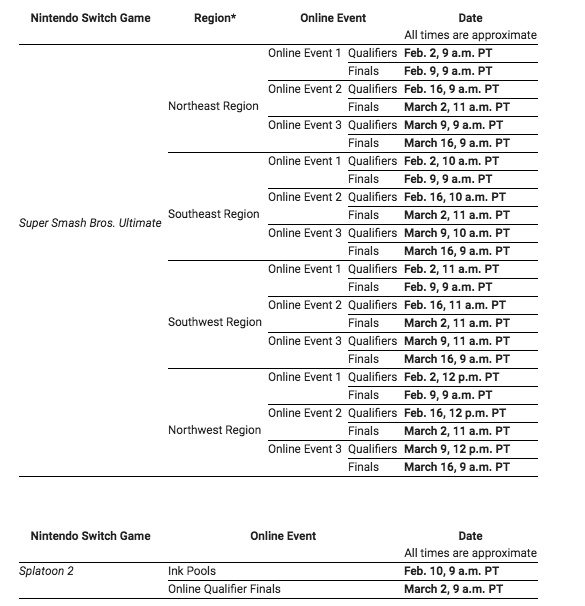
First up, in North America, both games will see a series of online qualifying events take place from February. These qualifiers are for the Splatoon 2 North America Inkling Open 2019 and the Super Smash Bros. Ultimate North America Open 2019, with finals for each event taking place at the PAX East video game conference in Boston on 30th March.
You can see the full schedule for these two competitions in the image below, and further details can be found at Nintendo’s official site here.
Europe
Europe is also getting in on the action with a European Smash Ball Team Cup event. In this competition, teams of three will battle it out in best-of-three and best-of-five Stock matches with no items (although the Smash Ball will feature). Match types will consist of 2v2 Smash, Smashdown and 3v3 Squad Strike. Players from United Kingdom & Ireland, France, Germany, Spain, Portugal, Italy, Russia, Netherlands, Belgium, Austria, Switzerland, and The Nordics, (Denmark, Finland, Norway, and Sweden) can take part, with the winning squads from each territory moving on to a final in spring 2019.
Further details surrounding this event are expected to be shared soon from the NintendoUKVS social media channels.
Are you thinking of taking part in some competitive Smash or Splatoon 2 action this year? Let us know if you’ll be keeping an eye on any of these events in the comments below.
Blockchains have to be trusted in order for them to succeed, and public blockchains can cause problems you may not think about, according to Bruce Schneier, a fellow and lecturer at the Harvard Kennedy School, in his keynote address at December’s Hyperledger Global Forum on “Security, Trust and Blockchain.”
Schneier began his talk by citing a quote from Bitcoin’s anonymous developer, Satoshi Nakamoto, who said “We have proposed a system for electronic transaction without relying on trust.”
“That’s just not true,’’ Schneier said. “Bitcoin is not a system that doesn’t rely on trust.” It eliminates certain trust intermediaries, but you have to somehow trust Bitcoin, he noted. Generally speaking, the Bitcoin system changes the nature of trust.
Schneier called himself a big fan of “systems thinking,” which is what the issue boils down to, he said. This is something that is in too short supply in the tech world right now,’’ he maintained, and “we need a lot more of it.”
Trust relationships
Schneier’s talk focused on the data structures and protocols that make up a public blockchain. He called private blockchains “100 percent uninteresting,” explaining that they’re easy to create and secure, they don’t need any special properties, and they’ve been around for years.
Public blockchains are what’s new, he noted. They have three elements that make them work:
The ledger, which is the record of what happened and in what order
The consensus algorithm, which ensures all copies of the ledger are the same
The token, which is the currency
All the pieces fit together as a single system, and whether they can achieve anything gets back to the issue of trust, he said.
In Resident Evil 2, the classic action, tense exploration, and puzzle solving gameplay that defined the Resident Evil series returns. Players join rookie police officer Leon Kennedy and college student Claire Redfield, who are thrust together by a disastrous outbreak in Raccoon City that transformed its population into deadly zombies. Both Leon and Claire have their own separate playable campaigns, allowing players to see the story from both characters? perspectives. The fate of these two fan favorite characters is in players hands as they work together to survive and get to the bottom of what is behind the terrifying attack on the city. Will they make it out alive?