Posted by: xSicKxBot - 05-01-2019, 04:43 AM - Forum: Lounge
- No Replies
May Xbox One Game Pass Lineup Revealed
May is almost upon us and Microsoft has announced a new slate of Xbox Game Pass titles joining the subscription line-up over the course of the month. As usual this initial burst of announcements covers the first half of May, with more announcements likely to come later and fill out the remaining days.
First, on May 2, Game Pass subscribers will get access to Wolfenstein 2: The New Colossus. The first-person shooter inserts you deep into Nazi-occupied America with a cast of colorful characters at your side. That same day the service will also add Wargroove, the retro turn-based strategy game reminiscent of Advance Wars.
On May 9, the service will add the resource management sim Surviving Mars and Tacoma, the sci-fi narrative adventure game from the makers of Gone Home, along with the MMORPG Black Desert. The strategy RPG For the King is being added as well, and while it officially launches on May 10, Game Pass subscribers get it three days early on May 7. As detailed in a separate announcement, the rogue-like Descenders will also leave early access and launch on Game Pass (and Steam) on May 7 as well.
Finally, on May 16, Game Pass will add tough sci-fi Souls-like The Surge along with the notably more family-friendly Lego Batman 3.
This month will also get a little bonus benefit outside of the slate of included games. Rocket League, which is already included in Game Pass, is launching an Xbox Customization Pack with in mid-July. Game Pass members get the pack early, and free.
Xbox Game Pass is an all-you-can-eat subscription service for $10 / £7.99 / AUD $10.95 per month, offering full game downloads. This is separate from Xbox Live Gold, which just outlined its own free games for the month of May. The two also recently got an "Ultimate" bundle that packages them together. If you haven't tried out Game Pass yet, you can sample it for cheap for a limited time. The offer gives you 3 months for just one buck.
Starlink: Battle For Atlas’ Huge Crimson Moon Update Is Now Live
It was only last week when we first heard about Starlink: Battle for Atlas’ major Crimson Moon update, but all of the promised content is now well and truly here. If you own a copy of the game, make sure to update it to the latest version.
Ubisoft has shared the full patch notes for the update (including the additional, paid Star Fox content which is now available on Switch for $11.99). It’s quite a lengthy read, but we’ve got everything you need to know below. Oh, and the Switch version’s patch is 8.96 GB in size.
NEW WORLD: CRIMSON MOON
The Crimson Moon has decloaked in Atlas! Discover this new location upon the completion of the ship modding tutorial in Act 2.
NEW FACTION ACTIVITIES
The Coliseum (Outlaw Faction Story) Enter the Outlaw arena and face waves of enemies in the Crimson Coliseum! In order to access this activity, you need to complete the ship modding tutorial in Act 2. Visit the Fortune’s Rest outpost on the Crimson Moon and interact with the hologram billboard of Fortune, selecting the “Champion of the Outlaws”.
The Outlaws challenge you to compete in the Crimson Coliseum: • Brawl mode • Laserdrome mode • Champion Battle mode • Gauntlet mode (not for the faint of heart)
Atlas Most Wanted (Prospector Faction Story) Hunt down the most wanted Outlaw criminals and claim their bounties by checking in with the Prospectors! This activity is unlocked after completing the “Building Blocks” objective in Act 3. Visit the Fortune’s Rest outpost on the Crimson Moon, interact with the hologram billboard and select “Atlas’s Most Wanted” to unlock Bounty Hunting.
The Forge of Atlas (Expedition Faction Story) Investigate the secrets of Atlas by solving ancient puzzles and discover the location of the Celestial Anvil in a series of Expedition activities! It unlocks upon completion of the ship modding tutorial in Act 2. Interact with the hologram billboard of the Fortune and select “The Forge of Atlas” to begin the Expedition Story.
RACES Visit the Fortune’s Rest outpost on the Crimson Moon, interact with the hologram billboard and select “Racing” from the “Crimson Moon Missions” to compete against the most dangerous pilots in the star system! Make sure to complete the ship modding tutorial in Act 2 in order to unlock this activity. There are four racetracks to test your speed and handling: • Phantasm Chasm • Paradise • Wardens’ Pilgrimage • Foundry of Kings
PAINT JOBS Customize your starship with paint jobs, obtainable after completing activities in the Crimson Moon update! Paint jobs can be applied through the Ships Mods screen. There are over 100 Paint Jobs to collect – can you find them all?
NEW ENEMY UNITS Prepare to face new outlaw enemies! Unlocked in Act 3, these enemies will occasionally spawn from the outlaw turrets at the shipwrecks. • Wanted Outlaws have escaped imprisonment • Outlaw Sloop Tanks have been wreaking havoc on the Expedition across Atlas • Outlaw Battle-Mechs have been destroying Prospector settlements across Atlas
NEW “STAR” DIFFICULTY AND ENEMY SCALING We are introducing a new difficulty level which will display stars instead of the enemy level. Enemies will be scaled according to the equipped pilot’s level.
NEW MECHANICS • Unlock the Grappler to capture Wanted Outlaws • Decipher Electral energy rifts to learn about the history of Atlas • Use Shield Ram to knock enemies into next week
ECONOMY • Collect the Outlaw currency Cogs to purchase exclusive items on the Crimson Moon • Cogs can be acquired by defeating Outlaws and completing Crimson Moon activities • Collect Trophies by completing activities throughout Atlas • Trophies can be turned in on the Crimson Moon in exchange for various rewards
LEADERBOARDS Set your best score and compare it with other players with the online Leaderboards! In order to access the Leaderboards, sign in to Ubisoft Club and check the Social Tab in the main menu. You can find the Global and Friends Leaderboards, which are available for races and Crimson Coliseum modes.
WEEKLY CHALLENGES Complete a series of weekly challenges and earn a variety of rewards, including time-limited trials of different digital weapons! Make sure to sign in to Ubisoft Club, navigate the Social Tab and accept the three weekly challenges!
RE-MAPPABLE CONTROLS ON PC | CONTROLS SWAP ON CONSOLE One of the most requested features from the Community, we’re pleased to announce you can fully customize controls on PC. On console, players will be able to swap controls for Boost and Hyperdrive from the options menu.
NEW STAR FOX MISSIONS (NINTENDO SWITCH EXCLUSIVE) *Requires purchase* Play as Falco, Peppy and Slippy in a series of missions to hunt down Star Wolf’s lieutenants Andrew, Pigma and Leon, after completing the main Star Fox story missions. Go to Fortune’s Rest outpost on the Crimson Moon, interact with the hologram billboard of Fortune and select “A Star Fox Reunion” in order to start!
BUG FIXES • [Switch] Fixed Cargo Shuttle wreckage not appearing in game but shown on map. • [All Consoles] New Imp Hives will spawn even if the player has destroyed all the imp hives at 100% exploration on every planet. • [All Consoles] Various other bug & crash fixes.
If you want to see some of the Crimson Moon content in action, you might want to check out this video below from Nintendo Minute. Hosts Kit and Krysta recently took a trip to Ubisoft to go hands-on with the new world and racing mode now available thanks to the update.
Will you be checking out the Crimson Moon update? Are you glad that Ubisoft is still adding more and more content to the game? Let us know in the comments.
Fedora 30 is available now. You’ll likely want to upgrade your system to the latest version of Fedora. Fedora Workstation has a graphical upgrade method. Alternatively, Fedora offers a command-line method for upgrading Fedora 29 to Fedora 30.
Upgrading Fedora 29 Workstation to Fedora 30
Soon after release time, a notification appears to tell you an upgrade is available. You can click the notification to launch the GNOME Software app. Or you can choose Software from GNOME Shell.
Choose the Updates tab in GNOME Software and you should see a screen informing you that Fedora 30 is Now Available.
If you don’t see anything on this screen, try using the reload button at the top left. It may take some time after release for all systems to be able to see an upgrade available.
Choose Download to fetch the upgrade packages. You can continue working until you reach a stopping point, and the download is complete. Then use GNOME Software to restart your system and apply the upgrade. Upgrading takes time, so you may want to grab a coffee and come back to the system later.
Using the command line
If you’ve upgraded from past Fedora releases, you are likely familiar with the dnf upgrade plugin. This method is the recommended and supported way to upgrade from Fedora 29 to Fedora 30. Using this plugin will make your upgrade to Fedora 30 simple and easy.
1. Update software and back up your system
Before you do anything, you will want to make sure you have the latest software for Fedora 39 before beginning the upgrade process. To update your software, use GNOME Software or enter the following command in a terminal.
sudo dnf upgrade --refresh
Additionally, make sure you back up your system before proceeding. For help with taking a backup, see the backup series on the Fedora Magazine.
2. Install the DNF plugin
Next, open a terminal and type the following command to install the plugin:
sudo dnf install dnf-plugin-system-upgrade
3. Start the update with DNF
Now that your system is up-to-date, backed up, and you have the DNF plugin installed, you can begin the upgrade by using the following command in a terminal:
sudo dnf system-upgrade download --releasever=30
This command will begin downloading all of the upgrades for your machine locally to prepare for the upgrade. If you have issues when upgrading because of packages without updates, broken dependencies, or retired packages, add the ‐‐allowerasing flag when typing the above command. This will allow DNF to remove packages that may be blocking your system upgrade.
4. Reboot and upgrade
Once the previous command finishes downloading all of the upgrades, your system will be ready for rebooting. To boot your system into the upgrade process, type the following command in a terminal:
sudo dnf system-upgrade reboot
Your system will restart after this. Many releases ago, the fedup tool would create a new option on the kernel selection / boot screen. With the dnf-plugin-system-upgrade package, your system reboots into the current kernel installed for Fedora 29; this is normal. Shortly after the kernel selection screen, your system begins the upgrade process.
Now might be a good time for a coffee break! Once it finishes, your system will restart and you’ll be able to log in to your newly upgraded Fedora 30 system.
Resolving upgrade problems
On occasion, there may be unexpected issues when you upgrade your system. If you experience any issues, please visit the DNF system upgrade wiki page for more information on troubleshooting in the event of a problem.
If you are having issues upgrading and have third-party repositories installed on your system, you may need to disable these repositories while you are upgrading. For support with repositories not provided by Fedora, please contact the providers of the repositories.
Posted by: xSicKxBot - 05-01-2019, 04:43 AM - Forum: Windows
- No Replies
Join us May 6 at 8 a.m. PT to watch Build 2019 live
More than 6,000 people from around the world are joining us May 6-8 in Seattle for Microsoft Build, our premier developer conference. This year’s event is focused on empowering developers of all kinds, from experienced computer scientists to tech beginners with big ideas.
Join us here at 8 a.m. PT on Monday, May 6, to watch the World Championship of Imagine Cup, our global student technology competition. The Build keynote presentations will begin at 8:30 a.m. PT, when we’ll share the latest about Microsoft’s platforms and tools aimed at helping people build great things.
Zombies are a bit like Heinz, in that they come in a variety of different types (and generally go well with jacket potatoes-ED). There are the classic slow-moving shamblers made famous by George A Romero. The fast-moving ones from the 28 Days series of films, and the mutated abominations of Resident Evil fame. There’s also sometimes toxic ones and fat ones, who, I guess, have no self-control when it comes to eating brains.
Inside the Zombicide physical box is an impressive total of 70 miniatures, which represent the spectrum of zombiekind in addition to the unfortunate survivors themselves. It is enough to put the fear of God into any self-respecting gamer, especially if you plan on painting them all. Thankfully, we digital gamers do not have to concern ourselves with such issues, leaving us free to concentrate on the business in hand, namely hacking our way through wave after wave of the restless undead.
Zombicide: Tactics & Shotguns isn’t a direct conversion of the boardgame. It has evolved from the multiplayer cooperative set-up into a campaign-driven single-player experience. The basics, however, remain the same; a group of survivors travel across the devastated city completing objectives and polishing off a few zombies along the way. The game explains the basics by handing the player control of Doug, an SMG touting ex-office worker. Doug is hungry; unfortunately, the only food worth foraging appears to be canned dog food. The zombie apocalypse means that beggars can’t be choosers but at least Doug will be sure of a lovely glossy coat and a healthy wet nose.
On each turn, every survivor will have three action points to spend. It takes a single action point to move to an adjacent space or room. If zombies hem you in then your movement options will be further limited. Other actions include picking up a new weapon or breaking down a locked door but be prepared for the possibility of a nasty surprise. Combat also requires the expenditure of action points. The survivor’s abilities, alongside the characteristics of the weapon, will determine the range, the number of attacks, accuracy and amount of damage inflicted. Another thing to bear in mind is the amount of noise that the weapon makes. The sound of a shotgun blast is obviously going to alert any nearby zombies and get them heading in your direction.
Most zombies will only have a single action point, which means that any survivors will only come under attack if they end their turn in a space occupied by the enemy. Be careful though because the fast zombies have extra action points and the survivors’ health points are strictly limited. The big difference between melee and ranged combat is that in close combat the survivor gets to select individual targets. Ranged combat usually results in the survivor, firing into an area without a specific target in mind. The problem is that each miss has a chance of hitting any unfortunate survivors that may also be in the same space. Every time that you defeat an enemy you will be awarded additional tins of pet food and the danger level increases. This means that more or tougher zombies are likely to spawn into play. It also means that your survivors may be able to trigger their skills, this may make them more effective in combat, allow them to travel further or permit them to heal wounded team members.
It’s a nice simple system that works really well and still requires some thought. Zombies may be stupid and predictable but they definitely have numbers on their side. You will want to try and keep your party together and stay on the move, otherwise you face being overwhelmed by hoards of the undead. The threat of friendly fire and the range of different enemies add some much needed variety. It is just a pity that the sound-alerting mechanic isn’t used to its full potential. There isn’t that much point in sneaking around when a few blasts from a shotgun gets the job done. Indeed, alerting enemies often makes things easier by drawing more cannon fodder into your sights. The line of sight system is instinctive, although when battling a mass of zombies, targeting an individual enemy can be rather hit or miss.
At the end of each level, cans of dog food can be used to upgrade the survivors or their weapons. As they advance, their abilities improve and they may learn new skills. Get to level five and you will have the option to equip a weapon in each hand. This is especially fun when you kit out a pair of the same weapon as you can use both simultaneously. The site of a dual machete-wielding roller-skating waitress is sure to strike fear into the unbeating heart of any self-respecting zombie.
The survivors themselves fall into one of four classes, each with their own preferred weapons and unique skills. Butchers inflict minor damage but hit a lot of targets; in contrast, assassins cause a lot of damage to only a few targets. Hunters have great long-range accuracy; finally, scouts are fearsome wielders of melee weapons. Some fellow survivors soon join Doug in his quest and there is also the option to use cash to purchase new members for your team. Although by no means essential, it is going to cost over double the price of the game itself to acquire them all which feels like a bit of a cynical cash grab.
The day-glo comic book graphics and raucous guitar-led backing track do a grand job of evoking 1980’s horror films. There are eight different zones, each of which has five stages. This means that in spite of the low difficulty curve, getting through to the end is still going to take a considerable amount of effort. It is a pity that a lot of environments just reuse the same graphics. It reinforces the repetitiveness of the missions, which usually require the player to reach specific points on the map or destroy a set number of zombies. Another minor niggle is the monotonous comments that the characters make; Yes, Doug, I know you need new shoes; you’ve told me one hundred times already.
The developers get a thumbs-up for producing a game that isn’t just a straight conversion of the board game. They have instead created a solo campaign that is a much better fit for mobile platforms. It is just a shame that the constraints of the board game appear to have prevented them from going even further by way of adding a little more variety to proceedings.
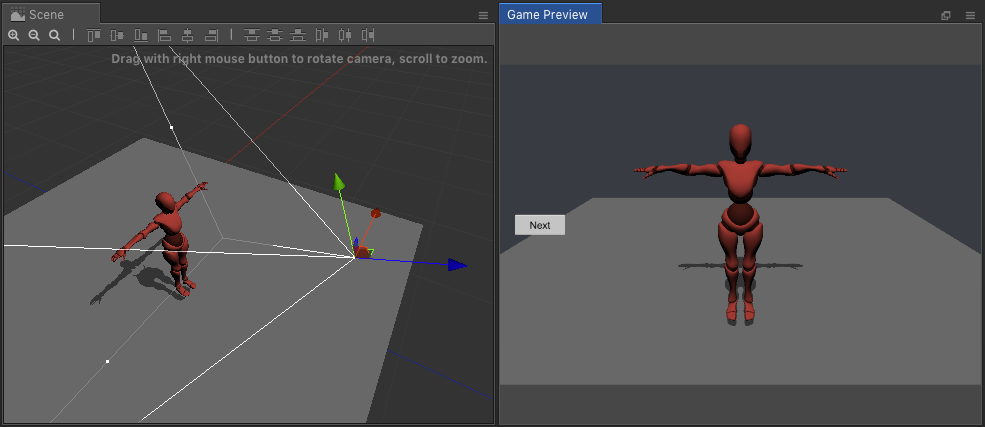
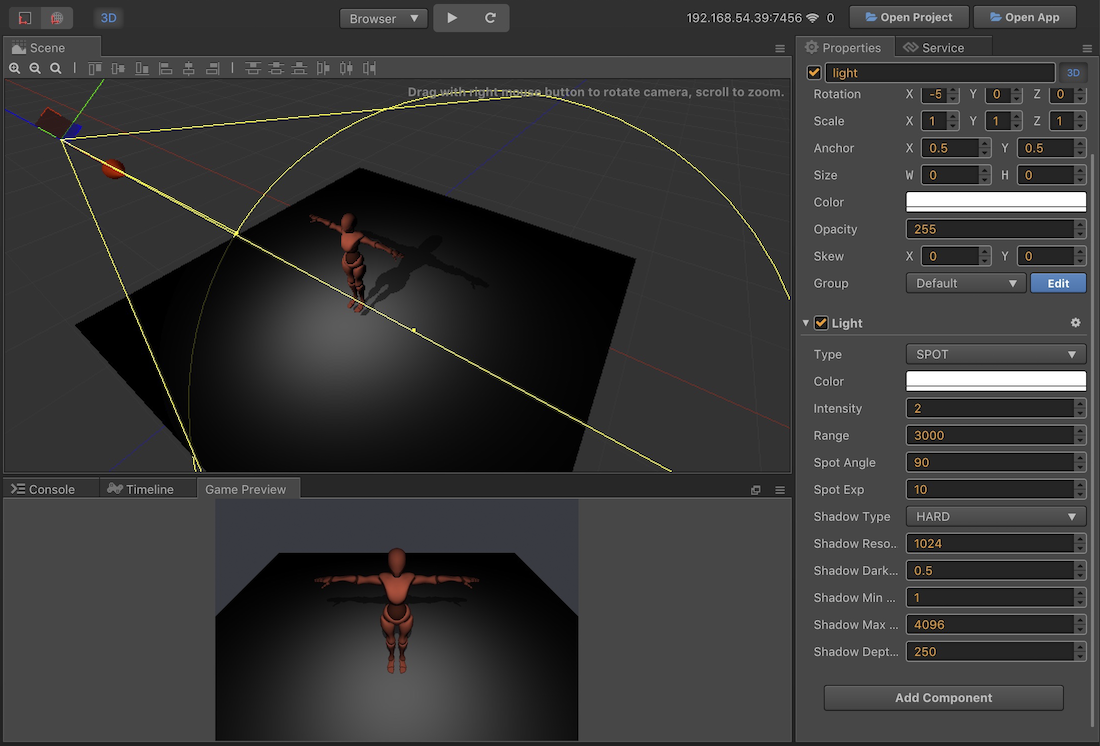
When Cocos Creator 2 was released, a major new feature was the new 3D renderer under the hood. The 2.1.1 release starts to take advantage of that new functionality with a new 3D scene editor, a game preview panel, new lighting and 3d primitive support and more. If you are interested in learning Cocos Creator, be sure to check out our tutorial series available here.
Since the release of Cocos Creator 2.1.0, we have received a lot of valuable suggestions from users. Based on previously announced plans, we will continue to speed up the iteration of the v2.1 series to implement user suggestions as quickly as possible. At the same time, in order to prevent these changes from affecting the stability of old projects, we only recommend upgrading projects with 3D requirements to v2.1. Other projects can continue to use v2.0, and wait until v2.2 is released before upgrading. This v2.1.1 upgrade mainly supports 3D scene editing, camera preview, lighting system, and also incorporates the latest 2.0.x changes.
What’s New
Support 3D scene editing
The Scene Editor allows you to switch to 3D editing mode with one click, making it easy to edit 3D objects, cameras, and lights. See the 3D Scenes document 4 for details.
Add game preview panel
A separate preview panel has been added to visually preview the images seen by the camera during scene editing. Panel Open: Main Menu → Panel → Game Preview, the preview panel can be placed in a separate window or dragged into the main editor window.
A Light component has been added to lay out lights in the scene, and a shadow effect can be set in conjunction with MeshRenderer. See the Light Source Component Reference 2 documentation.
Now, developers can set the Text Label, Placeholder Label and Background nodes separately, making them more flexible, simple, and more in line with the component development. See the EditBox Component Reference documentation.
Add text shadow rendering component
A new LabelShadow component has been added to add a shadow effect to the Label component, similar to the LabelOutline usage. See the Label Component Reference documentation.
Support for dynamically creating 3D Primitive models
Added cc.primitive module to dynamically create 3D models at runtime, including: box, cone, cylinder, plane, etc. See the Basic 3D Objects documentation.
Integrated Material System (Beta)
Added support for material systems, allowing users to create Material and Effect (Shader) resource types. It should be noted that the current material system is mainly provided to the internal use of the engine and is only for developer preview. We plan to upgrade the material system in v2.1.2, however it will not be back-ported to this version.
Improved features
Editor improvements
Added shortcut Ctrl/Cmd + Shift + F to align the currently selected node to the perspective of the scene editor.
When you click in the scene editor, you can hold down Ctrl/Cmd for multiple selections at the same time.
Improve fault tolerance processing for custom engines to avoid editor startup failure
Improve the search performance of the resource manager under very large projects
Add menu File -> Open project in new window to support simultaneous opening of multiple projects on Mac
Hide the component’s enabled checkbox when the component does not define the enabled associated lifecycle function
Upgrade the TypeScript version to 3.3.3333
Engine improvements
Make cc.Vec3 compatible with related APIs of cc.Vec2
Improved Label positioning accuracy in the editor and on different browsers (thanks to “Dacheng Xiaopeng” for advice)
Optimization 3D skeletal animation performance and volume
The cc.macro.CLEANUP_IMAGE_CACHE flag is enabled by default on the native platform to reduce texture memory usage
Native platform automatically verifies the maximum supported texture size of the current device
Add WeChat Mini gameXMLHttpRequest support for timeout event [#87]
Added cc.sys.HUAWEI_GAME enumeration to determine if it is currently Huawei’s fast game platform
Removed the creation entry for the CoffeeScript script. CoffeeScript scripts can still be created manually, and we plan to remove full support for CoffeeScript in v3.0.
See the new 3D functionality in action in the video below.
Join Brian Pasternack on his first day at one of the world?s largest companies, Sintracorp. Uncertain, unprepared, and massively unqualified, will Pasternack have what it takes to shine in Sintracorp?s hierarchy? It all depends on how he performs on his first assignment? and whether he survives it.
This is the most authentic simulation of the sport ever created, with TV-style presentation and commentary, true-to-life physics and advanced artificial intelligence. Choose from offline and online modes, from quick play online match-making to global online tournaments that link in real-time with the live World Snooker calendar.
Fade to Silence is a Survival-RPG set in the cold and deadly world of a post-apocalyptic winter. You assume the role of Ash, a natural but tormented leader, exploring a post-apocalyptic frozen wasteland, gathering the resources necessary to establish a refuge for survival. With dwindling supplies, simple tasks like upgrading equipment and collecting materials require an immediate expedition to scavenge the necessary items. In the search for survival materials, players must navigate a vast territory, in which they will encounter Eldritch monsters and an even greater foe; the unrelenting winter. While freezing temperatures constantly take their toll on Ash, the deadliest event is a constant threat ? a blizzard. If caught by surprise, it takes every ounce of skill, determination and luck to survive.
Posted by: xSicKxBot - 05-01-2019, 01:42 AM - Forum: Lounge
- No Replies
Citing arbitration clauses, Riot Games moves to block employee lawsuits
Riot Games has filed motions that aim to force two employees involved in an ongoing lawsuit against the company into private arbitration, a move the company’s attorney tells Kotaku is in line with clauses in the employees’ employment contracts.
The motions spotted by Kotaku are the latest development in a duo of lawsuits filed against Riot Games within the past six months by past and current employees that accused the company of facilitating gender-based discrimination.
The lawsuits themselves followed a Kotaku story from last year on what several developers from the studio called a toxic workplace environment that resulted in female employees enduring discrimination and harassment.
The attorney representing Riot Games says that the two employees being targeted by the private arbitration motions both agreed to arbitration clauses in their employment contracts. According to the attorney, those clauses dictate that employees must take complaints like the ones raised in the existing lawsuits into private arbitration rather than to a trial.
The lawyer representing the employees meanwhile said in a press release that those motions “only serve to silence the voices of individuals who speak out against such misconduct.”