Guide: Every Arcade Archives Game On Nintendo Switch, Plus Our Top Picks
Since 2017 we’ve seen a steady supply of Hamster’s Arcade Archives releases bringing arcade classics to the Switch eShop. What’s more, the series includes previously unreleased or hard-to-find arcade games from Nintendo itself. Having been so well acquainted with many of the NES versions, and it’s been wonderful to rediscover these games in their original (and sometimes quite different) arcade form over the past few years.
The number of titles in the Arcade Archives list grows on a near-weekly basis, so below we’ve reproduced the full list of Arcade Archives releases available on Switch eShop to date. With a variety of options to tailor each game’s presentation to your personal tastes, you can even flip the screen 90° for a more authentic rendition of games originally designed for an upturned CRT screen. Throw them in your Flip Grip and you’ve arguably got the best way to play these games in 2020, short of having the original arcade cabinets, of course.
New releases will be added to this list as they drop. The games are listed in alphabetical order, and it’s worth remembering that certain games – Castlevania, for example – start with a sneaky ‘VS’, so they’ll naturally be near the bottom. Alternatively, you can view them in our database sorted by Release Date or User Rating. Please note that we have NOT included the ACA Neo Geo releases here – we’ll have a separate guide for Neo Geo games on Switch before you can say “how many!?!”.
And if this huge list is a tad overwhelming, you’ll find our picks of the best Arcade Archives games on Switch at the bottom. You know, just to get you on the right track.
Arcade Archives Switch eShop releases – Complete list
Looking at that list and don’t know where to start? Then check out our picks of the best Arcade Archives games – in no particular order – to get you off on the right foot.
The best Switch Arcade Archives games…
Publisher: HAMSTER / Developer: Nintendo
Release Date: 14th Jun 2018 (USA) / 15th Jun 2018 (UK/EU)
Available for the first time since being tucked away as a bonus in Donkey Kong 64, Mario (or rather Jumpman) may seem quite limited in his abilities (and death by a short fall is very old-school), but Donkey Kong is still a fun game. Tougher than the NES port, it can get quite addictive as you seek to improve your high scores. Should the many re-releases of the NES version have failed to impressed, there’s nothing here that will win you over, but for fans of the game, this Arcade Archives release is something of an ‘ultimate edition’. Three versions of this classic with a few display options and HAMSTER’s usual array of modes and online leaderboards make this a great choice for high score chasers and people who wish they were more like Billy Mitchell.
Publisher: HAMSTER / Developer: Irem
Release Date: 21st Nov 2019 (USA) / 21st Nov 2019 (UK/EU)
Made by people that would go on to make Metal Slug, Irem’s In the Hunt is an excellent shoot-’em-up and a great fit for the Switch. Giving the final frontier the elbow in favour of a sub-based maritime excursion, it offers something comfortingly familiar in the genre but shockingly, joyously different in execution. It stands out as a high-quality deep cut in the Arcade Archives catalogue of retro classics.
Track & Field remains as endearingly entertaining as it was when it first appeared 36 years ago. It’s a little on the pricey side considering it only has six events, one of which (the high jump) is a bit of a stinker, and is obviously a one-trick pony given its subject matter. But it still does that one trick better than most games that have succeeded it, so if you’re looking for a quick button-basher this is a good choice.
Publisher: HAMSTER
Release Date: 8th Aug 2019 (USA) / 8th Aug 2019 (UK/EU)
A side-scrolling shooter in the R-Type vein, except you fly a ship that sprouts tentacles, Irem’s X Multiply deserves to sit alongside its more famous stablemate. When we say ‘in the vein’, we mean very literally as this game takes you into body of a human being infected with parasitic alien life forms. Timely, you might say!
Switching a space-based setting for a more interior, biological environment that would feel at home in an Alien movie or the latter stages of a Metroid title gives the game a much different, darker tone to R-Type but it’s just as addictive and well worth downloading if the 1989 arcade original (or the PlayStation and Saturn ports) passed you by.
Publisher: HAMSTER / Developer: Nintendo
Release Date: 30th Mar 2018 (USA) / 30th Mar 2018 (UK/EU)
Punch-Out!! is not only a nostalgic slice of Nintendo’s arcade history, it just so happens to be one of the most enjoyable boxing games ever made, laying down the entire foundation not only for the whole series but for several other games adopting the ‘behind the boxer’ viewpoint. Over three decades later, it is still a joy to pick up and play, still proving to be extremely rewarding when you finally figure out your opponent’s ‘tell’ and proceed to take them to the floor. Besides ARMS and Pato Box, Switch has few boxing alternatives on the system and despite being a little lacking content-wise when set side-by-side with later entries in the series, the core gameplay loop still delivers the goods. Short, sweet and straight to the point, just like Mr. Sandman’s right uppercut, then.
Publisher: HAMSTER
Release Date: 27th Feb 2020 (USA)
Yet another Irem shmup for you (what can we say – we love ’em), Konami’s Life Force, née Salamander, is a Gradius spin-off and a rollicking good one which alternates between horizontal and vertical-scrolling stages. As with X Multiple, this too is set inside a life form, although this time it’s a giant alien fighting off a virulent strain of something or other.
Life Force is a challenging beast and the Arcade Archives version includes three version of the game – the original Japanese Salamander from 1986, the renamed North American version that included narrative and graphical alterations, and yet another iteration (also renamed Life Force) which went back to Japan the following year with further tweaks. Three games in one? What more do you want, jam on it?
Publisher: Nintendo / Developer: HAMSTER
Release Date: 22nd Dec 2017 (USA) / 22nd Dec 2017 (UK/EU)
Super Mario Bros. being playable on a Nintendo system is not particularly surprising, but that it should first appear on Switch in its VS. incarnation was unexpected. The excellent gameplay, catchy music and a large chunk of the levels are still present, but the new stages make for a different feel that muscle-memory won’t get you through. Those levels may have since appeared in The Lost Levels, but their inclusion here alongside changes to existing levels (including a different solution to a multi-path puzzle) make for a still enjoyable but tougher alternative way of playing, with highscore chasing also adding to the fun thanks to the online leaderboards. Even if you can play through the regular version of the game in your sleep, VS. Super Mario Bros. is an excellent – and challenging – choice for platforming fans.
Obviously, Super Mario Bros. is a classic. The last entry on our list certainly isn’t, although it’s still a fascinating little curio in this collection…
Sky Skipper may not be a Nintendo arcade classic like Donkey Kong, but its inclusion in the Arcade Archives collection is significant thanks to its rarity and obscurity. The 1981 game was a commercial failure and virtually all of its cabinets were subsequently converted to run Popeye instead. Of a handful that made it to America, only one is known to exist and it resides in Nintendo of America HQ, and it was from that cabinet that the ROM for this release was extracted.
Regardless of the game’s quality, it’s something of a miracle that we’re able to play it at all and it’s wonderful to have it preserved and widely available now on Switch. For that reason alone, it’s worth investigating if you have the slightest interest in Nintendo’s arcade history.
With so many to choose from we’re just scratching the surface. It’s certainly worth bearing in mind the age of these games – that ‘Archives’ title is apt as many of these games belong in a museum and its a thrill to have them on Switch in such fine form. Give them time and the classic gameplay of the best of them still shines through.
Let us know which of Hamster’s Arcade Archives games you’ve most enjoyed, and which ones you’d avoid, with a cheeky comment below.
Posted by: xSicKxBot - 03-14-2020, 02:18 PM - Forum: Windows
- No Replies
Azure helps unlock our DNA and find 2 new prehistoric ancestors
These Denisovan discoveries were based on statistical models created by Cox and his colleagues and run on Microsoft Azure, which proved a key factor in their project’s success. Massey, unlike many other universities, does not have its own on-premises computer facility to carry out big data-based research.
“These are big, costly computers, but their capacity is limited. Lots of people want to use them, and that means that it is very hard to get the compute time you need when you need it. You have to wait in line,” Cox explains.
In this case, the team went with a Microsoft cloud option. “Azure works well for us. It has scalability and flexibility. It gives us the freedom to work at the pace that we need to get answers.”
Science moves fast
Cox estimates that if the team had instead used an in-house IT facility, their work might have taken an extra six months, year, or more to complete.
“It’s hard to say. But actually, it might have been never. That’s because the amount of computing time we needed would have meant that someone else probably would have got to the answers before we did, and they would have published before us. Science moves fast, and the questions would have been addressed by others if we hadn’t got there at the speed we needed.”
Businesses and bureaucracies routinely use the power of the cloud to sift through, analyze, and harness mountains of big data in fast, secure, and flexible ways. Cox says cloud computing brings the same benefits to the laboratory. “Processing so much data can be boring and laborious,” he says. “Azure frees us to do other things to develop our research.”
New technologies and solutions that operate in the cloud and leverage artificial intelligence and machine learning promise to accelerate the pace of research. And the ability to process lots of data quickly can also open up new directions for scientific inquiry as it did for Cox and his colleagues.
Tying in with the recent reveal of its new Tokyo office – the third announcement of the Platinum4 – PlatinumGames has now shared information on a brand new game engine being developed in-house to help the studio create “thrilling next-generation action games”.
Known for now as the PlatinumEngine, this new tool will be used to drive the studio’s creations going forward, being described as “bigger, more expressive, more creative,” in an update shared online.
Wataru Ohmori, Platinum’s Research and Development Group Lead and Chief Technology Officer, explains how development on the engine began:
“We’ve used our own in-house engine, specialized for action game development, since PlatinumGames was founded. But modern games demand a whole new level of quality, a greater variety and number of objects on-screen, and a richer amount of expressive visual power. We came to the frightening realization that if we don’t make our work more efficient, we’re simply not going to be able to keep making the games that we want to make as technology and expectations grow. Our new engine will help us make bigger, more expressive games than ever before, and with greater ease.”
Ohmori goes on to explain that third-party engines like Unity and Unreal are lacking some features that PlatinumGames felt it needed, so an optimised engine was the only solution to meet the studio’s needs.
Platinum’s Research and Development Group Team Lead, Tsuyoshi Odera, and Research and Development Group Programmer, Ryoichi Takahashi, explain just what the engine aims to do:
Odera: “…Our goal with this new engine is to reduce, as much as we can, the amount of effort that goes into game development. The idea is to take all the unnecessary work away from our game development teams. We’re looking into everything we can do to make their work more efficient, even if those changes seem minor on the surface. Things like reducing the number of button presses needed to convert data, reflecting new work in the build right after it’s converted, or making levels playable directly from the editor.”
Takahashi: “For the most part, I’ve worked more closely with game development teams than on system development, and each project has its own needs that have to be met through manual work; they often start to approach the limits of what can be done in terms of time and scale. At the end of the day, I want to give our artists an engine that will let them dig in to a wide variety of visual styles – photorealism, cartoony cell-shading, and beyond – to make sure our games are up to Platinum standards visually.”
Improving workflow and providing new tools should be a fantastic change for both the developers working on the game and the players who get to experience them later down the line. Ohmori wraps things up by saying, “PlatinumGames is known for our action games, but going forward, we’re going to have to try making things we haven’t made before.
“Those new challenges might be under the broad “action game” umbrella, or they might be something completely different, with some action elements. Either way, we’ll need to step up our game in terms of scale and expression.”
Dreams Will Test Letting Players Use Their Creations For Profit
Game and content creators working in the PS4-exclusive Dreams may have just been doing it for fun, but Sony knows their work could be much more than that. It has launched a beta evaluation program that will let creators use their Dreams work for business purposes, including for-profit music videos and concept art.
The beta evaluation is available to those who participated in the Dreams early access period and are over 18. If your account is in good standing, you have the skills needed to complete the full project, and it's a viable project, you will potentially receive permission for business use.
Sony and Media Molecule are evaluating applications on a per-project basis, and they ask that creators include the game's "Made in Dreams" logo in the credits among several other conditions.
Posted by: xSicKxBot - 03-14-2020, 08:08 AM - Forum: Python
- No Replies
Python List extend() Method
How can you not one but multiple elements to a given list? Use the extend() method in Python. This tutorial shows you everything you need to know to help you master an essential method of the most fundamental container data type in the Python programming language.
Definition and Usage
The list.extend(iter) method adds all elements in the argument iterable iter to an existing list.
In the first line of the example, you create the list lst. You then append the integers 4, 5, 6 to the end of the list using the extend() method. The result is the list with six elements [1, 2, 3, 4, 5, 6].
Try it yourself:
Syntax
You can call this method on each list object in Python. Here’s the syntax:
list.extend(iterable)
Arguments
Argument
Description
iterable
All the elements of the iterable will be added to the end of the list—in the order of their occurrence.
Video
Code Puzzle
Now you know the basics. Let’s deepen your understanding with a short code puzzle—can you solve it?
# Puzzle

# Author: Finxter Lee

lst1 = [1, 2, 3]

lst2 = [4, 5, 6]

lst1.append(lst2) lst3 = [1, 2, 3]

lst4 = [4, 5, 6]

lst3.extend(lst4) print(lst1 == lst3)

# What's the output of this code snippet?
You can check out the solution on the Finxter app. (I know it’s tricky!)
You can see that the extend() method allows for all sorts of iterables: lists, sets, tuples, and even range objects. But what it doesn’t allow is an integer argument. Why? Because the integer argument isn’t an iterable—it doesn’t make sense to “iterate over all values in an integer”.
Python List extend() At The Beginning
What if you want to use the extend() method at the beginning: you want to “add” a number of elements just before the first element of the list.
Well, you should work on your terminology for starters. But if you insist, you can use the insert() method instead.
The insert(i, x) method inserts an element x at position i in the list. This way, you can insert an element to each position in the list—even at the first position. Note that if you insert an element at the first position, each subsequent element will be moved by one position. In other words, element i will move to position i+1.
Python List extend() vs +
List concatenation operator +: If you use the + operator on two integers, you’ll get the sum of those integers. But if you use the + operator on two lists, you’ll get a new list that is the concatenation of those lists.
The problem with the + operator for list concatenation is that it creates a new list for each list concatenation operation. This can be very inefficient if you use the + operator multiple times in a loop.
How fast is the + operator really? Here’s a common scenario how people use it to add new elements to a list in a loop. This is very inefficient:
import time start = time.time() l = []

for i in range(100000): l = l + [i] stop = time.time() print("Elapsed time: " + str(stop - start))
Output:
Elapsed time: 14.438847541809082
The experiments were performed on my notebook with an Intel® Core™ i7-8565U 1.8GHz processor (with Turbo Boost up to 4.6 GHz) and 8 GB of RAM.
I measured the start and stop timestamps to calculate the total elapsed time for adding 100,000 elements to a list.
The result shows that it takes 14 seconds to perform this operation.
This seems slow (it is!). So let’s investigate some other methods to concatenate and their performance:
Python List extend() Performance
Here’s a similar example that shows how you can use the extend() method to concatenate two lists l1 and l2.
I performed a similar experiment as before for the list concatenation operator +.
import time start = time.time() l = []

l.extend(range(100000)) stop = time.time() print("Elapsed time: " + str(stop - start))
Output:
Elapsed time: 0.0
I measured the start and stop timestamps to calculate the total elapsed time for adding 100,000 elements to a list.
The result shows that it takes negligible time to run the code (0.0 seconds compared to 0.006 seconds for the append() operation above).
The extend() method is the most concise and fastest way to concatenate lists.
Python List append() vs extend()
I shot a small video explaining the difference and which method is faster, too:
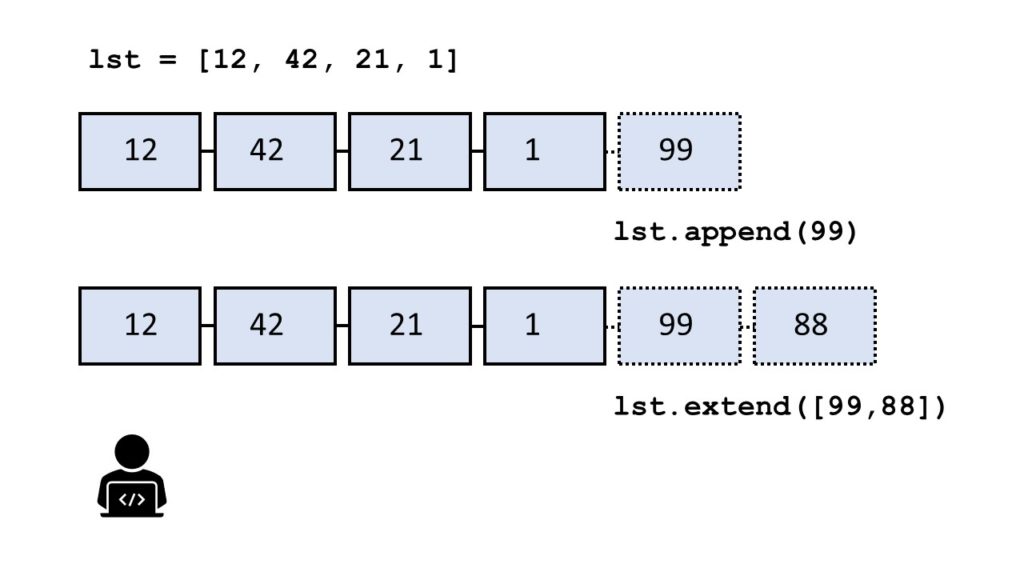
The method list.append(x) adds element x to the end of the list.
The method list.extend(iter) adds all elements in iter to the end of the list.
The difference between append() and extend() is that the former adds only one element and the latter adds a collection of elements to the list.
You can see this in the following example:
>>> l = []

>>> l.append(1)

>>> l.append(2)

>>> l

[1, 2]

>>> l.extend([3, 4, 5])

>>> l

[1, 2, 3, 4, 5]
In the code, you first add integer elements 1 and 2 to the list using two calls to the append() method. Then, you use the extend method to add the three elements 3, 4, and 5 in a single call of the extend() method.
Which method is faster — extend() vs append()?
To answer this question, I’ve written a short script that tests the runtime performance of creating large lists of increasing sizes using the extend() and the append() methods.
Our thesis is that the extend() method should be faster for larger list sizes because Python can append elements to a list in a batch rather than by calling the same method again and again.
I used my notebook with an Intel® Core™ i7-8565U 1.8GHz processor (with Turbo Boost up to 4.6 GHz) and 8 GB of RAM.
Then, I created 100 lists with both methods, extend() and append(), with sizes ranging from 10,000 elements to 1,000,000 elements. As elements, I simply incremented integer numbers by one starting from 0.
Here’s the code I used to measure and plot the results: which method is faster—append() or extend()?
import time def list_by_append(n): '''Creates a list & appends n elements''' lst = [] for i in range(n): lst.append(n) return lst def list_by_extend(n): '''Creates a list & extends it with n elements''' lst = [] lst.extend(range(n)) return lst # Compare runtime of both methods

list_sizes = [i * 10000 for i in range(100)]

append_runtimes = []

extend_runtimes = [] for size in list_sizes: # Get time stamps time_0 = time.time() list_by_append(size) time_1 = time.time() list_by_extend(size) time_2 = time.time() # Calculate runtimes append_runtimes.append((size, time_1 - time_0)) extend_runtimes.append((size, time_2 - time_1)) # Plot everything

import matplotlib.pyplot as plt

import numpy as np append_runtimes = np.array(append_runtimes)

extend_runtimes = np.array(extend_runtimes) print(append_runtimes)

print(extend_runtimes) plt.plot(append_runtimes[:,0], append_runtimes[:,1], label='append()')

plt.plot(extend_runtimes[:,0], extend_runtimes[:,1], label='extend()') plt.xlabel('list size')

plt.ylabel('runtime (seconds)') plt.legend()

plt.savefig('append_vs_extend.jpg')

plt.show()
The code consists of three high-level parts:
In the first part of the code, you define two functions list_by_append(n) and list_by_extend(n) that take as input argument an integer list size n and create lists of successively increasing integer elements using the append() and extend() methods, respectively.
In the second part of the code, you compare the runtime of both functions using 100 different values for the list size n.
In the third part of the code, you plot everything using the Python matplotlib library.
Here’s the resulting plot that compares the runtime of the two methods append() vs extend(). On the x axis, you can see the list size from 0 to 1,000,000 elements. On the y axis, you can see the runtime in seconds needed to execute the respective functions.
The resulting plot shows that both methods are extremely fast for a few tens of thousands of elements. In fact, they are so fast that the time() function of the time module cannot capture the elapsed time.
But as you increase the size of the lists to hundreds of thousands of elements, the extend() method starts to win:
For large lists with one million elements, the runtime of the extend() method is 60% faster than the runtime of the append() method.
The reason is the already mentioned batching of individual append operations.
However, the effect only plays out for very large lists. For small lists, you can choose either method. Well, for clarity of your code, it would still make sense to prefer extend() over append() if you need to add a bunch of elements rather than only a single element.
Python Append List to Another List
To append list lst_1 to another list lst_2, use the lst_2.extend(lst_1) method. Here’s an example:
The return value of the extend() method is None. The return value of the extend() method is not a list with the added elements. Assuming this is a common source of mistakes.
Here’s such an error where the coder wrongly assumed this:
>>> lst = [1, 2].extend([3, 4])

>>> lst[0]

Traceback (most recent call last): File "<pyshell#16>", line 1, in <module> lst[0]

TypeError: 'NoneType' object is not subscriptable
It doesn’t make sense to assign the result of the extend() method to another variable—because it’s always None. Instead, the extend() method changes a list object without creating (and returning) a new list.
a = [1, 2, 3]

b = [4, 5, 6] # 1. List concatenation operator +

l_1 = a + b # 2. List append() method

l_2 = [] for el in a: l_2.append(el) for el in b: l_2.append(el) # 3. List extend() method

l_3 = []

l_3.extend(a)

l_3.extend(b) # 4. Asterisk operator *

l_4 = [*a, *b] # 5. Itertools.chain()

import itertools

l_5 = list(itertools.chain(a, b)) # 6. List comprehension

l_6 = [el for lst in (a, b) for el in lst]
If you’re busy, you may want to know the best answer immediately. Here it is:
To concatenate two lists l1, l2, use the l1.extend(l2) method which is the fastest and the most readable.
To concatenate more than two lists, use the unpacking (asterisk) operator [*l1, *l2, ..., *ln].
However, you should avoid using the append() method for list concatenation because it’s neither very efficient nor concise and readable.
Python List extend() Unique – Add If Not Exists
A common question is the following:
How can you add or append elements to a list, but only if they don’t already exist in the list?
When ignoring any performance issues, the answer is simple: use an if condition in combination with the membership operation element in list and only append() the element if the result is False (don’t use extend() for this fine-grained method). As an alternative, you can also use the negative membership operation element not in list and add the element if the result is True.
Example: Say, you want to add all elements between 0 and 9 to a list of three elements. But you don’t want any duplicates. Here’s how you can do this:
lst = [1, 2, 3]

for element in range(10): if element not in lst: lst.append(element)
Resulting list:
[1, 2, 3, 0, 4, 5, 6, 7, 8, 9]
You add all elements between 0 and 9 to the list but only if they aren’t already present. Thus, the resulting list doesn’t contain duplicates.
But there’s a problem: this method is highly inefficient!
In each loop iteration, the snippet element not in lst searches the whole list for the current element. For a list with n elements, this results in n comparisons, per iteration. As you have n iterations, the runtime complexity of this code snippet is quadratic in the number of elements.
Why are Python sets great for this? Because they don’t allow any duplicates per design: a set is a unique collection of unordered elements. And the runtime complexity of the membership operation is not linear in the number of elements (as it’s the case for lists) but constant!
Example: Say, you want to add all elements between 0 and 9 to a set of three elements. But you don’t want any duplicates. Here’s how you can do this with sets:
s = {1, 2, 3}

for element in range(10): s.add(element) print(s)
Resulting set:
{0, 1, 2, 3, 4, 5, 6, 7, 8, 9}
The set doesn’t allow for duplicate entries so the elements 1, 2, and 3 are not added twice to the set.
You can even make this code more concise:
s = {1, 2, 3}

s = s.union(range(10)) print(s)
Output:
{0, 1, 2, 3, 4, 5, 6, 7, 8, 9}
The union method creates a new set that consists of all elements in both operands.
Now, you may want to have a list as a result and not a set. The solution is simple: convert the resulting set to a list by using the list(set) conversion method. This has linear runtime complexity and if you call it only once, it doesn’t change the overall runtime complexity of the code snippet (it remains linear in the number of set elements).
Problem: what if you want to maintain the order information and still add all elements that are not already in the list?
The problem with the previous approach is that by converting the list to a set, the order of the list is lost. In this case, I’d advise you to do the following: use two data structures, a list and a set. You use the list to add new elements and keep the order information. You use the set to check membership (constant rather than linear runtime complexity). Here’s the code:
lst = [1, 2, 3]

s = set(lst) for element in range(10): if element not in s: s.add(element) lst.append(element) print(lst)
Resulting list:
[1, 2, 3, 0, 4, 5, 6, 7, 8, 9]
You can see that the resulting list doesn’t contain any duplicates but the order information is maintained. At the same time, the runtime complexity of the code is linear because each loop iteration can be completed in constant time.
The trade-off is that you have to maintain two data structures which results in double the memory overhead. This nicely demonstrates the common inverse relationship between memory and runtime overhead.
Python List extend() Return New List
If you use the lst.extend(iter) operation, you add the elements in iter to the existing list lst. But what if you want to create a new list where all elements were added?
The answer is simply to use the list concatenation operation lst + list(iter) which creates a new list each time it is used. The original list lst will not be affected by the list concatenation operation.
Here’s an example that shows that the extend() method only modifies an existing list:
By using the list concatenation operation, you can create a new list rather than appending the element to an existing list.
Python List extend() Time Complexity, Memory, and Efficiency
Time Complexity: The extend() method has linear time complexityO(n) in the number of elements n to be added to the list. Adding one element to the list requires only a constant number of operations—no matter the size of the list.
Space Complexity: The extend() method has linear space complexity O(n) in the number of elements n to be added to the list. The operation itself needs only a constant number of bytes for the involved temporary variables. The memory overhead does not depend on the size of the list.
Again, you’re using list concatenation to create a new list with element 99 inserted at position 2. Note that the slicing operations lst[:2] and lst[2:] create their own shallow copy of the list.
Python List extend() Thread Safe
Do you have a multiple threads that access your list at the same time? Then you need to be sure that the list operations (such as extend()) are actually thread safe.
In other words: can you call the extend() operation in two threads on the same list at the same time? (And can you be sure that the result is meaningful?)
The answer is yes (if you use the cPython implementation). The reason is Python’s global interpreter lock that ensures that a thread that’s currently working on it’s code will first finish its current basic Python operation as defined by the cPython implementation. Only if it terminates with this operation will the next thread be able to access the computational resource. This is ensured with a sophisticated locking scheme by the cPython implementation.
The only thing you need to know is that each basic operation in the cPython implementation is atomic. It’s executed wholly and at once before any other thread has the chance to run on the same virtual engine. Therefore, there are no race conditions. An example for such a race condition would be the following: the first thread reads a value from the list, the second threads overwrites the value, and the first thread overwrites the value again invalidating the second thread’s operation.
All cPython operations are thread-safe. But if you combine those operations into higher-level functions, those are not generally thread safe as they consist of many (possibly interleaving) operations.
Where to Go From Here?
The list.extend(iter) method adds all elements in iter to the end of the list (in the order of their appearance).
If you keep struggling with those basic Python commands and you feel stuck in your learning progress, I’ve got something for you: Python One-Liners (Amazon Link).
In the book, I’ll give you a thorough overview of critical computer science topics such as machine learning, regular expression, data science, NumPy, and Python basics—all in a single line of Python code!
OFFICIAL BOOK DESCRIPTION:Python One-Liners will show readers how to perform useful tasks with one line of Python code. Following a brief Python refresher, the book covers essential advanced topics like slicing, list comprehension, broadcasting, lambda functions, algorithms, regular expressions, neural networks, logistic regression and more. Each of the 50 book sections introduces a problem to solve, walks the reader through the skills necessary to solve that problem, then provides a concise one-liner Python solution with a detailed explanation.
Apple to close all retail stores outside of China until March 27
Apple CEO Tim Cook in a letter published late Friday detailed the company’s response to the ongoing COVID-19 pandemic, saying it will close all retail outlets outside of Greater China until March 27.
Source: Deirdre O’Brien via Instagram
Cook in the letter acknowledged the severity of COVID-19, noting Apple “wants to continue to play a role in helping individuals and communities emerge stronger” from the crisis.
The executive said Apple learned a great deal from combating the virus in China, where the company just today reopened its chain of 42 stores, and came away with a set of best practices that will assist it and others in formulating a global response.
“One of those lessons is that the most effective way to minimize risk of the virus’s transmission is to reduce density and maximize social distance,” Cook writes. “As rates of new infections continue to grow in other places, we’re taking additional steps to protect our team members and customers.”
While China’s stores remain open, albeit with reduced operating hours, Apple will close all other outlets around the world to mitigate transmission and spread of the virus. Prior to Cook’s letter, the company on Friday announced store closures across Spain and one U.S. location in Pennsylvania.
Apple’s online storefront, accessible via the web or the official Apple Store app, will be open during the two-week hiatus for brick-and-mortar stores. Customers looking for technical support and repairs are urged to visit support.apple.com, where they can be connected with local Authorized Service Providers or request a product to be mailed in for service.
During the temporary shutdown, all hourly workers are set to receive full pay, Cook said. Further, Apple has updated work policies to accommodate personal or family health circumstances resulting from COVID-19, including recovering from an illness, caring for sick family members, mandatory quarantining, or childcare challenges due to school closures.
As with past global emergencies, Apple is donating funds to the global COVID-19 response. According to Cook, the company’s commitments reached $15 million worldwide, with funds going toward treatment and to “help lessen the economic and community impacts” of the virus. Apple is also matching employee donations on a two-to-one basis to support local, national and international COVID-19 response efforts.
Cook closed the letter by thanking those fighting on the front line, specifically first responders, doctors, nurses, researchers, public health experts and public servants.
“We do not yet know with certainty when the greatest risk will be behind us,” Cook writes. “And yet I have been inspired by the humanity and determination I have seen from all corners of our global community. As President Lincoln said in a time of great adversity: ‘The occasion is piled high with difficulty, and we must rise with the occasion. As our case is new, so we must think anew, and act anew.’ That’s always how Apple has chosen to meet big challenges. And it’s how we’ll rise to meet this one, too.”
Deirdre O’Brien, Apple’s SVP of Retail and People, issued a short statement on Instagram to announce the coming store closures and thank retail employees.
“I am profoundly grateful to our exceptional team members all around the world who have shown such deep care for our customers and each other during this difficult time,” O’Brien said.
Today’s announcement should come as no surprise, as Apple’s response to the coronavirus pandemic has been swift and wide-reaching. Apple Stores in China were initially closed in late January, followed by a complete retail and corporate shutdown in early February. The company this week shuttered all outlets in Italy on the back of a national quarantine, suspended all Today at Apple sessions in the U.S. and instituted strict global policies with hopes of minimizing the spread of the virus.
Most recently, Apple on Friday announced this year’s Worldwide Developers Conference will be held completely online due to ongoing COVID-19 concerns.
Posted by: xSicKxBot - 03-14-2020, 08:07 AM - Forum: Windows
- No Replies
Swiss Re announces a strategic alliance with Microsoft
Swiss Re to create a Digital Market Center using Microsoft’s data analytics and artificial intelligence capabilities to transform how risks are predicted, managed and insured
Microsoft to support Swiss Re in developing go-to-market strategies for new risk management solutions and insurance products based on data insights
The Digital Market Center’s initial focus will be on connected vehicles and mobility, Industry 4.0 and natural catastrophe resilience
Zurich, March 12, 2020 – Swiss Re and Microsoft Corp. announced today a strategic alliance to further advance insurance innovation and extend financial protection to more people globally. The centrepiece of the strategic alliance is the launch of Swiss Re’s Digital Market Center, which will help develop next-generation large-scale tools to transform the way the insurance industry predicts and manages risks, as well as how the industry creates tangible products based on Swiss Re’s risk knowledge.
Swiss Re’s new Digital Market Center will draw on Microsoft’s next-generation Azure cloud technologies, internet of things and artificial intelligence capabilities. The first areas of application are planned to be connected vehicles and mobility, industrial manufacturing (“Industry 4.0”), and natural catastrophe resilience. The Digital Market Center will also develop innovative cyber platforms to measure business risks in a digital environment and enable a new class of risk technology solutions.
Swiss Re’s Digital Market Center will offer insurers a broader understanding of risks and their ripple effects on society, governments and economies. For example, powered by Microsoft’s automotive data capabilities, Swiss Re will be able to develop a much deeper analysis of automotive risks such as a car’s safety performance when using the latest driving assistance technologies. By providing data-driven insights from this type of data, Swiss Re can enable insurers to design innovative new motor insurance products, such as pay-as-you-drive covers.
Swiss Re’s work in this area will go beyond new product creation and provide broader risk insights for complex, interconnected systems. For example, risk managers can get a greater understanding of how the loss of a ship’s cargo may impact global supply chains, or how natural catastrophes will impact a government’s key infrastructure investments. Based on these type of data insights, insurers can develop solutions that proactively mitigate losses before they occur.
As part of the strategic alliance, Swiss Re will transform its internal operating platform by modernising and moving it to the Azure cloud. This move will increase the efficiency and effectiveness of the core processes by leveraging the most advanced data processing and AI capabilities at scale.
Thierry Léger, CEO Swiss Re Life Capital, said: “Swiss Re’s alliance with Microsoft will help accelerate the digital transformation of the insurance industry, with benefits across all lines of business. By building digital markets and not just isolated products, we aim to transform the way businesses approach the risks they face. The alliance between Swiss Re and Microsoft present an exciting opportunity for the insurance industry.”
Anette Bronder, Swiss Re Group Chief Operating Officer, said: “Digital transformation can only be achieved through strong partnerships. The strategic alliance with Microsoft will greatly advance our ability to make our risk expertise available to our clients. At the same time, we can achieve significant efficiency gains for our own internal platforms and processes. This is an important step for Swiss Re’s evolution as a leading data-enabled risk knowledge company.“
Jean-Philippe Courtois, Executive Vice President and President, Microsoft Global Sales, Marketing and Operations at Microsoft, added: “I am looking forward to seeing how this collaboration enables new pathways for innovation in how insurance solutions are built and managed. By combining Swiss Re’s risk expertise with Microsoft Azure, we have the opportunity to deliver greater peace of mind to people and to enrich their experience with the insurance industry.”
Swiss Re
The Swiss Re Group is one of the world’s leading providers of reinsurance, insurance and other forms of insurance-based risk transfer, working to make the world more resilient. It anticipates and manages risk – from natural catastrophes to climate change, from ageing populations to cybercrime. The aim of the Swiss Re Group is to enable society to thrive and progress, creating new opportunities and solutions for its clients. Headquartered in Zurich, Switzerland, where it was founded in 1863, the Swiss Re Group operates through a network of around 80 offices globally. It is organised into three Business Units, each with a distinct strategy and set of objectives contributing to the Group’s overall mission.
About Microsoft
Microsoft (Nasdaq “MSFT” @microsoft) enables digital transformation for the era of an intelligent cloud and an intelligent edge. Its mission is to empower every person and every organization on the planet to achieve more.
For more information, press only:
Microsoft Media Relations, WE Communications for Microsoft, (425) 638-7777, rrt@we-worldwide.com
Cautionary note on forward-looking statements Certain statements and illustrations contained herein are forward-looking. These statements (including as to plans, objectives, targets, and trends) and illustrations provide current expectations of future events based on certain assumptions and include any statement that does not directly relate to a historical fact or current fact.
Forward-looking statements typically are identified by words or phrases such as “anticipate”, “assume”, “believe”, “continue”, “estimate”, “expect”, “foresee”, “intend”, “may increase”, “may fluctuate” and similar expressions, or by future or conditional verbs such as “will”, “should”, “would” and “could”. These forward-looking statements involve known and unknown risks, uncertainties and other factors, which may cause the Group’s actual results of operations, financial condition, solvency ratios, capital or liquidity positions or prospects to be materially different from any future results of operations, financial condition, solvency ratios, capital or liquidity positions or prospects expressed or implied by such statements or cause Swiss Re to not achieve its published targets. Such factors include, among others:
the frequency, severity and development of insured claim events, particularly natural catastrophes, man-made disasters, pandemics, acts of terrorism or acts of war;
mortality, morbidity and longevity experience;
the cyclicality of the reinsurance sector;
central bank intervention in the financial markets, trade wars or other protectionist measures relating to international trade arrangements, adverse geopolitical events, domestic political upheavals or other developments that adversely impact global economic conditions;
increased volatility of, and/or disruption in, global capital and credit markets;
the Group’s ability to maintain enough liquidity and access to capital markets, including sufficient liquidity to cover potential recapture of reinsurance agreements, early calls of debt or debt-like arrangements and collateral calls due to actual or perceived deterioration of the Group’s financial strength or otherwise;
the Group’s inability to realize amounts on sales of securities on the Group’s balance sheet equivalent to their values recorded for accounting purposes;
the Group’s inability to generate sufficient investment income from its investment portfolio, including as a result of fluctuations in the equity and fixed income markets, the composition of the investment portfolio or otherwise;
changes in legislation and regulation, or the interpretations thereof by regulators and courts, affecting the Group or its ceding companies, including as a result of comprehensive reform or shifts away from multilateral approaches to regulation of global operations;
the lowering or loss of one of the financial strength or other ratings of one or more companies in the Group, and developments adversely affecting its ability to achieve improved ratings;
uncertainties in estimating reserves, including differences between actual claims experience and underwriting and reserving assumptions;
policy renewal and lapse rates;
uncertainties in estimating future claims for purposes of financial reporting, particularly with respect to large natural catastrophes and certain large man-made losses, as significant uncertainties may be involved in estimating losses from such events and preliminary estimates may be subject to change as new information becomes available;
legal actions or regulatory investigations or actions, including in respect of industry requirements or business conduct rules of general applicability;
the outcome of tax audits, the ability to realize tax loss carryforwards and the ability to realize deferred tax assets (including by reason of the mix of earnings in a jurisdiction or deemed change of control), which could negatively impact future earnings, and the overall impact of changes in tax regimes on the Group’s business model;
changes in accounting estimates or assumptions that affect reported amounts of assets, liabilities, revenues or expenses, including contingent assets and liabilities;
changes in accounting standards, practices or policies;
strengthening or weakening of foreign currencies;
reforms of, or other potential changes to, benchmark reference rates;
failure of the Group’s hedging arrangements to be effective;
significant investments, acquisitions or dispositions, and any delays, unforeseen liabilities or other costs, lower-than-expected benefits, impairments, ratings action or other issues experienced in connection with any such transactions;
extraordinary events affecting the Group’s clients and other counterparties, such as bankruptcies, liquidations and other credit-related events;
changing levels of competition;
the effects of business disruption due to terrorist attacks, cyberattacks, natural catastrophes, public health emergencies, hostilities or other events;
limitations on the ability of the Group’s subsidiaries to pay dividends or make other distributions; and
operational factors, including the efficacy of risk management and other internal procedures in anticipating and managing the foregoing risks.
These factors are not exhaustive. The Group operates in a continually changing environment and new risks emerge continually. Readers are cautioned not to place undue reliance on forward-looking statements. Swiss Re undertakes no obligation to publicly revise or update any forward-looking statements, whether as a result of new information, future events or otherwise.
This communication is not intended to be a recommendation to buy, sell or hold securities and does not constitute an offer for the sale of, or the solicitation of an offer to buy, securities in any jurisdiction, including the United States. Any such offer will only be made by means of a prospectus or offering memorandum, and in compliance with applicable securities laws.
Coronavirus Isolation Is Causing A Spike In Online Gaming Traffic In Italy
We’re all more than aware of the havoc being caused by the coronavirus outbreak – E3 is the latest major gaming event to be cancelled as a result – but the spread is naturally causing unique situations depending on your location.
Italy is one of a number of countries which has decided to close its schools in an attempt to prevent further spreading of the virus. With kids being left to occupy themselves at home, a sudden surge in internet traffic has been reported with a new boost in online gaming serving as one of the main contributors.
A Bloomberg report notes that Telecom Italia, a major Italian telecommunications company, has seen the amount of data passing through its network surge by more than two-thirds in the past two weeks. Games such as Fortnite and Call of Duty have been highlighted in the report, as their vast number of players are using more bandwidth than working adults’ business programs and conference calls.
“We reported an increase of more than 70% of Internet traffic over our landline network, with a big contribution from online gaming such as Fortnite,” says Telecom Italia CEO Luigi Gubitosi.
Reportedly, traffic from games like the ones mentioned above can spike even higher on days when updates are pushed live as keen players all jump online to download the latest content at the same time.
Of course, the popularity of online games like Fortnite may well grow further as more and more people are forced to stay at home. Pokémon GO developer Niantic has actually introduced new updates to allow players to enjoy the game from home, rather than having to go out and about.