
+- Sick Gaming (https://sickgaming.net)
+-- Forum: Programming (https://sickgaming.net/forum-76.html)
+--- Forum: PHP Development (https://sickgaming.net/forum-82.html)
+--- Thread: [Tut] JavaScript localStorage – Simple Guide with Example (/thread-99834.html)
[Tut] JavaScript localStorage – Simple Guide with Example - xSicKxBot - 08-21-2022
JavaScript localStorage – Simple Guide with Example
by Vincy. Last modified on August 21st, 2022.
This article is for learning how to use JavaScript localStorage to put a string or object into it. This is for storing data in the client browser and use it when the need arises.
Data storage is a critical part of programming. These are the scenarios the localStorage used for adding persistency on the client-side.
- To store the session and the unique identity of a guest user to manage the state of his selection.
- To store shopping cart selected items on the client-side.
- To store language preferences to display content on a multilingual site.
- To store user preferences to display data, time and timezone as selected on the client.
Let us see a quick example of using the JavaScript localStorage to store an object. It prepares a JSON object of an array of data and put it into the localStorage.
Quick example
Code:
var animalObject = { 'Lion': 'Wild', 'Dog': 'Domestic'
}; // flatten the animal object as a string
animalString = JSON.stringify(animalObject); //store the string into local storage
localStorage.setItem('animals', animalString);
Quick example output
Log this localStorage object into the developer’s browser console to display the following output.
Code:
Object from local storage: {Lion: 'Wild', Dog: 'Domestic'}In a previous tutorial, we used JavaScript localStorage to create a persistent shopping cart.
What is localStorage?
The JavaScript localStorage is the global window object property. It is used to store the data to carry over page-to-page.
It is one of the storage mechanisms coming under the Web Storage API.
It can not replace the server-side solutions providing persistency. But, it is a good mechanism for non-dynamic websites.
It contains a handle to access the local storage space of the browser origin.
Properties
Web Storage API
Web Storage API provides two concepts to store the objects having data in a key: value format.
- window.localStorage
- window.sessionStorage
Both use different Storage instances and control the actions separately.
This storage object is similar to the JavaScript localStorage. But, it has an expiration time.
It is valid only on the current browser session. When closing and reloading the browser, then the sessionStorage object is elapsed.
The expiration time is the main difference between these two storage concepts.
How to set and get items in JavaScript localStorage?
This example is for learning a basic usage of the JavaScript localStorage object. It performs the following actions on the localStorage about a String item.
- To set an item as a key-value pair.
- To get the value of an item by key.
- To remove an item by key.
- To clear the entire localStorage.
- To get the key by item index position.
This localStorage class contains functions used to perform the above actions. This program uses these functions with appropriate parameters.
basics.html
Code:
<html>
<head>
<title>JavaScript localStorage Example and how to store a JavaScript object</title>
</head>
<body> <script> // set item in localstorage window.localStorage.setItem('king', 'Lion'); console.log("Local Storage Key-Value = " + JSON.stringify(window.localStorage) + "\n"); // get item from JavaScript localStorage window.localStorage.getItem('king'); console.log("Local Storage Value = " + window.localStorage.getItem('king') + "\n"); // to get name of key using index var indexPosition = parseInt(window.localStorage.length) -1; var KeyName = window.localStorage.key(indexPosition); console.log("Local Storage Key = " + KeyName + "\n"); // remove item from JavaScript localStorage window.localStorage.removeItem('king'); // to clear all items from localStorage window.localStorage.clear(); </script>
</body>
</html>
Output
The above program displays the following output. It is for printing the localStorage data, it’s key and value based on the appropriate function calls.
Code:
Local Storage Key-Value = {"king":"Lion"} Local Storage Value = Lion Local Storage Key = kingThis example is to store an object in the JavaScript localStorage. It proceeds with the following steps to achieve this.
- It builds a JSON object to have a property array.
- It converts the object into a string using JSON stringify.
- Then put the JSON string into the localStorage.
Like the above basic example, it calls the getItem() by object key to get the property mapping.
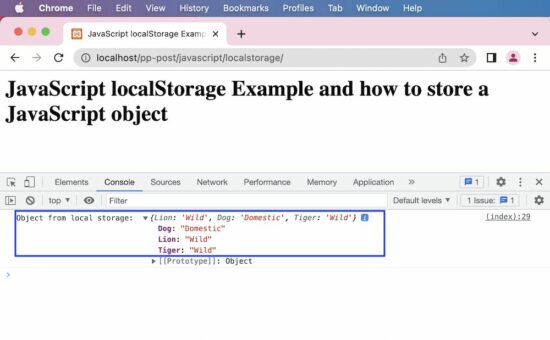
The retrieved string output from the localStorage is converted back to an object. The example outputs the converted object to the browser console.
index.html
Code:
<html>
<head>
<title>JavaScript localStorage Example and how to store a JavaScript object</title>
</head>
<body> <h1>JavaScript localStorage Example and how to store a JavaScript object</h1> <script> // Example: Store JavaScript object in HTML5 browser localStorage var animalObject = { 'Lion' : 'Wild', 'Dog' : 'Domestic', 'Tiger' : 'Wild' }; // flatten the object as a string animalString = JSON.stringify(animalObject); //store the string into local storage localStorage.setItem('animals', animalString); //retrieve the string from local storage var retrievedString = localStorage.getItem('animals'); // parse the string back to an object convertedObject = JSON.parse(retrievedString); console.log('Object from local storage: ', convertedObject); </script>
</body>
</html>Code:
Object from local storage: {Lion: 'Wild', Dog: 'Domestic', Tiger: 'Wild'}We learned how to use JavaScript localStorage to set a String or an Object and use it later when needed.
↑ Back to Top