
+- Sick Gaming (https://sickgaming.net)
+-- Forum: Programming (https://sickgaming.net/forum-76.html)
+--- Forum: Python (https://sickgaming.net/forum-83.html)
+--- Thread: [Tut] How to Install psycopg2 in Python? (/thread-99680.html)
[Tut] How to Install psycopg2 in Python? - xSicKxBot - 07-09-2022
How to Install psycopg2 in Python?
5/5 – (1 vote)
Code:
pip install psycopg2The Python psycopg2 library is among the top 100 Python libraries, with more than 15,749,750 downloads. This article will show you everything you need to get this installed in your Python environment.
How to Install psycopg2 on Windows?
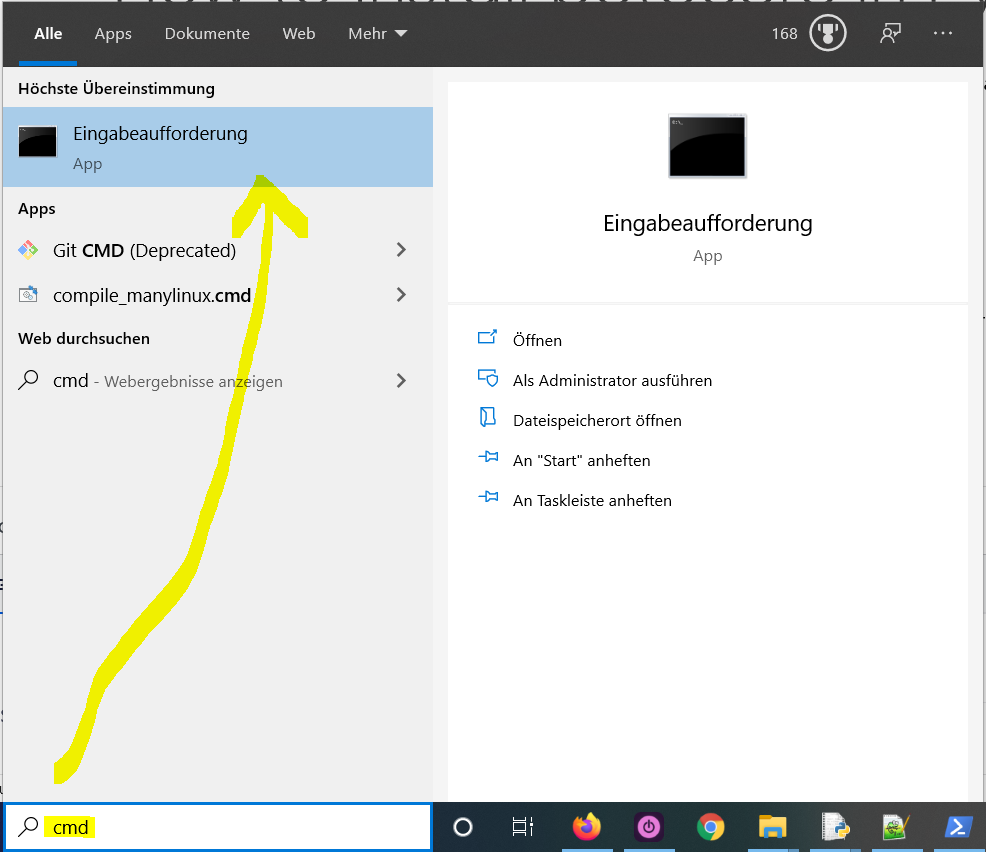
- Type in the search bar and hitCode:
"cmd"to open the command line.Code:Enter
- Type “” (without quotes) in the command line and hitCode:
pip install psycopg2again. This installs psycopg2 for your default Python installation.Code:Enter
- The previous command may not work if you have both Python versions 2 and 3 on your computer. In this case, try or “Code:
"pip3 install psycopg2"“.Code:python -m pip install psycopg2
- Wait for the installation to terminate successfully. It is now installed on your Windows machine.
Here’s how to open the command line on a (German) Windows machine:
First, try the following command to install psycopg2 on your system:
Code:
pip install psycopg2Second, if this leads to an error message, try this command to install psycopg2 on your system:
Code:
pip3 install psycopg2Third, if both do not work, use the following long-form command:
Code:
python -m pip install psycopg2The difference between
Code:
pipCode:
pip3Code:
pip3Code:
pipCode:
PATHCode:
pipCode:
pip3How to Install psycopg2 on Linux?
You can install psycopg2 on Linux in four steps:
- Open your Linux terminal or shell
- Type “” (without quotes), hit Enter.Code:
pip install psycopg2
- If it doesn’t work, try or “Code:
"pip3 install psycopg2"“.Code:python -m pip install psycopg2
- Wait for the installation to terminate successfully.
The package is now installed on your Linux operating system.
How to Install psycopg2 on macOS?
Similarly, you can install psycopg2 on macOS in four steps:
- Open your macOS terminal.
- Type “” without quotes and hitCode:
pip install psycopg2.Code:Enter
- If it doesn’t work, try or “Code:
"pip3 install psycopg2"“.Code:python -m pip install psycopg2
- Wait for the installation to terminate successfully.
The package is now installed on your macOS.
How to Install psycopg2 in PyCharm?
Given a PyCharmproject. How to install the psycopg2 library in your project within a virtual environment or globally? Here’s a solutionthat always works:
- Open from the PyCharm menu.Code:
File > Settings > Project
- Select your current project.
- Click the tab within your project tab.Code:
Python Interpreter
- Click the small symbol to add a new library to the project.Code:
+
- Now type in the library to be installed, in your example without quotes, and clickCode:
"psycopg2".Code:Install Package
- Wait for the installation to terminate and close all pop-ups.
Here’s the general package installation process as a short animated video—it works analogously for psycopg2 if you type in “psycopg2” in the search field instead:
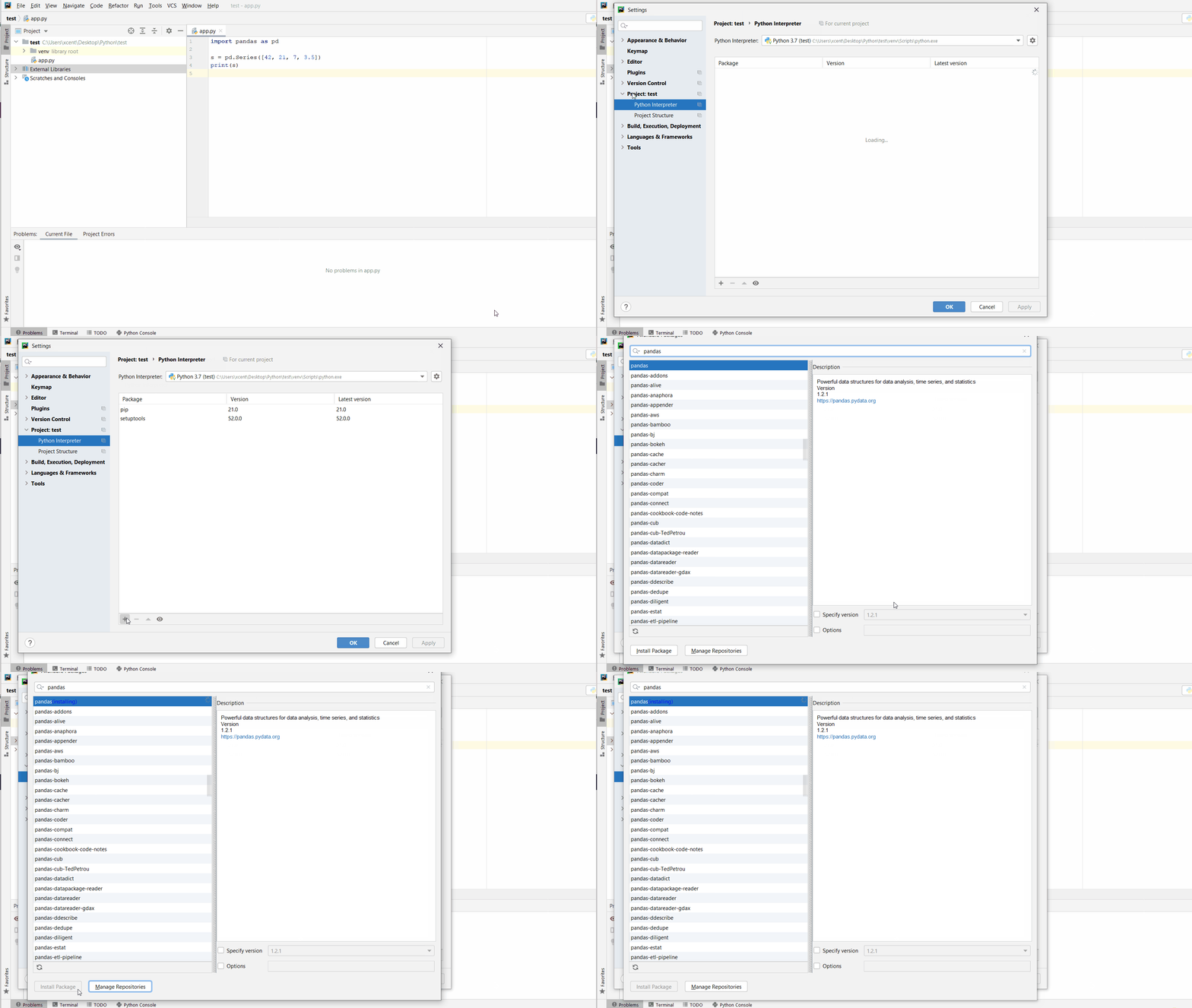
Make sure to select only “psycopg2” because there may be other packages that are not required but also contain the same term (false positives):
How to Install psycopg2 in a Jupyter Notebook?
To install any package in a Jupyter notebook, you can prefix the
Code:
!pip install my_packageCode:
"!"Code:
!pip install my_packageThis automatically installs the psycopg2 library when the cell is first executed.
How to Resolve ModuleNotFoundError: No module named ‘psycopg2’?
Say you try to import the psycopg2 package into your Python script without installing it first:
Code:
import psycopg2
# ... ModuleNotFoundError: No module named 'psycopg2'
Because you haven’t installed the package, Python raises a
Code:
ModuleNotFoundError: No module named 'psycopg2'To fix the error, install the psycopg2 library using “
Code:
pip install psycopg2Code:
pip3 install psycopg2See above for the different ways to install psycopg2 in your environment.
Improve Your Python Skills
If you want to keep improving your Python skills and learn about new and exciting technologies such as Blockchain development, machine learning, and data science, check out the Finxter free email academy with cheat sheets, regular tutorials, and programming puzzles.
Join us, it’s fun!
