
+- Sick Gaming (https://sickgaming.net)
+-- Forum: Programming (https://sickgaming.net/forum-76.html)
+--- Forum: Python (https://sickgaming.net/forum-83.html)
+--- Thread: [Tut] Convert CSV to Dictionary in Python (/thread-99601.html)
[Tut] Convert CSV to Dictionary in Python - xSicKxBot - 06-19-2022
Convert CSV to Dictionary in Python
5/5 – (1 vote)
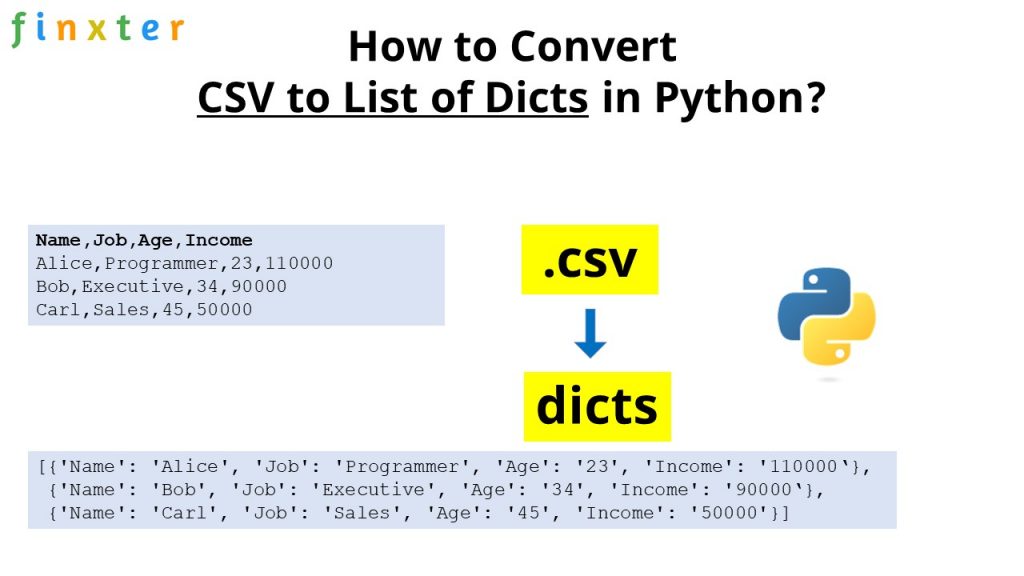
The best way to convert a CSV file to a Python dictionary is to create a CSV file object
Code:
fCode:
open("my_file.csv")Code:
csv.DictReader(f)Let’s have a look at a simple example to demonstrate this solution next!
Basic Solution: CSV to Dict Example
Here’s the content of an example CSV file
Code:
"my_file.csv"Code:
Name,Job,Age,Income
Alice,Programmer,23,110000
Bob,Executive,34,90000
Carl,Sales,45,50000
If you visualize this CSV in table form, it looks like this:
Name |
Job |
Age |
Income
Alice |
Programmer |
23 |
110000
Bob |
Executive |
34 |
90000
Carl |
Sales |
45 |
50000
Here’s the code to convert that CSV file to multiple dictionaries, one dictionary per row by using the
Code:
csv.DictReader(file)Code:
import csv csv_filename = 'my_file.csv' with open(csv_filename) as f: reader = csv.DictReader(f) for row in reader: print(row)A dictionary is a data structure that maps keys to values.
The output of the previous code snippet shows how the first row of the CSV is used as a header to determine the keys of the dictionary that are mapped to the values defined in the individual rows of the CSV file:
Code:
{'Name': 'Alice', 'Job': 'Programmer', 'Age': '23', 'Income': '110000'}
{'Name': 'Bob', 'Job': 'Executive', 'Age': '34', 'Income': '90000'}
{'Name': 'Carl', 'Job': 'Sales', 'Age': '45', 'Income': '50000'}
The
Code:
csv.DictReader(f)Code:
fCode:
open() Note: A common error is to pass the filename as a string—but this doesn’t work! The
Code:
csv.DictReader(f)One-Liner Solution: CSV to Dict
I love Python one-liners. That’s why I have written a book on those after all.

So, can we convert a CSV to a list of dictionaries in a single line of Python?
Of course, we can!
Here’s the one-liner that accomplishes the same as the code discussed before:
Code:
import csv; print(*csv.DictReader(open('my_file.csv')), sep='\n') Explanation: We import the
Code:
csvCode:
;Code:
*Code:
csv.DictReader()Code:
printCode:
'\n'The output is the same as before:
Code:
{'Name': 'Alice', 'Job': 'Programmer', 'Age': '23', 'Income': '110000'}
{'Name': 'Bob', 'Job': 'Executive', 'Age': '34', 'Income': '90000'}
{'Name': 'Carl', 'Job': 'Sales', 'Age': '45', 'Income': '50000'}
If you just want to store the CSV contents in a list of dictionaries rather than printing them, you can use the following technique:
Code:
import csv; lst=[*csv.DictReader(open('my_file.csv'))]; print(lst)The output is a list of dictionaries, one per (non-header) row of the original CSV:
Code:
[{'Name': 'Alice', 'Job': 'Programmer', 'Age': '23', 'Income': '110000'}, {'Name': 'Bob', 'Job': 'Executive', 'Age': '34', 'Income': '90000'}, {'Name': 'Carl', 'Job': 'Sales', 'Age': '45', 'Income': '50000'}]If you’re interested in learning one-liners as well, feel free to check out my book:
Python One-Liners Book: Master the Single Line First!
Python programmers will improve their computer science skills with these useful one-liners.

Python One-Linerswill teach you how to read and write “one-liners”: concise statements of useful functionality packed into a single line of code. You’ll learn how to systematically unpack and understand any line of Python code, and write eloquent, powerfully compressed Python like an expert.
The book’s five chapters cover (1) tips and tricks, (2) regular expressions, (3) machine learning, (4) core data science topics, and (5) useful algorithms.
Detailed explanations of one-liners introduce key computer science concepts and boost your coding and analytical skills. You’ll learn about advanced Python features such as list comprehension, slicing, lambda functions, regular expressions, map and reduce functions, and slice assignments.
You’ll also learn how to:
- Leverage data structures to solve real-world problems, like using Boolean indexing to find cities with above-average pollution
- Use NumPy basics such as array, shape, axis, type, broadcasting, advanced indexing, slicing, sorting, searching, aggregating, and statistics
- Calculate basic statistics of multidimensional data arrays and the K-Means algorithms for unsupervised learning
- Create more advanced regular expressions using grouping and named groups, negative lookaheads, escaped characters, whitespaces, character sets (and negative characters sets), and greedy/nongreedy operators
- Understand a wide range of computer science topics, including anagrams, palindromes, supersets, permutations, factorials, prime numbers, Fibonacci numbers, obfuscation, searching, and algorithmic sorting
By the end of the book, you’ll know how to write Python at its most refined, and create concise, beautiful pieces of “Python art” in merely a single line.
Get your Python One-Liners on Amazon!!