
+- Sick Gaming (https://sickgaming.net)
+-- Forum: Programming (https://sickgaming.net/forum-76.html)
+--- Forum: Python (https://sickgaming.net/forum-83.html)
+--- Thread: [Tut] How to Combine Two Python Lists and Remove Duplicates in Second List? (/thread-95619.html)
[Tut] How to Combine Two Python Lists and Remove Duplicates in Second List? - xSicKxBot - 06-11-2020
How to Combine Two Python Lists and Remove Duplicates in Second List?
Problem: Given two lists
Code:
[1, 2, 2, 4]Code:
[2, 5, 5, 5, 6]Code:
[1, 2, 2, 4, 5, 6]Note: You want to remove all duplicates in the second list and the elements in the second list that are already in the first list.
Solution: Use the following three steps to combine two lists and remove the duplicates in the second list:
- Convert the first and second lists to a set using the constructor.Code:
set(...)
- Use the set minus operation to get all elements that are in the second list but not in the first list.
- Create a new list by concatenatingthose elements to the first list.
Here’s the code:
Code:
# Create the two lists
l1 = [1, 2, 2, 4]
l2 = [2, 5, 5, 5, 6] # Find elements that are in second but not in first
new = set(l2) - set(l1) # Create the new list using list concatenation
l = l1 + list(new)
print(l)
# [1, 2, 2, 4, 5, 6]
Try it yourself in our interactive Python shell:
https://trinket.io/embed/python/d6d3eca8e3
Exercise: Can you rewrite this in a single line of Python code (Python One-Liner)?
Let’s dive into the more concise one-liner to accomplish the same thing:
Code:
l = l1 + list(set(l2) - set(l1))If you want to learn about the most Pythonic way to remove ALL duplicates from a Python list, read on:
How to Remove Duplicates From a Python List?
Naive Method: Go over each element and check whether this element already exists in the list. If so, remove it. However, this takes a few lines of code.
Efficient Method: A shorter and more concise way is to create a dictionary out of the elements in the list to remove all duplicates and convert the dictionary back to a list. This preserves the order of the original list elements.
Code:
lst = ['Alice', 'Bob', 'Bob', 1, 1, 1, 2, 3, 3]
print(list(dict.fromkeys(lst)))
# ['Alice', 'Bob', 1, 2, 3]- Convert the list to a dictionary with .Code:
dict.fromkeys(lst)
- Convert the dictionary into a list with .Code:
list(dict)
Each list element becomes a new key to the dictionary. For example, the list
Code:
[1, 2, 3]Code:
{1:None, 2:None, 3:None}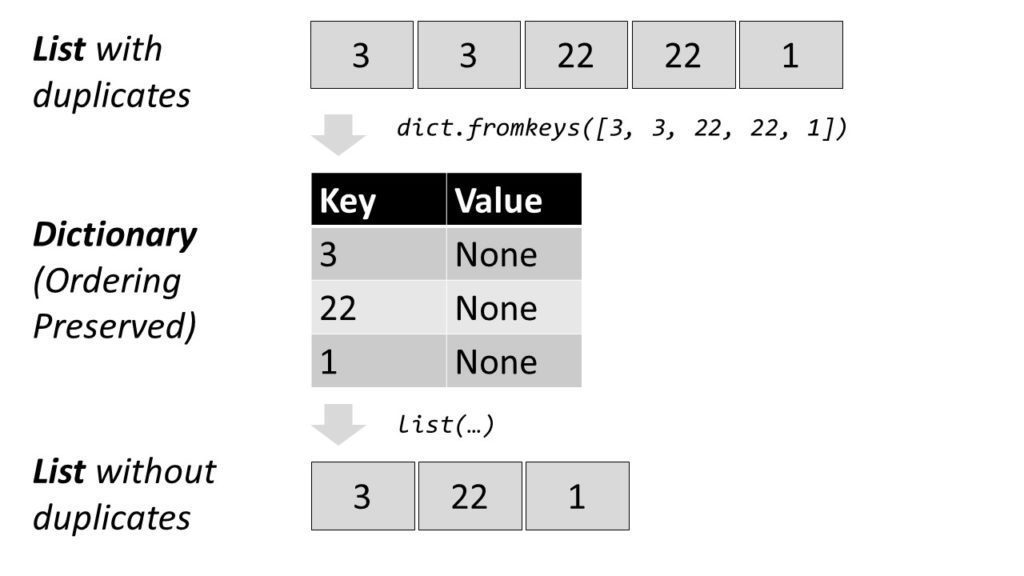
As dictionary values, you take dummy values (per default).
Then, you convert the dictionary back to a list, throwing away the dummy values.
Here’s the code:
Code:
>>> lst = [1, 1, 1, 3, 2, 5, 5, 2]
>>> dic = dict.fromkeys(lst)
>>> dic
{1: None, 3: None, 2: None, 5: None}
>>> duplicate_free = list(dic)
>>> duplicate_free
[1, 3, 2, 5]
Related blog articles:
- Python Remove Duplicates From List of Lists
- Python List Remove
- The Ultimate Guide to Python Dictionaries!
Where to Go From Here?
Enough theory, let’s get some practice!
To become successful in coding, you need to get out there and solve real problems for real people. That’s how you can become a six-figure earner easily. And that’s how you polish the skills you really need in practice. After all, what’s the use of learning theory that nobody ever needs?
Practice projects is how you sharpen your saw in coding!
Do you want to become a code master by focusing on practical code projects that actually earn you money and solve problems for people?
Then become a Python freelance developer! It’s the best way of approaching the task of improving your Python skills—even if you are a complete beginner.
Join my free webinar “How to Build Your High-Income Skill Python” and watch how I grew my coding business online and how you can, too—from the comfort of your own home.
Join the free webinar now!