
+- Sick Gaming (https://sickgaming.net)
+-- Forum: Programming (https://sickgaming.net/forum-76.html)
+--- Forum: Python (https://sickgaming.net/forum-83.html)
+--- Thread: [Tut] How to Add Elements to a List in Python? (/thread-95312.html)
[Tut] How to Add Elements to a List in Python? - xSicKxBot - 05-30-2020
How to Add Elements to a List in Python?
In Python, there are always multiple ways to accomplish the same thing—but with subtle differences in the side effects. A great coder will always choose the most effective way for the problem at hand.
This tutorial shows you six different ways to add elements to a listin Python. In a nutshell, the different ways to add one or more elements to a list are:
- append(): add a single element to an existing list.
- extend(): add multiple elements to an existing list.
- insert(): add an element at an arbitrary position in an existing list.
- Slice assignment: replace a slice of an existing list.
- List concatenation with +: add one or more elements to a new list.
- Asterisk operator *: unpack multiple iterables into a new list.
Try It Yourself: Before we dive into each of those methods, let’s try them yourself in our interactive Python shell!
https://trinket.io/embed/python/034f6bf94e
Exercise: Use each method to add yet another integer element
Code:
42Next, you’ll learn about each method in a video tutorial and short example code snippet. I’ve written in-depth articles for each method so feel free to follow the references given in each method.
Method 1: append()
The
Code:
list.append(x)Code:
xCode:
listCode:
list.append(element)Argument |
Description
Code:
elementThe object you want to append to the list.
Code:
# Method 1: append()
friends = ['Alice', 'Bob', 'Ann']
friends.append('Liz') print(friends)
# ['Alice', 'Bob', 'Ann', 'Liz']
Read More: Python List append() Method
Method 2: extend()
The
Code:
list.extend(iter)Code:
iterCode:
listCode:
list.extend(iterable)Argument |
Description
Code:
iterableAll the elements of the iterablewill be added to the end of the list—in the order of their occurrence.
Code:
# Method 2: extend()
friends = ['Alice', 'Bob', 'Ann']
friends.extend(['Liz', 'Carl']) print(friends)
# ['Alice', 'Bob', 'Ann', 'Liz', 'Carl']
Read More: Python List extend() Method
Method 3: insert()
The
Code:
list.insert(i, element)Code:
elementCode:
listCode:
iCode:
j>iCode:
list.insert(index, element)Argument |
Description
Code:
indexInteger value representing the position before you want to insert an element
Code:
elementObject you want to insert into the list.
Code:
# Method 3: insert()
friends = ['Alice', 'Bob', 'Ann']
friends.insert(3, 'Liz') print(friends)
# ['Alice', 'Bob', 'Ann', 'Liz']
Read More: Python List insert() Method
Method 4: Slice Assignment
Slice assignment is a little-used, beautiful Python feature to replace a slice with another sequence. Simply select the slice you want to replace on the left and the values to replace it on the right side of the equation. For example, the slice assignment
Code:
list[2:4] = [42, 42]Code:
2Code:
3Code:
42Code:
# Method 4: slice assignment
friends = ['Alice', 'Bob', 'Ann']
friends[3:3] = ['Liz'] print(friends)
# ['Alice', 'Bob', 'Ann', 'Liz']
Read More: Python Slice Assignment
Method 5: List Concatenation with +
If you use the
Code:
+Code:
+Code:
# Method 5: list concatenation
friends = ['Alice', 'Bob', 'Ann']
friends = friends + ['Liz'] print(friends)
# ['Alice', 'Bob', 'Ann', 'Liz']
Read More: Python List Concatenation
Method 6: List Concatenation with Unpacking *
There are many applications of the asterisk operator. But one nice trick is to use it as an unpacking operator that “unpacks” the contents of a container data structure such as a list or a dictionary into another one.
Code:
# Method 6: unpacking
friends = ['Alice', 'Bob', 'Ann']
friends = [*friends, 'Liz'] print(friends)
# ['Alice', 'Bob', 'Ann', 'Liz']
A great advantage is that you can quickly unpack all elements of two or more list into a new list.
Read More: Python Unpacking with Asterisk
Python List Methods Cheat Sheet
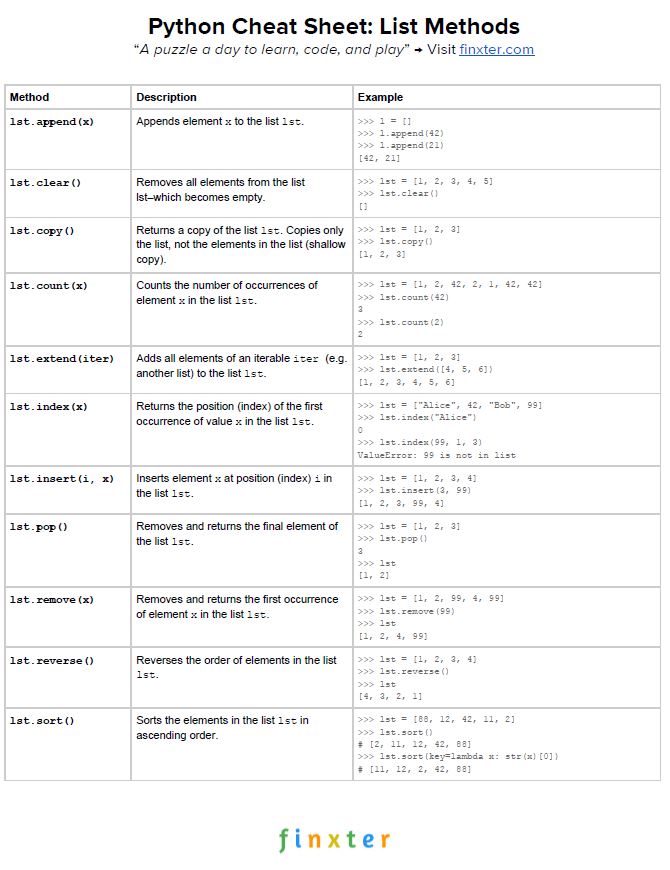
Here’s your freehttps://blog.finxter.com/python-list-methods/PDF cheat sheet showing you all Python list methods on one simple page. Click the image to download the high-resolution PDF file, print it, and post it to your office wall:
Instant PDF Download [100% FREE]
Discussion
Let’s summarize the strengths and weaknesses of the different methods:
- Use the method to add a single element to an existing list without creating a new list.Code:
append()
- Use the method to add multiple elements to an existing list without creating a new list.Code:
extend()
- Use the method to add an element at an arbitrary position in the list—without creating a new list.Code:
insert()
- Use slice assignment to replace a slice of an existing list—without creating a new list.
- Use list concatenation with to add one or more elements to a list—if you want to create a new list.Code:
+
- Use the asterisk operator to unpack multiple iterables into a new list—if you want to create a new list.Code:
*
Where to Go From Here?
Enough theory, let’s get some practice!
To become successful in coding, you need to get out there and solve real problems for real people. That’s how you can become a six-figure earner easily. And that’s how you polish the skills you really need in practice. After all, what’s the use of learning theory that nobody ever needs?
Practice projects is how you sharpen your saw in coding!
Do you want to become a code master by focusing on practical code projects that actually earn you money and solve problems for people?
Then become a Python freelance developer! It’s the best way of approaching the task of improving your Python skills—even if you are a complete beginner.
Join my free webinar “How to Build Your High-Income Skill Python” and watch how I grew my coding business online and how you can, too—from the comfort of your own home.
Join the free webinar now!