
+- Sick Gaming (https://sickgaming.net)
+-- Forum: Programming (https://sickgaming.net/forum-76.html)
+--- Forum: Python (https://sickgaming.net/forum-83.html)
+--- Thread: [Tut] Parsing XML Files in Python – 4 Simple Ways (/thread-100226.html)
[Tut] Parsing XML Files in Python – 4 Simple Ways - xSicKxBot - 11-13-2022
Parsing XML Files in Python – 4 Simple Ways
5/5 – (1 vote)
Problem Formulation and Solution Overview
This article will show you various ways to work with an
Code:
XML
Code:
XMLCode:
XMLCode:
XMLCode:
XMLTo make it more interesting, we have the following running scenario:
Jan, a Bookstore Owner, wants to know the top three (3) selling Books in her store. This data is currently saved in an
Code:
XML Question: How would we write code to read in and extract data from an XML file into a Python script?
We can accomplish this by performing the following steps:
- Method 1: Use Code:
xmltodict()
- Method 2: Use Code:
minidom.parse()
- Method 3: Use Code:
etree
- Method 4: Use Code:
untangle.parse()
Method 1: Use xmltodict()
This method uses the
Code:
xmltodict()Code:
XMLCode:
DictionaryIn the current working directory, create an
Code:
XMLCode:
books.xmlCode:
<bookstore> <book> <title>Surrender</title> <author>Bono</author> <sales>21987</sales> </book> <book> <title>Going Rogue</title> <author>Janet Evanovich</author> <sales>15986</sales> </book> <book> <title>Triple Cross</title> <author>James Patterson</author> <sales>11311</sales> </book>
</bookstore>
In the current working directory, create a Python file called
Code:
books.pyCode:
XMLCode:
xmltodictCode:
import xmltodict with open('books.xml', 'r') as fp: books_dict = xmltodict.parse(fp.read()) fp.close() for i in books_dict: for j in books_dict[i]: for k in books_dict[i][j]: print(f'Title: {k["title"]} \t Sales: {k["sales"]}')The first line in the above code snippet imports the
Code:
xmltodictCode:
XMLThe following highlighted section opens
Code:
books.xmlCode:
rCode:
<_io.TextIOWrapper name='books.xml' mode='r' encoding='cp1252'>Next, the
Code:
xmltodict.parse()Code:
fp.read()Code:
XMLCode:
books_dictCode:
DictionaryCode:
books_dictCode:
{'bookstore': {'book': [{'title': Surrender', 'author': 'Bono', 'sales': '21987'}, {'title': 'Going Rogue', 'author': 'Janet Evanovich', 'sales': '15986'}, {'title': 'Triple Cross', 'author': 'James Patterson', 'sales': '11311'}]}}The final highlighted section loops through the above
Code:
DictionaryCode:
TitleCode:
SalesCode:
Title: Surrender Sales: 21987
Title: Going Rogue Sales: 15986
Title: Triple Cross Sales: 11311 Note: The
Code:
\t
Method 2: Use minidom.parse()
This method uses the
Code:
minidom.parse()This example differs from Method 1 as this
Code:
XMLCode:
<?xml version="1.0"?>Code:
<book>Code:
idIn the current working directory, create an
Code:
XMLCode:
books2.xmlCode:
<?xml version="1.0"?>
<bookstore> <storename>Jan's Best Sellers List</storename> <book id="21237"> <title>Surrender</title> <author>Bono</author> <sales>21987</sales> </book> <book id="21946"> <title>Going Rogue</title> <author>Janet Evanovich</author> <sales>15986</sales> </book> <book id="18241"> <title>Triple Cross</title> <author>James Patterson</author> <sales>11311</sales> </book>
</bookstore>
In the current working directory, create a Python file called
Code:
books2.pyCode:
from xml.dom import minidom doc = minidom.parse('books2.xml')
name = doc.getElementsByTagName('storename')[0]
books = doc.getElementsByTagName('book') for b in books: bid = b.getAttribute('id') title = b.getElementsByTagName('title')[0] sales = b.getElementsByTagName('sales')[0] print(f'{bid} {title.firstChild.data} {sales.firstChild.data}')
The first line in the above code snippet imports the
Code:
minidomCode:
XMLThe first section of highlighted lines performs the following:
- Reads and parse the file and saves the results toCode:
books2.xml. This action creates the Object shown as (1) below.Code:doc
- Retrieves the tag and saves the results toCode:
<storename>. This action creates an Object shown as (2) below.Code:name
- Retrieves the tag for eachCode:
<book>and saves the results toCode:book. This action creates a List of three (3) Objects: one for each book shown as (3) below.Code:books
Code:
(1) <xml.dom.minidom.Document object at 0x0000022D764AFEE0> (2) <DOM Element: storename at 0x22d764f0ee0> (3) [<DOM Element: book at 0x22d764f3a30>, <DOM Element: book at 0x22d764f3c70>, <DOM Element: book at 0x22d764f3eb0>]The last section of highlighted lines loop through the books Object and outputs the results to the terminal.
Code:
21237 Surrender 21987
21946 Going Rogue 15986
18241 Triple Cross 11311
Method 3: Use etree
This method uses
Code:
etree The Code:
etreeThis example reads in and parses the
Code:
books2.xmlCode:
import xml.etree.ElementTree as ET xml_data = ET.parse('books2.xml')
root = xml_data.getroot() for books in root.findall('book'): title = books.find('title').text author = books.find('author').text sales = books.find('sales').text print(title, author, sales)
The first line in the above code snippet imports the
Code:
etreeCode:
<tag>The following line reads in and parses
Code:
books2.xmlCode:
xml_dataCode:
<Element 'bookstore' at 0x000001E45E9442C0>The following highlighted section uses a
Code:
forCode:
<book>Code:
<title>Code:
<author>Code:
<sales>Code:
Surrender Bono 21987
Going Rogue Janet Evanovich 15986
Triple Cross James Patterson 11311
To retrieve the attribute of the
Code:
<book>This code extracts the
Code:
idCode:
<book>Code:
{'id': '21237'}
{'id': '21946'}
{'id': '18241'}
To extract the values, run the following code.
Code:
for id in root.iter('book'): vals = id.attrib.values() for v in vals: print(vals)Code:
21237
21946
18241
Method 4: Use untangle.parse()
This method uses
Code:
untangle.parse()This example reads in and parses the
Code:
books3.xmlCode:
untangle The Code:
untangleIn the current working directory, create an
Code:
XMLCode:
books3.xmlCode:
untangleCode:
<?xml version="1.0"?>
<root> <book name="Surrender"/> <book name="Going Rogue"/> <book name="Triple Cross"/>
</root>
In the current working directory, create a Python file called
Code:
books3.pyCode:
import untangle book_obj = untangle.parse('books3.xml')
books = ','.join([book['name'] for book in book_obj.root.book]) for b in books.split(','): print(b)
The first line in the above code snippet imports the
Code:
untangleCode:
XMLThe following line reads in and parses the
Code:
books3.xmlCode:
book_objThe next line calls the
Code:
join()Code:
booksCode:
Surrender,Going Rogue,Triple CrossThe next line instantiates a
Code:
forCode:
Surrender
Going Rogue
Triple Cross
Summary
This article has shown four (4) ways to work with
Code:
XMLGood Luck & Happy Coding!
Programmer Humor – Blockchain
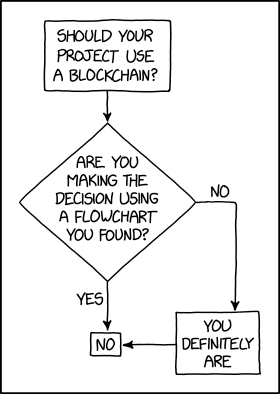 [i]“Blockchains are like grappling hooks, in that it’s extremely cool when you encounter a problem for which they’re the right solution, but it happens way too rarely in real life.” source – xkcd[/i]